
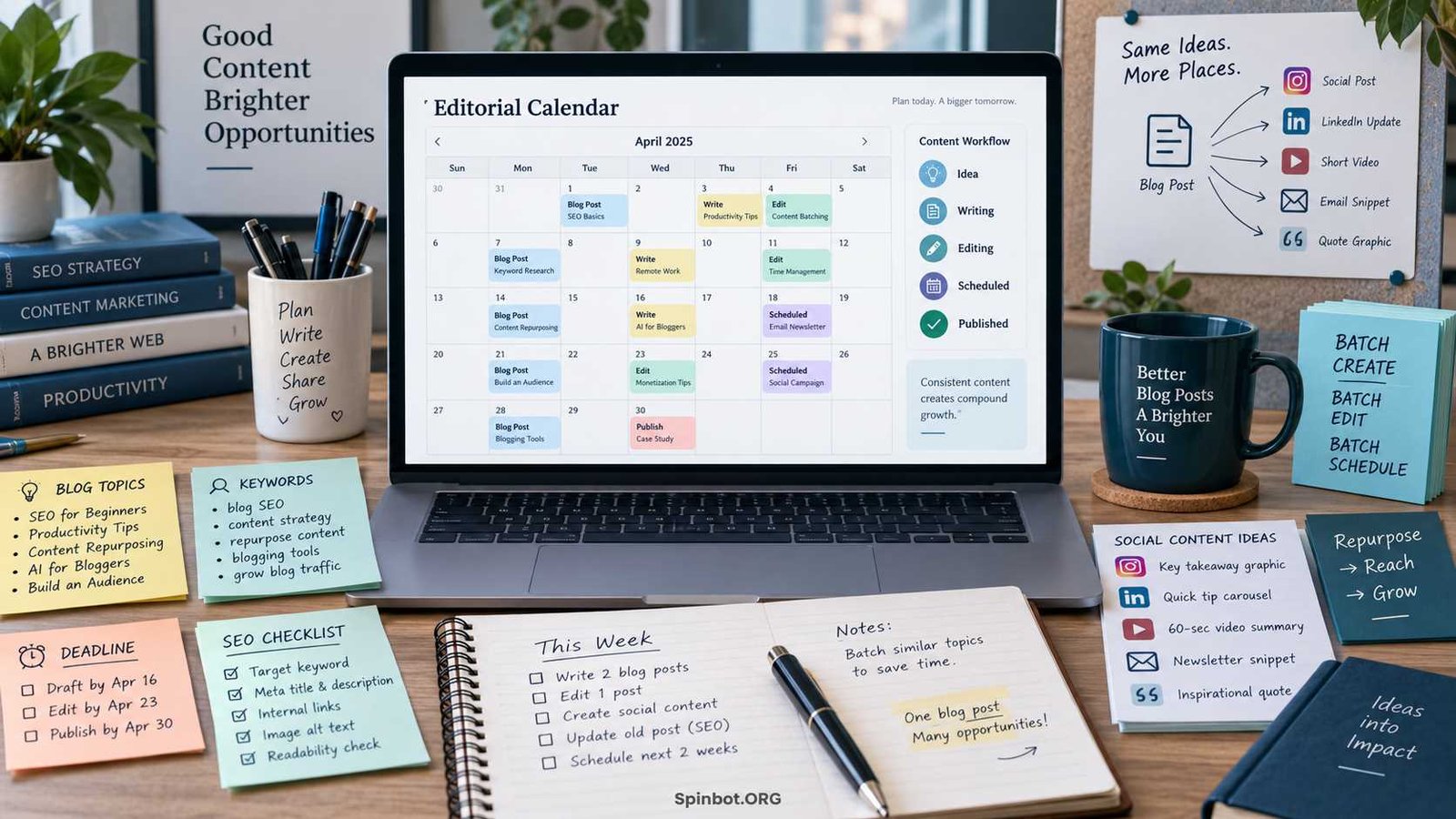
You add Monday: blog post. Thursday: another blog post. Maybe a newsletter on Friday. Then real life gets involved. Research takes longer than expected, an article needs another edit, a better topic appears, and suddenly your neat calendar is full of missed dates.
The problem usually isn’t that you need a more complicated calendar. You need a smarter one.
The best content calendar hacks for bloggers focus on making your publishing system easier to maintain. Your calendar should help you choose better topics, see what needs attention, protect time for important work, and avoid creating content just because an empty date needs filling.
A useful content calendar tells you three things quickly:
- What are we creating?
- Why are we creating it?
- What needs to happen next?
Everything else is optional.
Why Most Blog Content Calendars Become Useless
A content calendar is not the same thing as a list of content ideas.
Ahrefs defines a content calendar, also called an editorial calendar, as a system for organizing, managing, and scheduling content production. It may include fields such as topic, author, status, due date, format, and publishing channel.
That distinction matters.
Your idea backlog can contain 100 possible articles. Your calendar should contain the articles you have actually decided to produce.
When every possible idea gets placed on a date, the calendar stops being a plan and becomes a wish list.
Another common mistake is planning by date before planning by priority.
Imagine you decide to publish every Tuesday and Friday. You now have eight slots to fill next month. If you start asking, What can I put on Tuesday?, you are working backward.
A better question is:
Which eight pieces of content would be most useful to publish next?
Then assign dates.
That small change turns your calendar from a scheduling tool into a content strategy tool.
Build the Strategy Before Filling the Calendar
You do not need a 40-page strategy document before planning blog posts. But you do need enough direction to know which ideas deserve your time.
HubSpot’s content strategy framework includes defining a goal, researching the audience, auditing existing content, choosing content types, brainstorming ideas, and then publishing and managing that content.
For a small blog, you can simplify this into four questions.
Set one clear content goal
Start with the result you want.
Your goal might be:
- Grow organic search traffic
- Build an email audience
- Generate product leads
- Attract freelance clients
- Establish expertise in a topic
- Support an existing business
- Increase affiliate revenue
You may eventually pursue several goals, but each piece of content should have a clear reason to exist.
A blogger focused on SEO, for example, may prioritize topics with strong search demand and close relevance to the site’s subject. A consultant may prefer lower-volume topics that match high-value client problems.
The same publishing frequency can produce very different calendars because the goals are different.
Define your audience and content pillars
Content pillars are the main subjects your blog covers.
A freelance writing blog might use pillars such as:
- Finding clients
- Pricing
- Writing skills
- Productivity
- Portfolio building
These pillars keep your calendar balanced.
Without them, bloggers often publish five articles about one subject because those ideas came easily, then ignore other topics readers also need.
Research topics and search intent
A keyword alone is not enough.
Before scheduling a post, ask what someone searching that phrase actually wants.
Do they want:
- A definition?
- Instructions?
- Examples?
- A comparison?
- A product recommendation?
- A template?
- A quick answer?
Search intent affects both the article format and the amount of work required.
Ahrefs recommends finding and prioritizing topics before scheduling them, rather than treating the content calendar as the starting point.
Decide how content will be distributed
A blog post does not have to live only on your blog.
One article might later become:
- An email
- A LinkedIn post
- A short social post
- A video outline
- An infographic
- Several tips for social media
- An updated section in an older article
Planning this before publication makes repurposing far easier.
15 Content Calendar Hacks for Bloggers
Here’s what matters most: your system should remove decisions, not create more of them.
These hacks help do that.
1. Keep your idea backlog separate from scheduled posts
Create two spaces:
Ideas: everything you might create.
Calendar: content you have committed to creating.
Ahrefs also separates an ideas backlog from content already planned or being worked on.
This keeps the calendar realistic while letting you collect ideas freely.
2. Plan around content pillars instead of random topics
Tag every planned post with its main content pillar.
At the end of each month, look at the mix.
If 10 of 12 posts fall into one pillar, ask whether that is intentional.
You do not need perfect balance. You simply want to spot accidental gaps.
3. Plan in monthly or quarterly sprints
Planning an entire year in detail sounds efficient, but it often creates unnecessary rewriting later.
Topics change. Search results change. Products change. Your own data changes.
A better approach for many bloggers is:
- Keep a broad three-to-six-month direction
- Plan the next month in detail
- Review weekly
Ahrefs has described planning its content roughly one to two months ahead as part of its workflow.
Your ideal window may be shorter or longer.
4. Prioritize before assigning dates
Give ideas a simple priority score.
For example:
| Factor | Score |
|---|---|
| Audience relevance | 1–3 |
| Search opportunity | 1–3 |
| Business value | 1–3 |
| Existing content gap | 1–3 |
| Timeliness | 1–3 |
You do not need complex math.
The scoring forces you to compare ideas before committing resources.
5. Group related keywords into topic clusters
Suppose your keyword list contains:
- content calendar for bloggers
- blog editorial calendar
- how to plan blog posts
- blogging schedule template
These may not require four completely separate articles.
Research whether they represent different search intents. If the intent overlaps heavily, one stronger article may serve readers better.
This also helps prevent accidental keyword cannibalization, where several pages on your site compete around nearly identical topics.
6. Batch similar work
Switching constantly between researching, writing, editing, uploading, and designing images creates friction.
Instead, batch similar tasks.
Monday could be research.
Tuesday could be outlining.
Wednesday could be drafting.
Thursday could be editing and uploading.
You do not have to follow those exact days. The point is to reduce unnecessary context switching.
Your calendar can show both the publication date and the production stage.
7. Use repeatable status labels
Do not invent a new workflow for every post.
Use a small set of statuses such as:
Idea → Approved → Researching → Writing → Editing → Ready → Scheduled → Published
A solo blogger might need only five of these.
A larger team may need more.
The test is simple: can you look at the status and immediately understand what happens next?
8. Add internal deadlines before publication dates
If an article publishes Friday, Friday should not also be the deadline for writing it.
Give each stage its own deadline.
For example:
- Research: Monday
- Draft: Tuesday
- Edit: Wednesday
- Images and upload: Thursday
- Publish: Friday
That gives you room to fix problems without missing the public date.
9. Leave buffer slots
A completely full calendar is fragile.
Someone gets sick. Research reveals a problem. A client project appears. An article needs more work.
Ahrefs specifically recommends keeping buffer time because delays are normal in content production.
You might leave one publishing slot open every month or avoid planning every available hour.
Unused capacity is not wasted capacity. It is protection against chaos.
10. Mix evergreen and timely content
Evergreen content stays useful for a long period.
Examples include:
- How to write a blog introduction
- What is search intent?
- How to create an editorial calendar
Timely content depends more heavily on a date, trend, update, event, or new product.
A healthy calendar can contain both.
Evergreen posts build a durable library. Timely posts let you respond to changing reader needs.
11. Schedule content refreshes
A content calendar should not contain only new articles.
Old content also requires work.
Ahrefs recommends putting content refreshes and optimizations on the calendar so they receive the same time and resource planning as new content.
Add a review date when you publish an important article.
That does not mean every article must be rewritten every six months. It simply reminds you to check whether facts, screenshots, recommendations, links, or search intent have changed.
12. Turn one blog post into several distribution assets
A strong article can fuel several smaller pieces.
For example, a post called 15 Content Calendar Hacks could become:
- One email containing the five best tips
- Three LinkedIn posts
- A simple infographic
- A short checklist
- Several social posts
- A video outline
Ahrefs recommends repurposing material for different channels rather than simply reposting the same piece unchanged.
Add these assets directly beneath the main blog entry in your calendar.
13. Keep only useful fields visible
You do not need 25 columns because another marketing team uses 25 columns.
At minimum, a content calendar can be extremely simple. Ahrefs notes that title and due date can be enough to start, with more fields added based on the workflow.
If you never use a field, delete it.
Your calendar should be quick to scan.
14. Create templates for repeated work
Every blog post may require the same basic checklist:
- Confirm keyword and intent
- Research sources
- Create outline
- Draft
- Edit
- Add internal links
- Create images
- Write title and meta description
- Upload
- Review
- Schedule
- Promote
Save that workflow as a reusable template.
A repeatable process reduces forgotten steps and makes production easier to estimate.
15. Review the calendar using performance data
Do not judge your calendar by whether every box turned green.
Judge it by what the content achieved.
Review questions such as:
- Which posts gained search traffic?
- Which attracted links?
- Which generated email signups?
- Which supported sales?
- Which social formats earned engagement?
- Which topics produced almost no response?
Then feed what you learn back into the next calendar.
That is how a content calendar becomes smarter over time.
What Should an Effective Content Calendar Include?
There is no single correct structure.
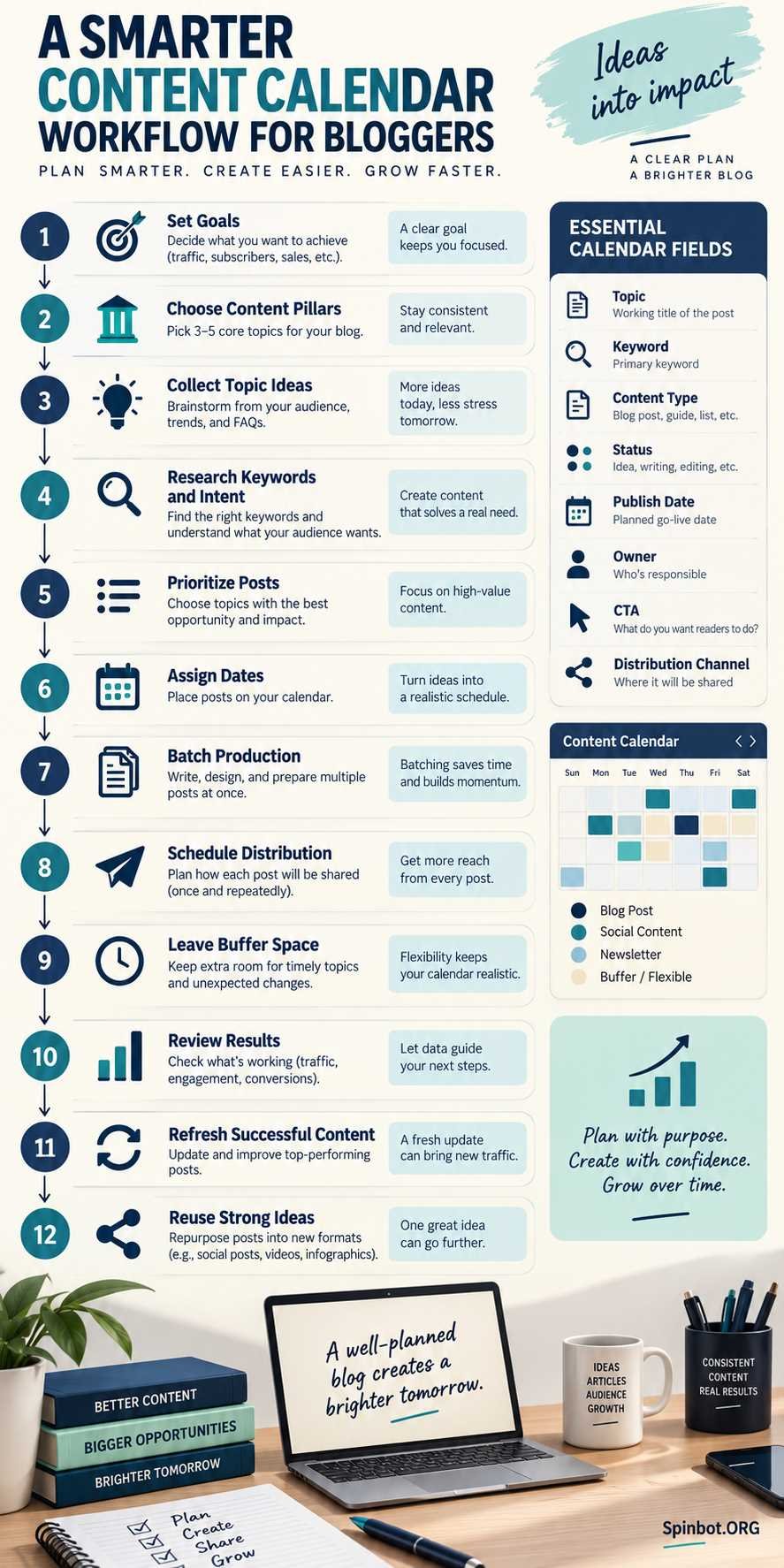
For most bloggers, these fields provide a useful starting point:
| Field | Purpose |
|---|---|
| Topic or working title | Identifies the content |
| Primary keyword | Shows the main search topic |
| Search intent | Clarifies what the reader wants |
| Content pillar | Keeps topic coverage organized |
| Content type | Guide, review, list, comparison, etc. |
| Priority | Helps determine what gets produced first |
| Status | Shows the current stage |
| Owner | Identifies who is responsible |
| Draft deadline | Protects the publishing deadline |
| Publish date | Sets the live date |
| CTA | Defines the desired next action |
| Distribution | Shows where the content will be promoted |
| Review date | Reminds you to revisit important content |
Start smaller if necessary.
A calendar you actually update is far more useful than an impressive system you stop opening after two weeks.
What Is the Best Tool for Creating a Content Calendar?
There is no universal best tool for creating a content calendar.
The best tool is the simplest one that solves your current planning problem.
Ahrefs lists tools ranging from Google Sheets and Google Calendar to Notion, Trello, Airtable, and other project-management systems for editorial planning.
Here is a practical way to choose.
Google Sheets: best for simple planning
Use a spreadsheet if you want:
- Low setup time
- Custom columns
- Easy sorting
- Simple collaboration
- No complicated workflow
For many solo bloggers, a spreadsheet is enough.
Do not upgrade simply because a specialized calendar looks nicer.
Notion: useful for flexible databases
Notion makes sense when you want the same content shown in different ways.
For example, you may want:
- Calendar view
- Table view
- Status board
- Topic database
- Article briefs linked to calendar entries
This works well when your calendar is becoming part of a larger content workspace.
Trello: useful for visual workflows
Trello’s card-and-column system works naturally with stages such as:
Ideas → Writing → Editing → Scheduled → Published
It is especially useful if you prefer moving content visually through a process instead of managing rows in a spreadsheet.
Buffer and similar tools: useful for social scheduling
If social distribution is a major part of your workflow, a social scheduling platform can reduce manual work.
Buffer’s July 2026 social media calendar guide includes approaches using Buffer itself as well as calendar templates for tools such as Google Sheets and Notion.
A social scheduler may help when your problem is not blog production but managing promotion across several networks.
When should you use specialized software?
Upgrade when your current tool creates a real bottleneck.
Good reasons include:
- Several writers need assignments
- Editors need approval stages
- Deadlines are frequently missed
- Assets are scattered across multiple tools
- Social scheduling is taking too much manual effort
- You need clearer reporting
Do not pay for complexity before you need it.
How Do I Plan a Social Media Calendar Effectively?
Bloggers often make a second mistake after building an editorial calendar: they create a completely separate social calendar that doubles their planning workload.
A cleaner approach is to connect the two.
Start with the blog post as the main asset.
Imagine you publish a guide on Monday.
Your content calendar might then include:
Monday: Publish article
Tuesday: Share key takeaway
Wednesday: Turn one section into a short post
Friday: Send email linking to the article
Next Tuesday: Share infographic
Next month: Resurface an evergreen tip
This gives the article several chances to reach readers without requiring six unrelated ideas.
Keep social content flexible, though. Some posts should respond to current conversations instead of being scheduled weeks ahead.
The goal is structure without removing your ability to react.
A Simple Weekly Content Calendar Routine
You do not need to spend half a day managing your calendar.
A short weekly review can keep it useful.
Review what is publishing next
Check the next seven to fourteen days.
Ask:
- Are drafts ready?
- Are images complete?
- Are sources verified?
- Is anything blocked?
- Does a deadline need to move?
Review stalled content
Look for articles that have remained in the same status too long.
A post stuck at Researching for three weeks probably needs a decision, not another colored label.
Finish it, simplify it, reassign it, postpone it, or remove it.
Recheck priorities
A new opportunity may deserve attention more than something you scheduled six weeks ago.
The calendar should guide decisions, not prevent them.
Plan distribution
Check newly published posts and decide how they will be promoted.
This is where your email and social calendar should connect with your blog calendar.
Look at recent performance
You do not need a full analytics report every week.
Simply note whether recently published content is beginning to receive impressions, clicks, engagement, leads, or other signals relevant to your goals.
Then use those observations when planning future topics.
Make the Calendar Serve Your Content
An effective content calendar does not make you publish more.
It helps you publish with more purpose.
Start with a clear strategy. Keep your idea backlog separate from committed work. Prioritize topics before giving them dates. Batch similar tasks. Leave room for delays. Schedule updates as well as new posts. Connect your blog with email and social distribution.
And keep the tool simple.
You can build a useful system in a spreadsheet before you ever need advanced software.
The strongest content calendar is not the one with the most fields, automations, or color codes. It is the one you can open on Monday morning and immediately understand what deserves your attention next.

Raj blends SEO mastery with real-world freelance grit. Covers SEO, blogging, content strategy, copywriting, freelance writing, marketing, and business communication.