

That is where a social media landing page comes in.
Instead of dropping visitors on a busy homepage and asking them to find their own way, a landing page gives them a clear next step. That might be buying a product, booking a call, joining an email list, downloading a guide, or viewing the offer they just saw on social media.
There are actually two common types of social media landing pages. A campaign landing page is built around one offer or action. A link-in-bio page acts more like a small hub that directs people to several important destinations. Both can work, but they solve different problems.
Here’s how to decide what you need and build a page that makes better use of every social click.
What Is a Social Media Landing Page?
A social media landing page is a web page created specifically for people arriving from a social network.
For example, imagine you run a small fitness business. You publish an Instagram post promoting a beginner workout program. Someone taps the link because that program caught their attention.
If the link sends them to your homepage, they may see your blog, coaching services, About page, newsletter, advanced programs, and other options. Now they have to search for the offer they wanted.
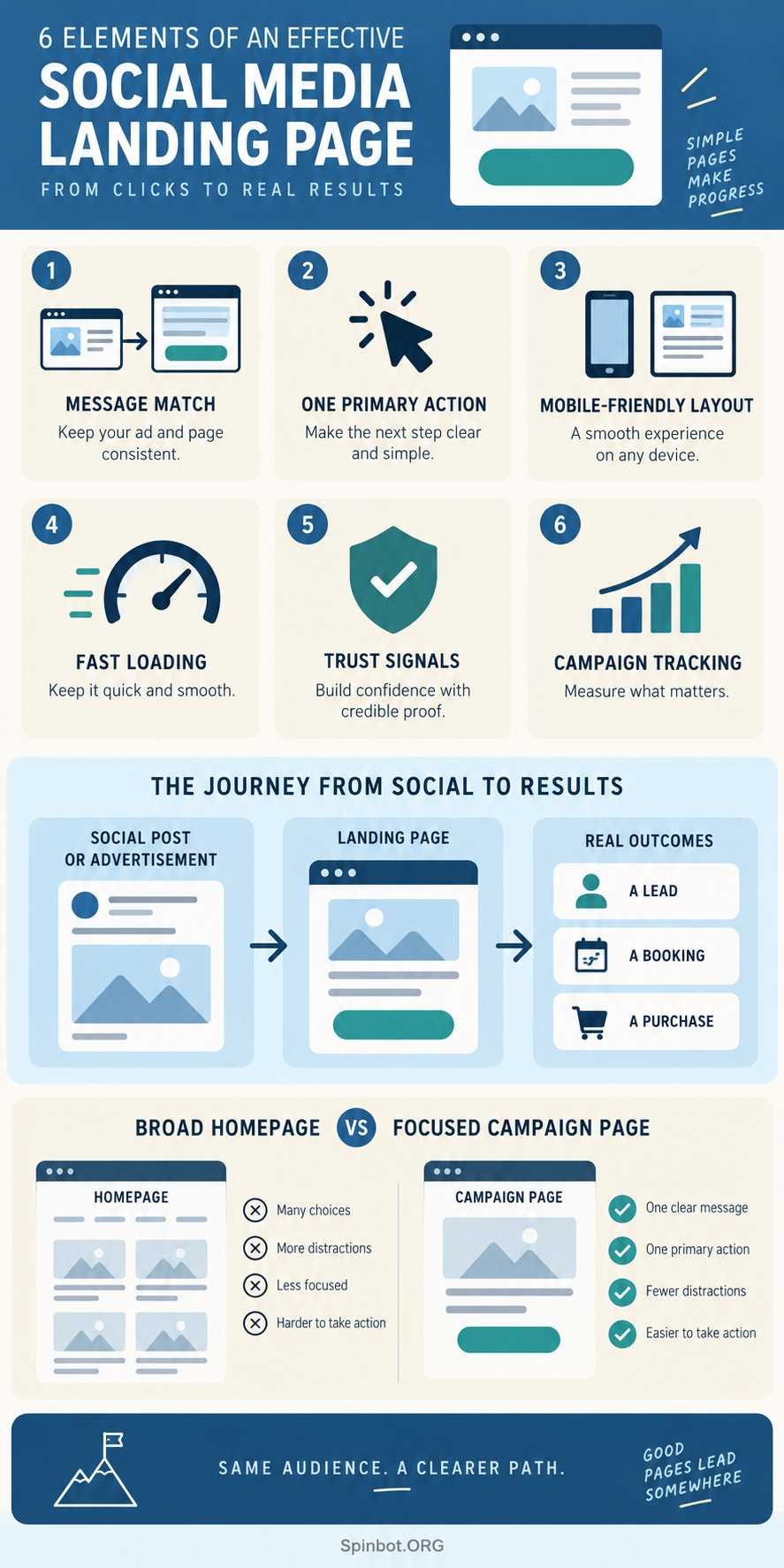
A focused landing page removes that work. It can immediately show the beginner program, explain the benefit, answer basic questions, and present a button to buy or sign up.
Sprout Social describes landing pages as destination pages connected to a specific marketing campaign or promotion. Unlike a general homepage, they normally guide visitors toward a particular action.
That small difference changes how the page should be designed.
Campaign landing pages vs link-in-bio pages
Not every social media landing page needs one button.
If someone taps a promotional ad for a specific product, one clear action usually makes sense. If someone visits your general social profile, however, they may want your store, newsletter, latest article, booking page, or other content.
That is where a link-in-bio page can help.
A link-in-bio page is mainly a routing page. It gives visitors a short set of useful destinations. A campaign landing page goes deeper and tries to move the visitor toward one main goal.
A business may need both.
You could keep a simple bio page on your Instagram profile all year, then send paid campaign traffic directly to individual landing pages for specific products or promotions.
Why your homepage is not always enough
A homepage has a broad job. It introduces your business and helps different types of visitors explore.
A landing page has a narrow job.
That narrower focus matters when the visitor has already expressed interest in something. If someone clicked an ad for a free consultation, the next page should make it easy to understand and book that consultation. Making them search through the rest of your site creates unnecessary friction.
The goal is not to remove every link from every page. The goal is to make the visitor’s next decision obvious.
Why Social Traffic Often Needs Its Own Landing Page
People coming from social media usually have context before they reach your site.
They saw a video, advertisement, post, recommendation, product demonstration, or special offer. Your landing page should continue that same conversation.
If your social post says, “Get our free small-business content calendar,” but your landing page opens with a general description of your marketing company, the connection is weak.
The visitor has to stop and work out whether they are still in the right place.
A stronger landing page would repeat the core promise naturally: get the free content calendar, see what it contains, enter your email, and receive it.
This is often called message match. The promise before the click and the experience after the click should make sense together.
TikTok’s current guidance for websites receiving advertising traffic also stresses that a page should quickly communicate who you are, what you offer, and why the visitor should stay. It also recommends clear navigation and fast load times.
The principle applies well beyond TikTok.
Your social content creates an expectation. Your landing page should fulfill it.
What Makes a Social Media Landing Page Work?
A good landing page does not need flashy animation, dozens of sections, or clever wording. It needs to make the offer easy to understand and the next action easy to take.
Match the page to the click
Start by asking why the visitor arrived.
Someone who clicked a product demonstration may be ready to see product details and pricing. Someone who clicked an educational post may respond better to a free guide or email signup. Someone who clicked a local service ad may want availability, reviews, location information, and a booking button.
Do not build one generic page and expect it to serve every campaign equally well.
Give the page one primary goal
A page can contain supporting links without losing focus, but one action should clearly matter most.
For a freelance writer, that action might be “Request a Quote.”
For an online store, it could be “Shop This Product.”
For a local business, it might be “Book an Appointment.”
For a creator, it could be “Join the Newsletter.”
When every button looks equally important, the visitor has to decide what your page is supposed to do. That decision should already have been made before you built it.
Design for a phone first
Social media and mobile use are closely connected, so your page should work comfortably on a small screen.
Check the actual page on a phone rather than shrinking your desktop browser and assuming everything is fine.
The headline should be readable without zooming. Buttons should be easy to tap. Forms should not feel endless. Important information should not depend on tiny text or hover effects.
Accessibility matters here too. W3C notes that web accessibility standards apply to content used on mobile devices and address issues such as touchscreens, small screens, and different ways people interact with devices.
A page that is easier to use is not only better for conversions. It is better for people.
Make the value clear before asking for action
A call to action works better when visitors know what they will get.
“Submit” tells them almost nothing.
“Get the Free Checklist” is clearer.
“Book a 20-Minute Consultation” sets an expectation.
Your copy does not need to be clever. It needs to remove doubt.
Support the main message with useful proof where appropriate. That could include customer reviews, recognizable clients, product ratings, a refund policy, delivery details, credentials, a short demonstration, or a clear explanation of what happens next.
Use only proof you can genuinely support.
How to Create a Social Media Landing Page
You can build a useful page with most modern website builders and landing-page tools. The tool matters less than the decisions you make before opening it.
A simple process looks like this:
- Choose your traffic source and audience. Decide which social post, profile, advertisement, or campaign will send people to the page. Think about what those visitors already know before clicking.
- Pick one primary action. Decide whether you want a purchase, signup, download, booking, inquiry, or another measurable outcome.
- Match the opening message to your social content. Use a headline and supporting text that clearly continue the promise made before the click.
- Build around benefits and proof. Explain what the visitor gets, why it matters, what is included, and why they can trust the offer. Remove sections that do not help the decision.
- Test the page on a real phone. Check buttons, menus, forms, images, checkout steps, text size, and loading behavior.
- Add tracking before publishing. Make sure you can tell which campaign or social source produced the visit and whether visitors completed the desired action.
Do not wait until the campaign ends to think about measurement.
Track the Social Traffic You Send
Without tracking, you may know that a page received visitors but not which post, platform, or campaign produced them.
One simple way to improve attribution is to add UTM parameters to your campaign links.
Google Analytics supports parameters such as utm_source, utm_medium, utm_campaign, and utm_content. These can identify the traffic source, marketing medium, campaign, and even different creative versions. Google recommends using consistent naming so campaign data does not become fragmented across reports.
Imagine you promote the same landing page through Facebook and Instagram.
Both links can lead to exactly the same page while carrying different source information. You can then compare what happens after each click.
Go beyond visits alone. The useful question is whether visitors completed the goal of the page.
For a sales page, watch purchases. For a lead page, watch completed forms. For a booking page, track confirmed bookings. For a link-in-bio page, individual link clicks may matter more.
Traffic tells you who arrived. Conversion tracking tells you whether the page did its job.
How to Sell Products on Social Media With Landing Pages
If you are learning how to sell products on social media, do not treat the landing page as an afterthought.
The social post earns attention. The landing page has to turn that attention into enough confidence to buy.
Suppose a skincare company posts a short video about one particular moisturizer. Sending viewers to a store homepage containing 80 products adds extra decisions.
A focused product landing page can continue the exact story from the video. It can show the moisturizer, explain who it is for, list the main benefits, answer likely questions, show genuine customer feedback, and lead directly to the purchase step.
For a more expensive product or service, asking for an immediate sale may be too much. The landing page could instead offer a demonstration, consultation, free sample request, email course, or useful guide.
That creates a simple path:
Social content → relevant landing page → useful action → follow-up
The right action depends on how ready the visitor is to buy.
Link-in-Bio Page or Dedicated Campaign Page?
The two page types should not be treated as rivals.
| Situation | Link-in-bio page | Campaign landing page |
|---|---|---|
| General social profile | Strong fit | Sometimes |
| Several current destinations | Strong fit | Weak fit |
| One product promotion | Possible | Strong fit |
| Paid social advertisement | Possible | Usually stronger |
| Event registration | Possible | Strong fit |
| Creator profile hub | Strong fit | Sometimes |
| One lead-generation offer | Possible | Strong fit |
| Multiple content channels | Strong fit | Weak fit |
Use a link-in-bio page when the visitor reasonably needs choices.
Use a focused campaign page when you already know why the visitor clicked.
Current link-in-bio guidance from Sprout Social also recommends keeping these destinations aligned with current campaigns and avoiding stale pages or outdated information.
That sounds basic, but expired offers and forgotten links can quietly waste good social traffic.
Common Social Landing Page Mistakes
One of the easiest mistakes is sending every social visitor to the homepage. Sometimes the homepage is the right destination, but it should be a choice rather than a default habit.
Another problem is giving visitors too many competing actions. A product page that asks people to buy, subscribe, read six blog posts, follow four social accounts, download a guide, and contact sales is forcing one page to do too much.
Weak message match causes trouble too. If the advertisement promises one thing and the landing page talks about something else, trust drops quickly.
Mobile problems are especially costly. A tiny form, oversized image, slow page, hidden button, or awkward checkout may look minor from a desktop computer but become obvious when you test the real mobile experience.
Finally, do not launch without tracking. If three campaigns point to the same page and you cannot separate their results, it becomes much harder to decide what to improve.
Should You Hire a Social Media Expert or Agency?
You do not automatically need an agency to create an effective landing page.
A freelancer, blogger, creator, or small business with a straightforward offer can often build one using an existing website platform or landing-page builder.
Expert help becomes more useful when the project involves paid advertising, several audience segments, complex tracking, frequent campaigns, conversion testing, custom design, or a large marketing budget.
If you plan to hire a social media expert, ask what happens after someone clicks the social content. Posting and ad management are only part of the customer journey.
The same applies when comparing social media agency packages or social media services packages. Find out whether landing-page strategy, copy, design, tracking, testing, and reporting are included or charged separately.
A local social media agency may be useful when local market knowledge, in-person content creation, or location-based campaigns matter. But location alone does not make an agency a good fit. Look at the actual work included and how success will be measured.
The better question is not “Do I need an agency?”
It is “Where does my current process break down?”
If you can attract clicks but cannot turn them into inquiries or sales, the landing-page experience deserves attention before you simply spend more money generating traffic.
Build the Page Around One Useful Next Step
A social media landing page should make the journey from interest to action feel natural.
Start with what brought the visitor there. Match the page to that promise. Make the primary action obvious. Build for mobile visitors. Remove unnecessary choices. Then track what people actually do.
Use a link-in-bio page when visitors need a few useful paths. Use a dedicated campaign landing page when one offer deserves their full attention.
Social media can create the click.
Your landing page decides what happens next.

Raj blends SEO mastery with real-world freelance grit. Covers SEO, blogging, content strategy, copywriting, freelance writing, marketing, and business communication.