

That sounds simple. In practice, it solves a much messier problem.
HR has an enrollment reminder. Leadership wants a company update. IT needs to announce maintenance. A department is launching a new process. Someone asks for an urgent all-company email at the last minute. Without a shared calendar, those messages can collide, arrive too late, or overwhelm employees.
A good internal communications content calendar turns that stream of requests into a manageable system. Staffbase describes an internal comms calendar as a visual way to organize when and how communications will go out, while its current guidance also recommends adding fixed dates, recurring communications, deadlines, reminders, and approval time.
The goal isn’t to fill every empty date. It’s to make each communication earn its place.
What an Internal Communications Content Calendar Actually Does
An internal communications calendar is a working schedule for employee-facing messages, campaigns, meetings, announcements, and recurring content.
It might include:
- company newsletters
- CEO or leadership updates
- town halls
- policy announcements
- employee surveys
- training reminders
- benefits information
- IT notices
- recognition campaigns
- culture initiatives
- office closures
- major project launches
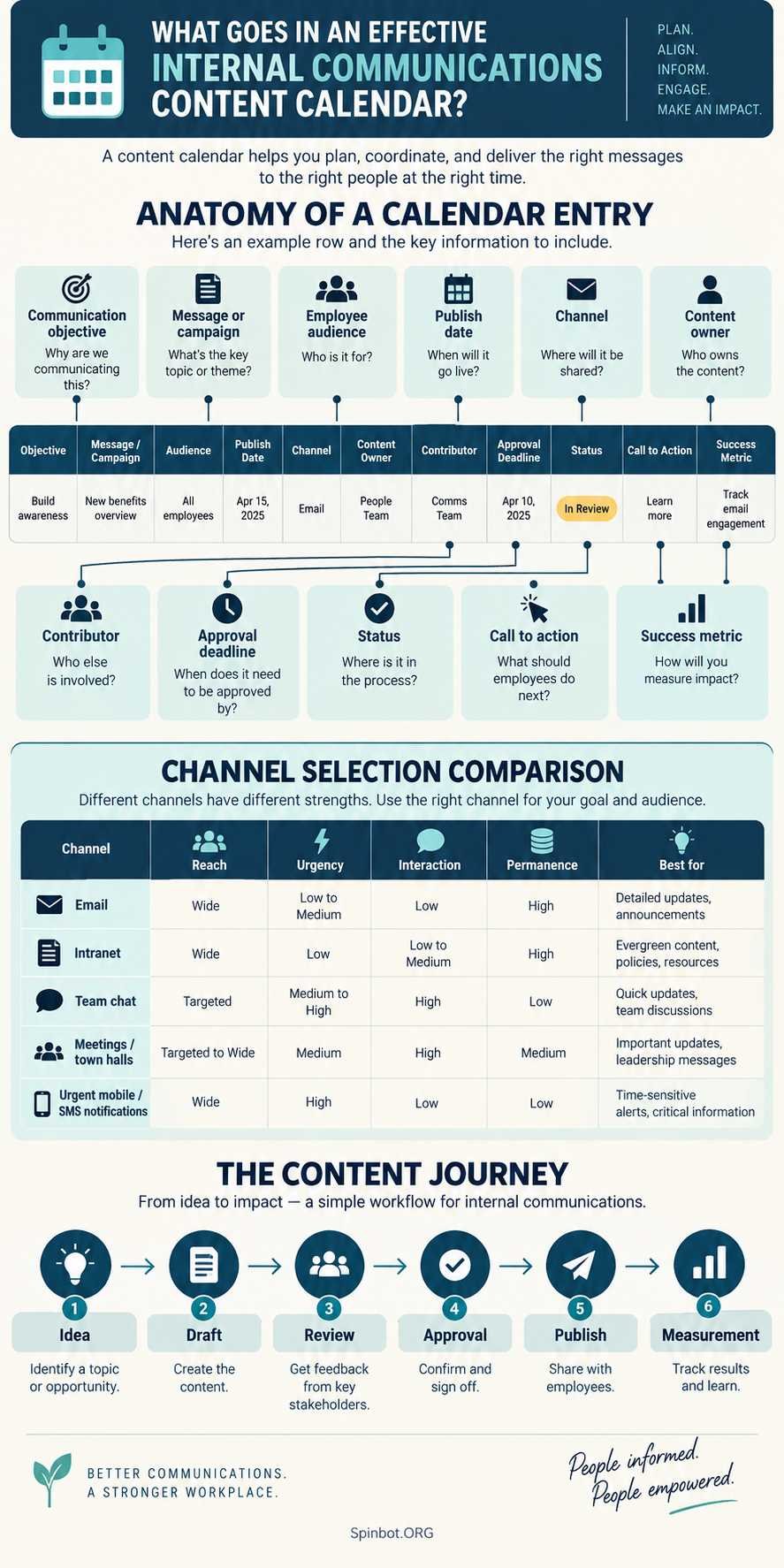
The calendar also shows the work behind each message. A useful entry may include a drafting deadline, contributor, approver, target audience, communication channel, and desired employee action.
This is where a content calendar differs from an internal communications plan template.
A communication plan sits one level higher. It defines who needs information, what they need to know, why you are communicating, how often you will communicate, and which channels you will use. Smartsheet’s communication planning templates, for example, include fields such as stakeholders, objectives, target audiences, communication methods, frequency, and measurable results.
The content calendar turns that strategy into scheduled work.
Think of the plan as the rules of the road and the calendar as the actual journey.
Define Goals and Audiences Before Adding Dates
One of the easiest mistakes is opening a spreadsheet and immediately filling it with events.
Start with the reason for the communication instead.
A message about mandatory cybersecurity training has a different goal from a culture newsletter. One requires employees to take a specific action before a deadline. The other may aim to keep people informed and connected.
For each major communication, ask:
What should happen after employees receive this?
Possible objectives might include:
- understand a company change
- complete a task
- attend an event
- give feedback
- follow a new procedure
- use a new resource
- feel recognized
- know where to get help
Audience matters just as much.
Not every message belongs in front of every employee. A payroll update for one country may have no value to employees elsewhere. A warehouse safety notice may not need to reach the sales team.
Segmenting the audience keeps the calendar more useful and helps reduce unnecessary communication.
What to Include in Your Internal Communications Calendar
You can make an internal communication plan template extremely complicated. Most teams don’t need that.
Start with fields that support real decisions.
| Field | What it tells you |
|---|---|
| Publish date | When employees receive the message |
| Topic or campaign | What the communication is about |
| Objective | What the communication should achieve |
| Audience | Who needs to receive it |
| Channel | Where the message will appear |
| Owner | Who is responsible for delivery |
| Contributor | Who supplies information or content |
| Draft deadline | When writing needs to be ready |
| Approval deadline | When reviewers must sign off |
| Status | Planned, drafting, review, approved, published |
| Call to action | What employees should do next |
| Measurement | How you will judge the result |
Add other fields only when they solve a recurring problem.
For example, a global company might need language and region columns. A regulated organization may need legal-review status. A small company with one communications manager may need neither.
The best calendar isn’t the one with the most columns. It’s the one people will actually maintain.
Build an Internal Communications Channel Strategy
A calendar becomes much more useful when it answers not just when to communicate, but where.
Your internal communications channel strategy may include:
- employee newsletter
- intranet
- Slack
- Microsoft Teams
- town halls
- manager briefings
- digital signage
- mobile notifications
- SMS
- printed notices
Don’t choose a channel simply because your company already uses it.
Match the channel to the message.
Suppose IT needs employees to know that a system will be unavailable Saturday from 10 p.m. to midnight. Email may work well because people can search for the announcement later. A short Teams or Slack reminder on Friday may support it.
A detailed policy change is different. A chat message alone may disappear in a busy conversation. You may need a permanent intranet page, supported by email and manager communication.
Slack itself recommends organizing ongoing discussions and related information in channels, while Microsoft Teams allows conversations to be grouped into channels and sections around projects, topics, and other work areas.
That doesn’t mean every message should appear everywhere.
Sending the same announcement through email, chat, intranet, SMS, and a town hall can create noise rather than clarity. Use multiple channels when repetition serves a purpose, such as an urgent deadline or an important change.
Set a Cadence Employees Can Actually Handle
Start by putting predictable communications on the calendar.
These might include:
- monthly newsletters
- quarterly town halls
- leadership messages
- payroll reminders
- annual enrollment
- training deadlines
- employee surveys
- company events
Staffbase recommends adding dates that are unlikely to change first, then recurring communications, deadlines, reminders, and review periods. It also suggests checking the calendar for periods where employees may receive too many messages.
That last step matters.
Imagine five departments all want an all-company email on Monday morning. Each message may be reasonable on its own. Together, they compete for attention.
Your calendar lets you see the collision before employees experience it.
Move lower-priority communications where possible. Combine related information when that improves clarity. Keep urgent messages separate when combining them would weaken their importance.
Also leave some breathing room.
An internal calendar that is packed weeks in advance with no room for unexpected communication is too rigid. Leadership changes direction. Systems fail. Deadlines move. Weather disrupts operations. A good calendar makes those changes easier to absorb.
Decide Who Owns Each Communication
A calendar without ownership quickly turns into a list of wishes.
Every meaningful communication should have one person responsible for moving it forward.
The director of internal communications, communications manager, or whoever leads the function can set the overall rules:
- which messages receive priority
- what qualifies for company-wide distribution
- required lead times
- approval processes
- channel standards
- publishing cadence
- how results are reviewed
That doesn’t mean the communications team must write everything alone.
HR may supply benefits details. IT may provide technical information. Legal may review sensitive wording. Executives may approve leadership messages.
The calendar should make those handoffs visible.
Suppose HR wants an enrollment announcement published November 1. If legal needs three working days for review and communications needs two days to write and format the message, October 31 is not a useful content deadline.
Work backward.
The final publish date may be November 1, but the first content deadline might need to be October 23.
That is one of the biggest practical benefits of a content calendar: it shows the work before the send date.
Which Tools for Internal Communication Planning Make Sense?
You don’t automatically need expensive software.
For a small team, Google Sheets or Excel may be enough. A spreadsheet is easy to customize and works especially well when there are only a few owners.
In fact, Staffbase currently provides its own strategic internal communications calendar in Excel and Google Sheets formats, including annual, monthly, and daily planning views.
Once several departments, campaigns, deadlines, and approval steps are involved, a project-management tool may make the process easier. Teams may use tools such as Asana, Trello, Monday.com, or similar systems to assign work, track status, and manage dependencies.
Communication platforms also play a role. Slack supports channels, lists, shared information, tasks, deadlines, and workflows inside its workspace.
Specialized internal communication platforms can become useful when you need capabilities such as employee audience targeting, publishing, analytics, multichannel distribution, or centralized employee communications.
So what is the best internal communications software?
There isn’t one answer for every company.
For a five-person communications team with a straightforward publishing process, specialized software may be unnecessary. For a large organization communicating with office staff, frontline workers, multiple regions, and several languages, a spreadsheet may become painful very quickly.
Choose the tool after identifying the workflow problem. Don’t create a complicated workflow to justify the tool.
A Simple Internal Communications Content Calendar Example
Here is what a small section of a calendar might look like:
| Date | Communication | Audience | Channel | Owner | Goal |
|---|---|---|---|---|---|
| May 4 | Monthly company update | All employees | Internal Comms | Share priorities | |
| May 6 | Security training reminder | Incomplete participants | Email + Teams | IT | Complete training |
| May 12 | Benefits webinar | Eligible employees | Intranet + Email | HR | Drive registrations |
| May 20 | Employee recognition | All employees | Newsletter | HR + Comms | Recognize staff |
| May 28 | Town hall reminder | All employees | Email + Chat | Internal Comms | Increase attendance |
Now suppose leadership requests an urgent organizational announcement for May 20.
Because the calendar already shows an employee recognition message that day, the communications lead can decide whether to move that lower-priority item rather than sending both at once.
Without the calendar, that conflict may not become obvious until both messages are already being prepared.
Measure the Calendar Instead of Just Filling It
Publishing on time is useful, but it isn’t the final goal.
Measure whether communication did what it was supposed to do.
Depending on the channel and objective, useful indicators could include:
- delivery or reach
- email opens
- link clicks
- survey responses
- event registrations
- attendance
- training completion
- downloads
- employee feedback
- questions received
- completion of a requested action
Be careful with surface-level numbers.
A message can have a high open rate and still fail. If 90% of employees open a benefits email but few complete the required action, the communication still needs work.
Similarly, a message aimed at 40 managers doesn’t need thousands of views. It needs the right 40 people to understand and act.
Workshop recommends auditing existing communications for what is working, what isn’t, and what is missing before building or revising the calendar.
Use those findings to improve the next cycle rather than treating each send as an isolated event.
Where Internal Communications Calendars Usually Break
Most calendar problems aren’t caused by the spreadsheet.
They come from the process around it.
One common failure is missing ownership. If nobody is clearly responsible for a communication, deadlines slide.
Another is late approvals. The message may be scheduled, but the calendar doesn’t show when executives, HR, legal, or another team must review it.
Channel duplication is another problem. Teams sometimes believe more channels automatically mean more reach. Employees may instead learn to ignore repeated announcements.
Then there is calendar overload. Every department believes its message deserves immediate company-wide attention. Someone needs the authority to prioritize.
Finally, avoid turning the calendar into an untouchable annual plan. Staffbase explicitly describes the calendar as a living document because dates change, contributors miss deadlines, and unexpected needs appear.
That flexibility isn’t a weakness. It’s part of the design.
Keep the Calendar Useful as Your Organization Changes
An internal communications content calendar works best when it helps people make choices before messages are sent.
It should show what employees need to hear, who needs to hear it, where the message belongs, who owns the work, when approvals are required, and what outcome you’re trying to create.
Start simple. A spreadsheet with ten useful columns is better than the best internal communications software if nobody maintains the software.
Then improve the system as your needs grow.
Add better audience segmentation when employees receive too much irrelevant information. Add approval stages when reviews become a bottleneck. Reconsider your internal communications channel strategy when important messages disappear in crowded channels. Move to more advanced tools when coordination genuinely becomes difficult.
Most importantly, don’t judge the calendar by how full it looks.
Judge it by whether employees receive the right information at the right time without having to fight through everything else to find it.

Raj blends SEO mastery with real-world freelance grit. Covers SEO, blogging, content strategy, copywriting, freelance writing, marketing, and business communication.