

For most teams, Slack is the strongest all-around choice because it combines channels, threads, calls, search, automation, outside collaboration, and a large integration ecosystem. But that does not make it the best choice for every workplace. Microsoft-heavy companies often get more value from Teams, Google Workspace users may need nothing beyond Google Chat, and frontline businesses have very different needs from software teams.
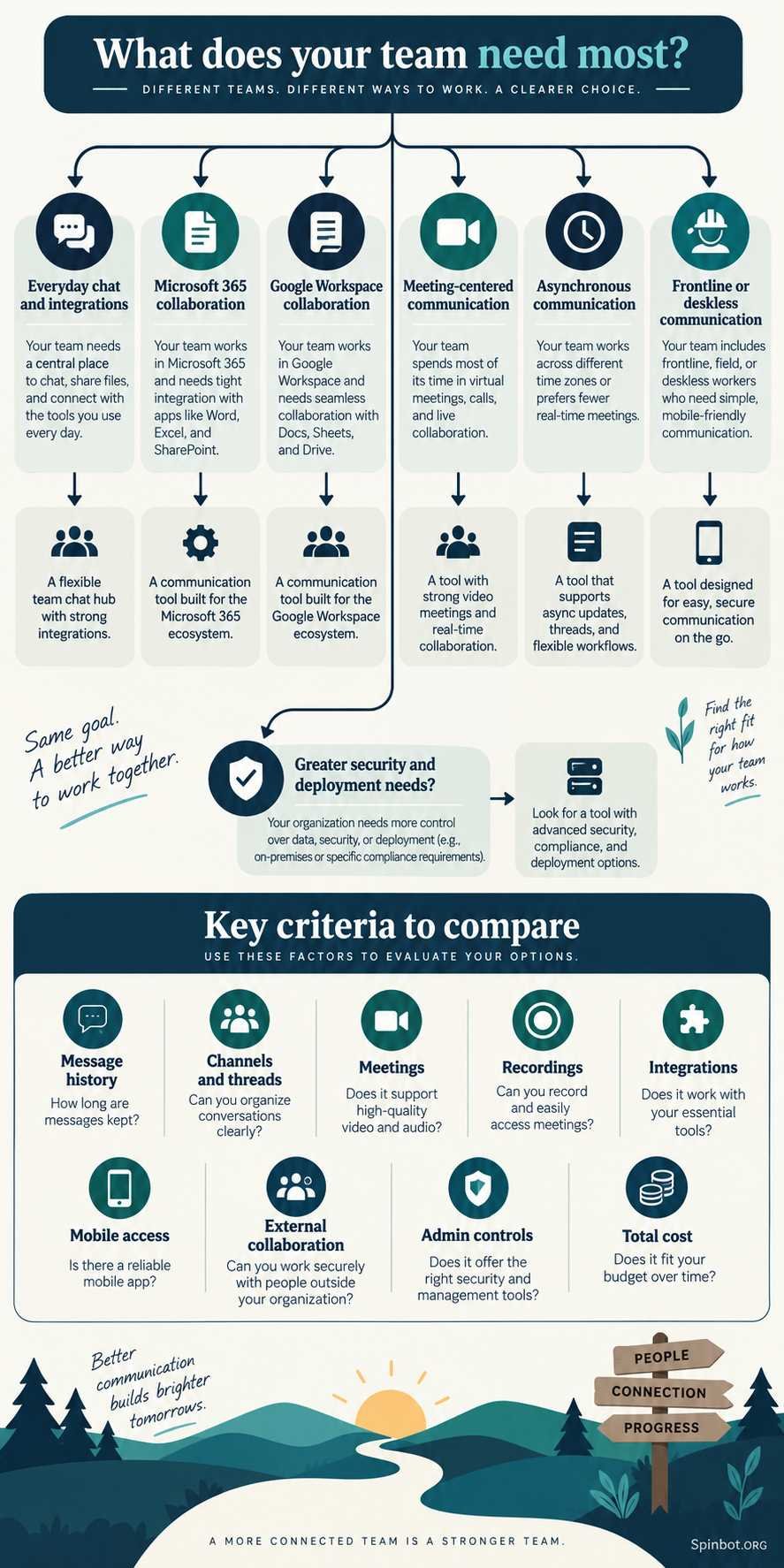
The right choice depends on how your team actually communicates: live chat, meetings, asynchronous discussions, company announcements, mobile updates, or some mix of all five.
Best Team Communication Apps at a Glance
| App | Best for | Main strength | Main limitation |
|---|---|---|---|
| Slack | Knowledge teams and mixed workflows | Integrations, channels, search, automation | Free history is limited |
| Microsoft Teams | Microsoft 365 businesses | Meetings plus Microsoft collaboration | Can feel complex for simple chat needs |
| Google Chat | Google Workspace users | Tight Gmail, Drive, Meet, Calendar integration | Less compelling outside Google Workspace |
| Zoom Team Chat | Meeting-heavy teams | Chat connected directly to meetings | Best value depends on using the wider Zoom platform |
| Twist | Async-first remote teams | Calm, thread-focused discussions | Free history access is short |
| Pumble | Budget-conscious small teams | Unlimited free message history | Smaller integration ecosystem |
| Mattermost | Organizations wanting deployment control | Flexible, channel-based collaboration | More specialized and technical |
| Connecteam | Frontline and deskless workers | Mobile communication and company updates | Less suited to software-style project chat |
Pricing and plan features can change, so check the vendor’s current plan before buying. The comparisons below reflect official product information available in September 2026.
Slack Is the Best Overall Choice for Integration-Heavy Teams
Slack still makes the most sense when communication needs to connect many different parts of a team’s work.
A marketing team, for example, might discuss campaigns in channels, receive project updates from other apps, jump into a quick Huddle, share files with an agency through Slack Connect, and search an old conversation when someone asks why a decision was made six months ago.
That breadth is Slack’s biggest advantage.
Its free plan includes channels, searchable messages from the most recent 90 days, up to 10 app integrations, one-to-one Huddles, and basic AI features. The Pro plan currently lists unlimited message history, unlimited app integrations, group Huddles, workflows, and expanded external collaboration. Slack lists Pro at $7.25 per active user per month when billed annually.
The tradeoff appears as the team grows. A tool that starts as simple chat can become a maze of channels, notifications, bots, threads, direct messages, and automated alerts.
Slack therefore works best when the team also agrees on some communication rules. A company might use:
- channels for work other people may need later;
- threads for discussion around one topic;
- direct messages for genuinely private or temporary exchanges;
- Huddles when typing becomes slower than talking;
- project software for tasks that require ownership and deadlines.
Without that discipline, adding more integrations can make communication noisier rather than better.
Best fit: agencies, SaaS companies, remote teams, marketing departments, product teams, and businesses that use many connected apps.
Microsoft Teams Makes More Sense Inside Microsoft 365
If your company already works in Word, Excel, PowerPoint, Outlook, OneDrive, and other Microsoft services, switching to a separate communication system can create unnecessary duplication.
Microsoft Teams brings chat, calls, meetings, file collaboration, tasks, and other communication into the same ecosystem.
Microsoft currently lists Teams Essentials at $4 per user per month with annual billing in the United States. The plan includes chat, video conferencing, file sharing, polls, 10 GB of cloud storage per user, and meeting recordings with transcripts and live captions in English. Microsoft also offers broader Microsoft 365 plans that combine Teams with business email, Office applications, and larger storage allowances.
That makes Teams especially attractive when the alternative would be paying separately for chat, meetings, document collaboration, and office software.
Its weakness is almost the reverse of Slack’s. Teams can do a lot, but a five-person company that simply wants quick group chat may not need everything around it.
There can also be an ecosystem cost to switching. If your company already stores documents in SharePoint and OneDrive, schedules through Outlook, and runs meetings in Teams, moving daily chat somewhere else means employees must constantly move between systems.
Best fit: businesses already committed to Microsoft 365, especially organizations where meetings and documents are central to daily work.
Google Chat Is the Practical Choice for Google Workspace Teams
Google Chat is easy to underestimate because many businesses already have access to it through Google Workspace.
It supports direct messaging and group collaboration through Spaces while connecting closely with Gmail, Calendar, Drive, Meet, and other Workspace services. Google also offers integrations with tools such as Jira, Asana, PagerDuty, GitHub, and Workday, along with APIs and Apps Script for custom workflows.
Google says Chat now includes Gemini features for tasks such as composing messages, searching information, and finding important content. Some capabilities vary by Workspace edition.
The important buying question is not whether Google Chat has every feature Slack has.
It is whether your team needs another communication platform at all.
Suppose a 12-person consulting business already runs email in Gmail, meetings in Meet, files in Drive, and scheduling in Calendar. Adding Slack creates another place to search, another notification stream, another permissions system, and possibly another subscription.
Google Chat may be the simpler answer even if Slack offers a richer communication ecosystem.
Best fit: small and midsize businesses already centered on Google Workspace.
Zoom Team Chat Is Strong for Meeting-Centered Communication
Zoom is no longer only a place you enter five minutes before a video meeting.
Zoom Team Chat gives teams channels, project spaces, one-to-one conversations, AI-assisted summaries, and communication connected directly to meetings. Its continuous meeting chat lets participants communicate before, during, and after a meeting in the same space.
That matters more than it may sound.
A common communication failure happens when the conversation before a meeting lives in email, the meeting happens in a video app, notes are saved somewhere else, and follow-up questions appear in Slack.
Now the team has four places containing pieces of the same decision.
Zoom’s model can reduce that fragmentation for organizations where meetings drive a large part of the work. Zoom also surfaces meeting assets such as recordings and related materials from the post-meeting chat experience.
This also explains why the search for the best meeting recorder app sometimes leads to the wrong purchase decision. If your real problem is losing decisions after meetings, a recorder alone may not fix it. You may need a communication system that keeps the discussion, meeting, recording, summary, and follow-up work connected.
Best fit: client-facing teams, distributed organizations, training teams, and companies already using Zoom heavily.
Twist Is Better When Instant Messaging Has Become the Problem
Most communication apps are designed around fast responses.
Twist deliberately moves in the other direction.
Its core idea is asynchronous communication built around organized threads. Instead of treating every message like something that deserves an immediate reply, teams can keep deeper discussions grouped by subject and answer when they have time to think.
That can work especially well across time zones.
Imagine a team with developers in Europe, a designer in Canada, and a project manager in the United States. Constant live chat creates an unfair choice: someone either misses the conversation or stays online outside normal working hours.
An async-first structure gives that team a more permanent place to discuss decisions without expecting everyone to appear at the same moment.
There is an important limitation on the free plan. Twist currently provides access to only one month of comments and messages, although the company says older data remains stored and becomes accessible again after upgrading. Its Unlimited plan lists full history and unlimited integrations at $6 per user per month.
That history limit matters if you expect your communication tool to double as an organizational memory.
Best fit: distributed remote teams that value focused, thoughtful communication over constant availability.
Pumble Offers Unusually Strong Free Message History
For small teams, the problem with many of the best internal communication tools is not the initial cost. It is what happens when the team eventually needs an old conversation.
Pumble takes a different approach.
Its free plan currently includes unlimited users, unlimited channels, and unlimited message history. It also supports direct messages, threads, file sharing, scheduled messages, voice and video messages, and one-to-one meetings. The free plan limits the number of third-party app integrations, while paid tiers add more collaboration and administrative features.
That makes Pumble particularly interesting for a small organization that needs searchable communication history but cannot justify a paid seat for every employee.
It also supports meeting recording, although recording availability and other advanced meeting features depend on the appropriate plan.
The tradeoff is ecosystem depth. Slack’s much larger integration marketplace may matter more than free history if your team needs communication connected to dozens of specialized business applications.
A useful way to think about the choice is:
Choose Pumble because you want affordable communication. Choose Slack because you want communication to become a hub connecting many other tools.
Neither priority is automatically better.
Best fit: startups, small businesses, nonprofits, and cost-sensitive teams that care about long-term message access.
Mattermost Fits Organizations That Need More Control
Mattermost sits in a more specialized part of the market.
It provides familiar communication features including public and private channels, direct and group messaging, file sharing, threads, search, calls, and mobile access. Mattermost documentation also describes different deployment and enterprise options aimed at organizations with more demanding operational requirements.
Calls can include screen sharing, threaded chat, reactions, and other collaboration functions. Group-call and recording capabilities vary by plan.
For a typical eight-person design agency, this may be more platform than necessary.
For an organization where hosting, administrative control, security policies, or technical deployment requirements strongly influence software selection, Mattermost deserves a closer look.
This is a good example of why a list of the best internal communications software can be misleading. Feature count is not the same as fit.
A specialized tool can be the best option for one organization and needless complexity for another.
Best fit: technical organizations and teams with stricter infrastructure, deployment, or administrative requirements.
Connecteam Is Built Around Frontline Employees
Office communication software often assumes every employee sits at a computer all day.
Retail staff, technicians, drivers, cleaners, restaurant workers, healthcare support staff, construction crews, and field teams do not work that way.
Connecteam approaches internal communication from a mobile workforce perspective. Its Communication Hub includes chat, updates, surveys, events, an employee directory, a knowledge base, and help-desk functions.
That combination changes what “communication” means.
A manager may need to publish a company announcement, check whether employees saw it, share a policy, run a quick survey, and give staff access to reference information from their phones. Those needs are different from a software developer discussing code inside a project channel.
Connecteam currently lists a Communications Basic plan starting at $29 per month for the first 30 users with annual billing. Features include personal and group chat, media and file attachments, a company feed, and engagement tracking.
For a distributed frontline company, that pricing model can also produce a different cost calculation from software priced strictly per employee.
Best fit: field service businesses, retail, hospitality, construction, logistics, and other deskless workforces.
Team Chat and Internal Communication Platforms Are Not Always the Same Thing
The phrases best internal communication platforms, best internal communication tools, and best team communication app are often used as though they describe the same software.
There is overlap, but the problems can be different.
A team communication app usually focuses on daily collaboration:
- direct messages;
- project or department channels;
- threads;
- calls;
- meetings;
- file sharing;
- integrations.
A broader internal communication platform may focus more heavily on company-wide communication:
- leadership announcements;
- employee news;
- intranet-style content;
- surveys;
- employee directories;
- knowledge distribution;
- engagement measurement;
- communication with workers who rarely use desktop computers.
A 15-person agency probably does not need an enterprise employee-communications suite.
A company with 5,000 factory, warehouse, office, and field employees may find ordinary group chat completely inadequate.
Define the communication problem before comparing software.
How to Choose the Right Team Communication App
Feature tables become less useful once every product has chat, files, calls, mobile apps, and AI features. The better approach is to look at how communication moves through your organization.
Start with the ecosystem you already pay for
If your team lives in Microsoft 365, Teams deserves to be the default candidate.
If nearly everything runs through Gmail, Drive, Meet, and Calendar, test Google Chat before buying another platform.
If your tools are spread across many vendors, Slack’s integration ecosystem becomes more valuable.
This simple check can eliminate half the shortlist.
Decide how quickly people really need to respond
A customer-support team may depend on live communication.
A distributed writing or development team may benefit from slower, better-organized discussions.
Choosing a real-time system and then telling everyone to behave asynchronously often works poorly because the interface itself encourages frequent checking.
Check message-history limits before migrating
Communication history becomes more useful with age.
Old conversations can explain why a policy changed, what a client approved, how a technical issue was fixed, or who made a decision.
Slack’s free tier currently limits searchable history to 90 days. Twist exposes one month on its free tier. Pumble advertises unlimited free message history.
That difference can matter more than emojis, themes, or other visible features.
Look at meetings as part of communication, not a separate category
Ask what happens after someone clicks End Meeting.
Where does the recording go?
Where are action items stored?
Can the team continue discussing the meeting in the same place?
Can someone who missed the call understand what happened?
Teams and Zoom are particularly strong candidates when meetings are central to the workflow. Microsoft includes recordings and transcripts in Teams Essentials, while Zoom increasingly connects meeting discussions and assets with Team Chat.
Test the mobile experience with the people who will actually use it
A desktop-first manager can easily choose a platform that is frustrating for employees working from phones.
For frontline teams, test common actions on a real phone:
- finding an announcement;
- replying to a manager;
- locating a policy;
- viewing a file;
- checking a schedule or update;
- searching an older message.
A communication tool succeeds only when the people receiving the information actually use it.
Calculate cost using your real headcount
A difference of a few dollars per user looks small until it is multiplied by 50 or 500 employees every month.
Also count tools the new app might replace.
A $7-per-user platform that replaces separate chat, meeting, recording, and workflow subscriptions can cost less overall than a $3 chat app that solves only one part of the problem.
What a Sensible Setup Looks Like
Suppose a 25-person hybrid marketing company uses Google Workspace, Zoom, a project-management platform, and several specialist marketing tools.
The team is considering Slack because employees complain that email is slow.
Buying Slack immediately might solve the chat problem while creating another one.
Now campaign information could exist in Gmail, Google Chat, Slack, Zoom chat, project comments, and meeting recordings.
A better migration starts with rules.
The company might decide that:
- the project-management app owns tasks and deadlines;
- Google Drive owns final documents;
- one communication app owns normal team discussion;
- Zoom owns scheduled external meetings;
- major decisions are copied into the relevant project record.
If Slack becomes the communication layer, the company should deliberately reduce communication elsewhere.
If Google Chat proves sufficient, the simpler option may be better because employees already work inside Workspace.
The failure point is not usually missing software. It is allowing five tools to perform the same job.
Which Team Communication App Should You Choose?
For most knowledge-work teams that want strong integrations and flexible communication, Slack is the best team communication app overall.
But the more useful answer depends on your environment:
Choose Microsoft Teams if Microsoft 365 already runs your business.
Choose Google Chat if you want straightforward communication inside Google Workspace without another major subscription.
Choose Zoom Team Chat if meetings sit at the center of your workflow and you want conversations to continue around them.
Choose Twist if constant notifications and expectations for instant replies are hurting a distributed team.
Choose Pumble if budget matters and unlimited free message history is a priority.
Choose Mattermost when deployment, administrative control, or technical requirements outweigh simplicity.
Choose Connecteam when many employees work away from desks and communication needs to function primarily on mobile devices.
The biggest mistake is choosing the app with the longest feature list. Good team communication depends less on how many things the software can do than on whether your team knows which conversations belong there, how information should be organized, and where important decisions will live later.
Pick the platform that removes communication channels from your workflow rather than adding one more place to look.

Raj blends SEO mastery with real-world freelance grit. Covers SEO, blogging, content strategy, copywriting, freelance writing, marketing, and business communication.