

A guide that ranked well last year may slowly lose clicks. Statistics become old. Screenshots stop matching the software. Competitors publish clearer answers. Searchers start asking slightly different questions.
That is where a content refresh can help.
Refreshing expired blog content means improving an existing article so it becomes accurate, useful, and competitive again. The goal is not to rewrite every old post or change the publication date. It is to find pages that still have value, understand why they are declining, and make meaningful improvements.
Here is a practical way to do it without throwing away the SEO value the page has already built.
What Does It Mean to Refresh Expired Blog Content?
An expired blog post is usually a page that has become outdated, incomplete, less useful, or less competitive over time.
For example, a post may need attention because:
- its traffic has been falling for several months
- important information is no longer correct
- some external links are broken
- its screenshots show an old interface
- competitors now answer the topic more completely
- search intent has changed
- its title no longer matches what people are searching for
- newer posts on your own site cover part of the same topic
This gradual decline is often called content decay. Search Engine Land describes it as a loss of organic traffic, rankings, or relevance over time. The cause can be outdated information, stronger competing pages, changed search intent, technical problems, or other search changes.
But age alone is not a reason to update a post.
A five-year-old article that still ranks, gets clicks, satisfies readers, and contains accurate information may need very little work. A six-month-old article with outdated advice may need a major refresh.
Refresh based on evidence, not the calendar.
Decide Which Blog Posts Are Worth Refreshing
Do not start by opening your oldest WordPress posts one by one.
Start with performance data.
Look for traffic and ranking declines
Google Search Console is a useful place to find refresh candidates.
Compare a recent period with an earlier one and look for pages that show:
- falling clicks
- declining impressions
- lower average positions
- fewer queries bringing traffic
- strong impressions but weak click-through rates
A post that once performed well but is steadily losing traffic is often a better refresh candidate than a post that never attracted search traffic at all.
Why? Because the declining page has already shown that Google and readers considered it relevant.
You may be able to recover that value more efficiently than starting from zero.
Find pages that still receive impressions
Pay special attention to pages that still appear in search but receive fewer clicks than before.
Those pages may not be dead. They may simply need better alignment with current search intent.
Imagine you have an article ranking between positions 8 and 15 for several useful queries. It still receives thousands of impressions, but clicks have dropped.
That is a strong candidate for investigation.
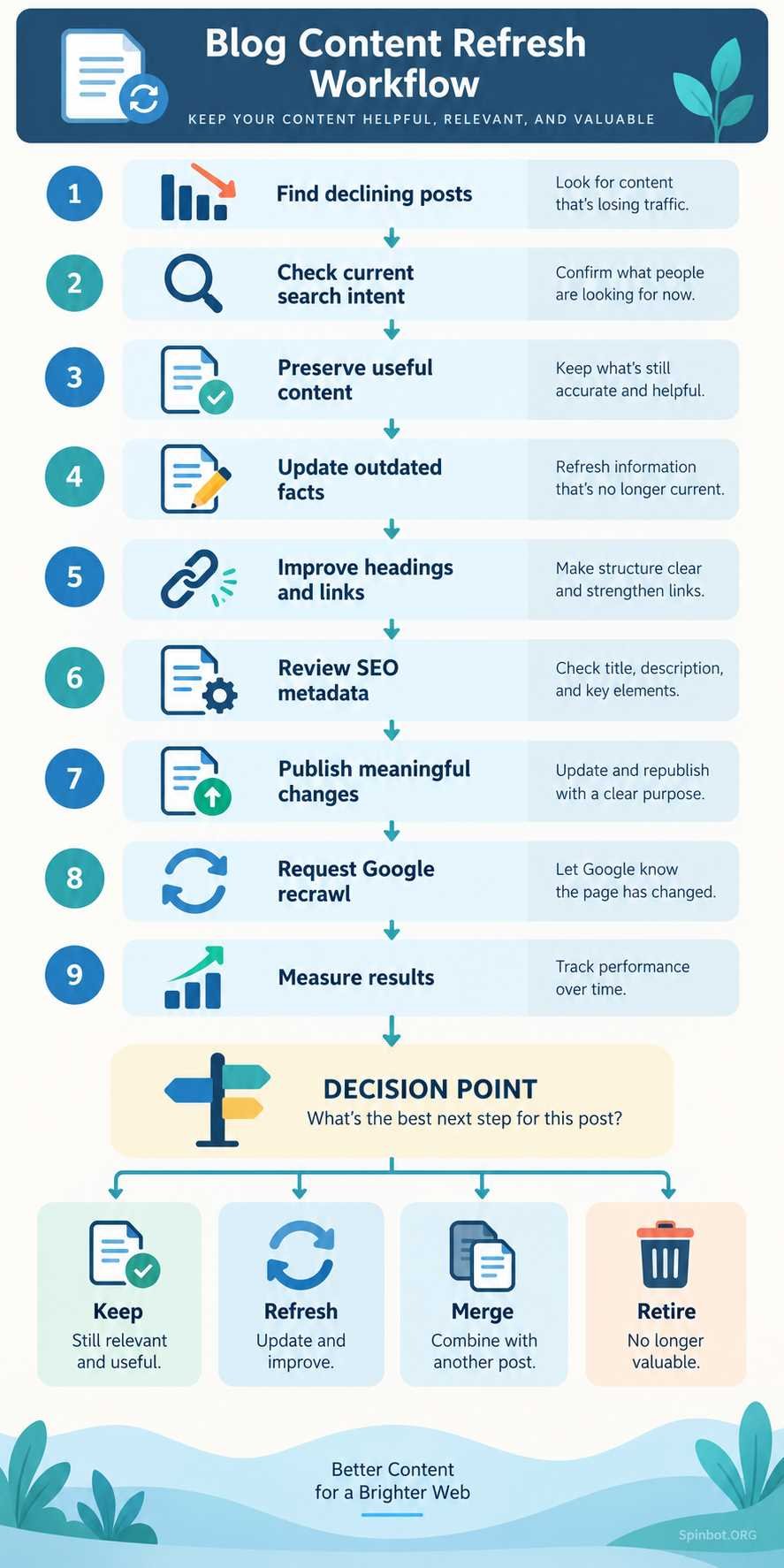
Sort old content into four groups
Not every weak post deserves a refresh. Use four simple options:
Keep: The article remains accurate and performs well.
Refresh: The topic is still relevant, but the page needs better information, structure, examples, links, or optimization.
Merge: Two or more similar posts compete with each other or would be more useful as one stronger resource.
Retire: The topic has no meaningful value anymore, the content is obsolete, or the page cannot reasonably satisfy current search intent.
This prevents you from wasting hours refreshing content that should have been consolidated or removed.
Record Your SEO Baseline Before Editing
Before changing a post, record how it performs today.
At minimum, note:
- organic clicks
- impressions
- average position
- major search queries
- click-through rate
- conversions, leads, or affiliate clicks if relevant
You do not need a complicated spreadsheet for every article. A simple record is enough.
The reason is practical: if you make 30 changes and then traffic rises or falls, you need something to compare against.
Without a baseline, you are guessing.
It also helps you avoid a common mistake: assuming that a refresh worked because the page “looks better.”
A prettier post is not automatically a more useful post.
Check Whether Search Intent Has Changed
Search intent is the result the searcher actually wants.
Before editing your article, search its main topic again and review the current results.
Do not copy competing articles. Study what Google appears to be rewarding and what readers now expect.
Ask:
- Are the top results tutorials, lists, tools, comparisons, or definitions?
- Are they aimed at beginners or experienced readers?
- Do they answer the query immediately?
- Are new subtopics appearing repeatedly?
- Are the results much fresher than your article?
- Is your article solving the same problem?
Suppose you wrote a broad explanation called “What Is Content Refresh?” but current searchers mainly want a step-by-step process for updating old blog posts.
Adding another 1,000 words of definitions will not fix the mismatch.
The page needs to move closer to the actual job the reader is trying to complete.
Refresh the Content That Is Actually Outdated
Once you understand the problem, edit with purpose.
Do not automatically rewrite every paragraph.
Replace old facts, dates, statistics, and examples
Start with information that can become wrong.
Check:
- statistics
- dates
- prices
- software features
- product names
- policies
- screenshots
- research findings
- examples tied to old events
If a statistic was useful three years ago but newer data now exists, update it and cite the current source.
If the old fact is still necessary for historical context, label it clearly instead of making it appear current.
Remove information that no longer helps
Old articles often collect clutter.
You may find:
- abandoned tools
- dead resources
- repetitive explanations
- outdated recommendations
- unnecessary introductory paragraphs
- examples that no longer make sense
Do not keep weak material simply because the page once ranked with it.
Keep what still serves the reader.
Add missing explanations
Search results can reveal useful gaps.
Maybe competing articles explain a difficult step more clearly. Maybe readers now need information that did not matter when you first published the post.
Add missing sections when they genuinely improve the answer.
This is different from making the article longer for SEO.
A 1,500-word article that solves the problem is better than a 3,000-word article padded with loosely related material.
Improve clarity
A content refresh is also an editing opportunity.
Break long paragraphs. Remove vague sentences. Simplify complicated instructions. Replace generic statements with specific steps.
A useful test is simple:
Could someone skim the page and still understand what to do?
If not, the structure needs work.
Review Links, Images, and On-Page SEO
Refreshing text is only part of the process.
Repair broken and outdated links
Check external links to make sure they still lead to useful, trustworthy sources.
Replace links that now:
- return errors
- redirect to irrelevant pages
- point to outdated research
- lead to discontinued products
- no longer support the claim you cited them for
Also review internal links.
Your website may have newer articles that did not exist when the old post was published. Add links where they naturally help the reader continue learning.
Avoid inserting internal links only because you want to push SEO value somewhere else. The anchor and destination should make sense in context.
Review the title and meta description
Do not change a strong title automatically.
If the title still matches the search intent and earns clicks, leave it alone.
Consider updating it when:
- it contains an obsolete year
- it promises information the article no longer covers
- the wording does not match current search behavior
- it is vague compared with the actual value of the page
The same applies to the meta description. Make it accurate and specific rather than stuffing extra keywords into it.
Update images when they affect usefulness
Some images age faster than text.
A software tutorial with screenshots from a discontinued interface can confuse readers even if the written instructions are correct.
Replace screenshots, diagrams, charts, or examples when the visual information is outdated.
You do not need to replace decorative images simply to make the page appear fresh.
Keep the Existing URL Unless There Is a Good Reason to Change It
For most normal content refreshes, keep the existing URL.
Changing a URL creates extra work and can introduce problems with redirects, internal links, backlinks, analytics, and indexing.
For example, if your article is:
example.com/content-refresh-guide/
you usually do not need to change it to:
example.com/content-refresh-guide-2026/
just because you updated the post in 2026.
A stable URL is often more practical for evergreen content.
Change the URL only when there is a clear structural reason, such as consolidating pages, fixing a badly designed slug, or moving content into a new site architecture.
If you do change it, use an appropriate permanent redirect from the old URL to the new one and update important internal links.
Publish the Refresh Honestly
One of the weakest content-refresh tactics is changing only the date.
If nothing meaningful changed, a new date does not make the article more useful.
Google’s sitemap documentation makes a similar distinction. Google says the lastmod value should reflect the date of the page’s last significant update. Changes to main content, structured data, or links can qualify, while something trivial such as changing a copyright date does not.
That is a sensible editorial rule too.
If you say a page was updated, make sure it was actually updated.
Depending on the article, a meaningful refresh might involve:
- replacing outdated information
- rewriting important sections
- adding useful new material
- improving internal and external links
- updating screenshots
- correcting factual errors
- changing the structure to match current reader intent
That gives the updated date a real purpose.
How to Get Google to Refresh Your Updated Page
A common question after editing an article is how to refresh my Google page.
For a page you own, what you usually want is for Google to crawl the updated URL again.
Request indexing with URL Inspection
Google Search Console’s URL Inspection tool lets verified site owners request indexing for an individual URL.
Google’s current instructions are straightforward:
- Open URL Inspection.
- Enter the complete URL.
- Review whether Google can access the page.
- Select Request indexing.
Google also makes clear that requesting indexing does not guarantee that the page will immediately be crawled, indexed, or ranked differently.
Do not keep clicking the request button repeatedly. It does not turn Googlebot into an instant refresh button.
Google says that most sites should not expect every changed page to be indexed on the same day.
Use your sitemap for larger numbers of URLs
If you refreshed many posts, manually submitting every URL is not the best workflow.
Make sure your XML sitemap is current and accessible.
Google uses sitemaps to discover important pages and information about them, including when URLs were last updated. Many content management systems, including WordPress setups, generate sitemaps automatically.
For the lastmod value to be useful, it should accurately represent a significant update. Google says it may use this information when it is consistently reliable.
What if Google is not indexing my site?
This is a broader issue than refreshing one blog post.
If one updated URL is slow to recrawl, check it with URL Inspection.
If large parts of your site are not being indexed, investigate technical causes separately. Possible areas to examine include crawl accessibility, canonical tags, robots directives, server problems, internal linking, sitemap configuration, and whether the pages provide enough unique value to be indexed.
Do not assume that requesting indexing will fix a site-wide indexing problem.
Do Not Confuse Content Refreshing With Google Removal Tools
Some search phrases around refreshing Google lead to a different problem entirely.
For example, how to get a news article removed from Google is not the same as refreshing your own blog content.
Google provides a Refresh Outdated Content tool for cases where a page or image you do not own has disappeared or changed significantly but old information still appears in Google Search. The tool updates Google’s search result; it does not remove content from the original website.
If you own the page and have simply updated it, Google recommends requesting a recrawl instead.
The same distinction matters when you want to update a Google image. Updating or removing an old image from Google’s search results follows different procedures from refreshing the SEO content of a blog post.
Keep those tasks separate.
Measure Whether the Content Refresh Worked
Publishing the update is not the end.
Return to the baseline you recorded earlier.
Compare:
- organic clicks
- impressions
- ranking positions
- query coverage
- click-through rate
- conversions
- engagement where useful
Do not judge the result the next morning.
Search engines need time to crawl and reassess changes, and traffic naturally moves from day to day.
Look for trends over a reasonable period and compare similar periods where possible.
Also remember that a refresh can succeed in ways that do not immediately produce a dramatic ranking jump.
For example, the page might:
- start ranking for more relevant queries
- improve conversion rate
- attract better internal engagement
- regain lost impressions
- become easier to cite and link to
- better support other pages on your site
SEO traffic matters, but usefulness comes first.
Common Content Refresh Mistakes
A good process also means knowing what not to do.
Refreshing everything because it is old
Old does not mean expired.
Spend your time where evidence shows a problem or opportunity.
Rewriting sections that already work
If a section is accurate, useful, well written, and still satisfies search intent, there may be no reason to replace it.
A refresh is editing, not demolition.
Forcing extra keywords into the page
Do not treat related phrases as boxes that must all be checked.
If a keyword has a different intent, leave it out.
For example, a tutorial about refreshing an old blog post does not need a large section about removing news stories from Google simply because keyword research placed the phrases next to each other.
Changing the URL without a reason
The article can become completely new while keeping the same address.
Do not create avoidable redirect work.
Updating only the publication date
A new date should represent a meaningful change.
Readers notice when a supposedly updated article still contains old screenshots and obsolete advice.
Deleting useful material during the rewrite
Newer is not always better.
Preserve sections that still answer important queries or explain the subject well.
Expecting immediate Google results
A refresh link, indexing request, sitemap update, or republished date is not a ranking button.
Google still decides when to crawl the page and whether the updated content deserves greater visibility.
A Simple Content Refresh Checklist
Use this workflow when an older post starts losing value:
- Find pages with declining traffic, rankings, or relevance.
- Record current SEO performance.
- Search the topic again and check current intent.
- Identify information that is outdated or missing.
- Keep useful sections that still work.
- Replace obsolete facts, examples, screenshots, and sources.
- Improve weak explanations and page structure.
- Repair broken external links.
- Add relevant internal links.
- Review the title and meta description.
- Keep the existing URL unless there is a strong reason to change it.
- Publish only after making meaningful updates.
- Request indexing for an important individual URL when appropriate.
- Keep your sitemap accurate for site-wide discovery.
- Measure performance against your original baseline.
That is a content refresh.
It is not rewriting an article because it reached a certain birthday. It is diagnosing why a useful page is becoming less useful, then fixing the right problems.
Make Content Refreshing Part of Your Publishing Routine
A blog with hundreds of posts does not need hundreds of rewrites every year.
It needs maintenance.
Review your search performance regularly. Watch for posts that once earned useful impressions or traffic and are now sliding. Check whether the information is still correct. Look for topics where reader expectations have changed.
Then update selectively.
The strongest content-refresh strategy is not to make every article look new. It is to make important articles stay useful.
When you preserve what already works, remove what has expired, add what readers now need, and give Google clear signals about meaningful updates, old content can remain a valuable part of your site for years.

Raj blends SEO mastery with real-world freelance grit. Covers SEO, blogging, content strategy, copywriting, freelance writing, marketing, and business communication.