

Some old posts may still bring steady traffic. Others may contain outdated advice, broken links, old screenshots, or information that no longer matches what people are searching for.
So, how often should you update old blog content?
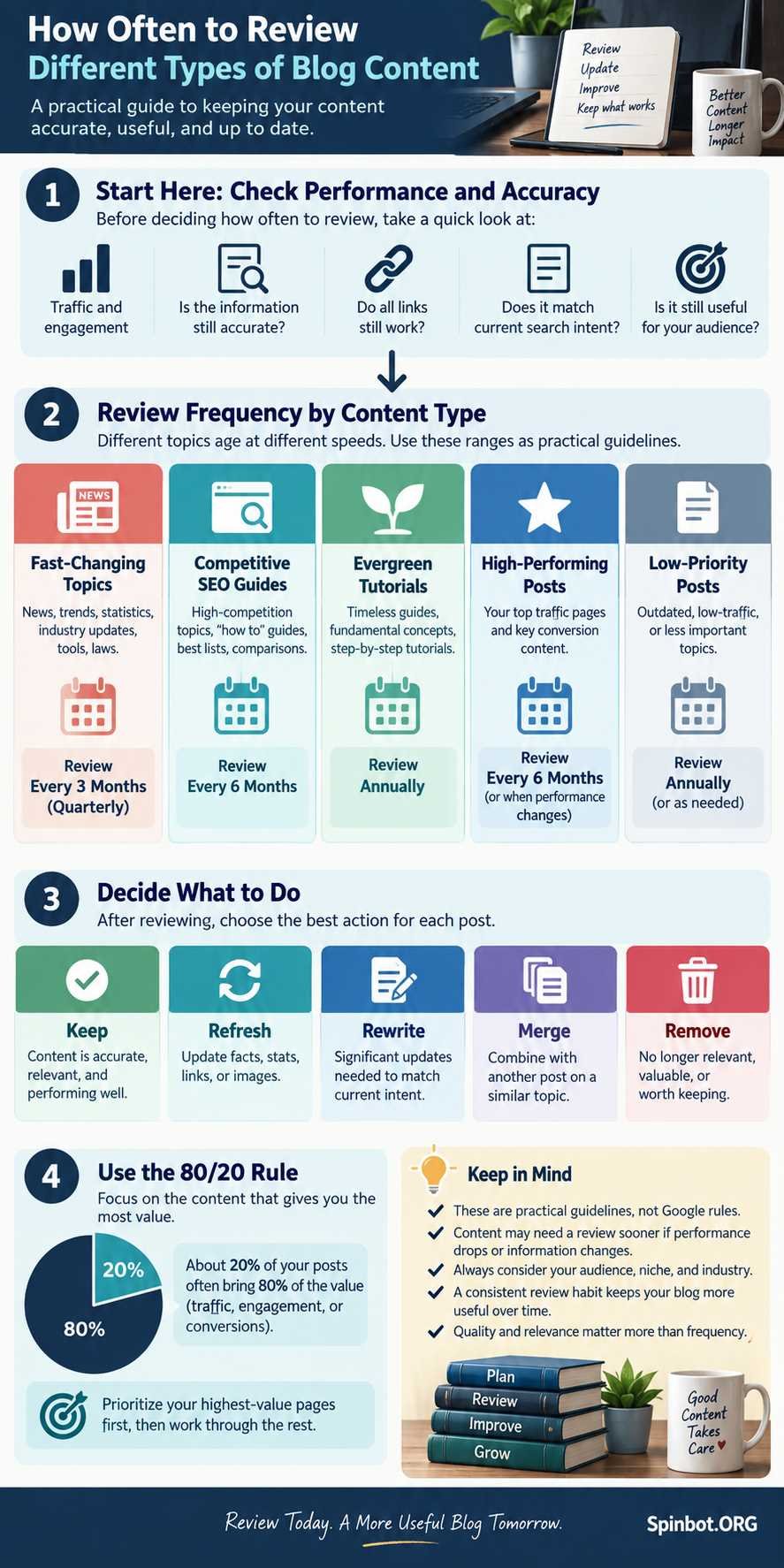
For most blogs, a good starting point is to review important posts every 6 to 12 months. Fast-changing topics may need checking every three months or even sooner. Stable evergreen posts may go a year or longer without needing meaningful changes.
The key word is review. You do not need to rewrite every article on a fixed schedule.
Update a post when there is a real reason to make it better.
Google itself warns against changing page dates simply to make content appear fresh when the content has not substantially changed. It also says adding or removing large amounts of content just to make a site seem fresh is not a useful strategy.
Here is a practical way to decide what needs your attention.
How Often Should You Update Old Blog Content?
There is no single update schedule that works for every blog post.
A page about current software features can become outdated in weeks. A beginner guide to writing a business letter may stay useful for several years with only minor changes.
A sensible review schedule looks something like this:
| Content type | Suggested review frequency | Main things to check |
|---|---|---|
| Fast-changing news or software topics | Monthly to quarterly | Facts, features, dates, screenshots |
| SEO and marketing guides | Every 3–6 months | Search intent, examples, tools, competitors |
| Product comparisons | Every 3–6 months | Pricing, availability, features |
| Evergreen tutorials | Every 6–12 months | Accuracy, links, clarity |
| Stable reference content | Yearly | Facts, sources, broken links |
| Strong posts with stable performance | Monitor rather than rewrite | Traffic, rankings, accuracy |
These are working guidelines, not Google rules.
Semrush recommends regularly reviewing older posts and paying particular attention to pages that already have rankings, traffic, or backlinks because those pages may have more to gain from improvement.
The better rule is simple:
Review content on a schedule. Update it based on need.
Review Frequency Is Not Update Frequency
This distinction saves a lot of wasted work.
Imagine you have a post that has ranked well for two years. The information is still correct. Search traffic is stable. Readers appear to find what they need.
Your scheduled review comes around.
Should you rewrite it?
Probably not.
You can check the page without changing it.
Reviewing might mean checking:
- whether the facts are still accurate;
- whether important links still work;
- whether search traffic has changed;
- whether the search results now answer a different question;
- whether a better example would help readers;
- whether the page has become too similar to another article on your site.
If everything still works, leave the page alone.
Editing simply because six months have passed can create new problems. You might remove a useful section, weaken a clear explanation, or change a page that already satisfies its readers.
Some Blog Posts Age Faster Than Others
Content age is not measured only by the publication date.
What matters more is how quickly the subject changes.
Fast-changing topics
Software, AI tools, digital marketing platforms, regulations, prices, product recommendations, and statistics can become outdated quickly.
A guide written six months ago may mention features that no longer exist.
These posts deserve frequent reviews because accuracy changes with the subject.
SEO and marketing guides
SEO content often sits somewhere in the middle.
Basic ideas may remain useful for years, while specific tools, search features, best practices, and platform behavior change more often.
Google says its core systems undergo significant broad changes several times per year. That does not mean you should rewrite every SEO post whenever an update happens. It does mean that advice based heavily on old search behavior deserves periodic checking.
Evergreen tutorials
Some topics age slowly.
A guide about organizing paragraphs, writing better headlines, developing a content calendar, or preparing a basic blog outline may stay useful for a long time.
These posts still deserve review, but they often need small improvements rather than full rewrites.
The subject should determine the refresh cycle.
Update a Post When These Signals Appear
A calendar can tell you when to look. Performance and accuracy should tell you when to act.
Here are the strongest signs that an old post deserves attention.
Search traffic is falling
A gradual decline can suggest that competing pages now satisfy the query better, the topic has changed, or your page no longer matches current search intent.
Do not panic over a few bad days.
Look for meaningful patterns over several weeks or months.
Information is outdated
This is one of the clearest reasons to update.
Examples include:
- old statistics;
- discontinued tools;
- changed prices;
- dead external links;
- outdated screenshots;
- old regulations;
- obsolete instructions;
- references to features that no longer exist.
Accuracy comes before SEO.
Search intent has changed
Suppose your article explains what a tool is, but most current search results now focus on tutorials showing how to use it.
Your information may still be correct, but your page may no longer answer the main question people have.
That calls for a deeper refresh.
Competitors provide something important that you do not
Do not copy competitors.
Instead, ask why their pages may be more useful.
Perhaps they include a clearer process, current screenshots, practical examples, a comparison table, or answers to questions your article ignores.
That gap can show you where improvement is justified.
Your post still has valuable backlinks or rankings
An older page with links or existing visibility is often a better refresh candidate than a page that has never attracted any interest.
Semrush specifically recommends evaluating old posts for rankings, traffic, and backlinks when deciding what deserves updating.
What Is the 80/20 Rule for Blogging?
The 80/20 rule is another name for the Pareto principle.
In general terms, it is the idea that a relatively small share of inputs can account for a large share of results. It is better treated as a rule of thumb than an exact formula.
For bloggers, it means you should not assume that all posts deserve equal attention.
On many sites, a smaller group of articles produces a large share of:
- organic traffic;
- email signups;
- affiliate clicks;
- leads;
- backlinks;
- revenue.
Your actual numbers may be 70/30, 90/10, or something completely different.
The important idea is concentration.
Find the pages that matter most and protect them first.
What Is the 80/20 Rule in SEO?
In SEO, the 80/20 idea is most useful as a prioritization method.
Instead of trying to refresh 500 articles, identify the smaller group of pages with the strongest opportunity.
Start with posts that:
- already receive organic impressions;
- rank close to stronger positions;
- have valuable backlinks;
- once received traffic but are declining;
- support an important product or service;
- target topics central to your site.
For example, imagine you have 200 blog posts.
Twenty-five of them generate most of your search traffic.
Your first refresh project should probably not begin with the other 175.
Protect and improve the 25 posts that already matter.
Then move outward.
That is a much more efficient content-maintenance strategy than updating articles alphabetically or simply choosing the oldest ones.
What Should You Actually Change During a Refresh?
A useful refresh is not just changing a few words.
The amount of work should match the problem.
Correct outdated facts
Check dates, statistics, names, products, regulations, and other factual claims.
Replace weak or outdated sources where better evidence is available.
Match current search intent
Search for the topic again.
Look at the questions current results answer.
If the main intent has changed, reorganize your page so the most important answer appears where readers expect it.
Improve weak sections
Old articles often contain paragraphs that were written mainly to reach a word count.
Cut them.
Replace vague explanations with examples, steps, comparisons, or direct answers.
Google explicitly says it has no preferred word count and recommends creating content that leaves the reader feeling they have learned enough to achieve their goal.
Check internal links
Add useful links to newer related content.
Also look for old internal links pointing to pages that have moved or disappeared.
A content refresh is a good time to strengthen connections between related articles.
Check external links
Remove dead references.
Replace outdated sources.
Prefer original or authoritative sources when factual claims need support.
Improve examples and visuals
Sometimes the text is fine, but the screenshots or examples make the article feel ancient.
Updating those elements can improve usefulness without rewriting the entire page.
Change the updated date only when the update is meaningful
Changing 2024 to 2026 in the byline while leaving everything else untouched is not a content refresh.
Google says its systems consider several signals when estimating when a page was published or significantly updated.
If you display a modified date, use it when the page has actually undergone a meaningful revision.
When Should You Leave an Old Post Alone?
Not every old article is broken.
Leave a post largely unchanged when:
- the facts remain accurate;
- search intent has not changed;
- the article answers the query clearly;
- performance remains strong;
- readers still find it useful;
- there is no important new information to add.
You can still fix a broken link or typo.
But do not turn a simple maintenance check into a full rewrite without a reason.
Age alone is not evidence of poor quality.
Should You Delete Old Blog Posts?
Sometimes.
But deleting old posts should be a page-by-page decision, not a mass cleanup designed to make your site appear newer.
Google specifically warns against removing lots of old content primarily because you believe doing so will make the site seem fresh.
Before deleting anything, choose among four options.
Refresh it
Use this when the topic is still useful and the page has a good foundation.
Merge it
Two weak articles sometimes compete around nearly identical topics.
Combining them into one stronger resource can make more sense than maintaining both.
Redirect it
If you remove a page but have a close replacement, a permanent redirect may be appropriate.
This is especially worth considering when the old URL has useful links pointing to it.
Remove it
Deletion can make sense when a post is obsolete, irrelevant to your site, inaccurate beyond repair, or provides no useful value.
Do not redirect every deleted page to your homepage. Redirect only when there is a genuinely relevant destination.
Are Blogs Still Viable in 2026?
Yes, but the useful question is not whether blogging itself is alive.
The better question is whether your blog gives readers something worth finding.
Search results have changed. AI-generated answers, video, social platforms, forums, newsletters, and other formats compete for attention.
That makes weak publishing harder to justify.
Publishing hundreds of shallow articles and hoping a few rank is a poor long-term plan. Google’s current guidance continues to emphasize original, substantial, useful content created primarily for people rather than pages produced mainly to attract search traffic.
A blog can still support:
- organic discovery;
- brand authority;
- product education;
- email growth;
- affiliate marketing;
- lead generation;
- customer support;
- long-form explanations that do not fit social platforms.
The opportunity has not disappeared.
The standard is simply higher.
For established blogs, that is another reason old content matters. You may already own pages with rankings, links, history, and audience value. Improving those assets can sometimes make more sense than constantly adding new URLs.
Build a Simple Content Refresh Schedule
You do not need a complicated system.
Start with three layers.
Every quarter: check performance
Review your most important posts for:
- traffic changes;
- ranking changes;
- major factual issues;
- broken links;
- sudden changes in search intent.
Do not automatically edit them.
Just identify problems.
Every 6 to 12 months: review the broader archive
Check important evergreen posts more deeply.
Ask:
- Is the information still correct?
- Does this still match what readers want?
- Is anything clearly missing?
- Are examples current?
- Are sources still reliable?
- Should this page remain separate?
Continuously: react to obvious changes
Some updates should not wait for your calendar.
If a tool shuts down, a law changes, a product disappears, or an important fact becomes false, update affected pages as soon as practical.
A Better Rule Than Updating Everything on Schedule
The goal is not to make every post look new.
The goal is to keep useful content useful.
Review high-value pages every few months. Review most important evergreen content every six to twelve months. Check fast-changing subjects more often. Leave strong, accurate pages alone when they do not need work.
Use the 80/20 principle to decide where your effort belongs first.
And when you refresh an article, make the change meaningful.
A better fact, clearer answer, stronger example, repaired link, updated screenshot, or improved structure gives the reader something real.
Changing the date does not.
That is the simplest answer to how often to update old blog content: check regularly, but update only when accuracy, usefulness, search intent, or performance gives you a reason.

Raj blends SEO mastery with real-world freelance grit. Covers SEO, blogging, content strategy, copywriting, freelance writing, marketing, and business communication.