
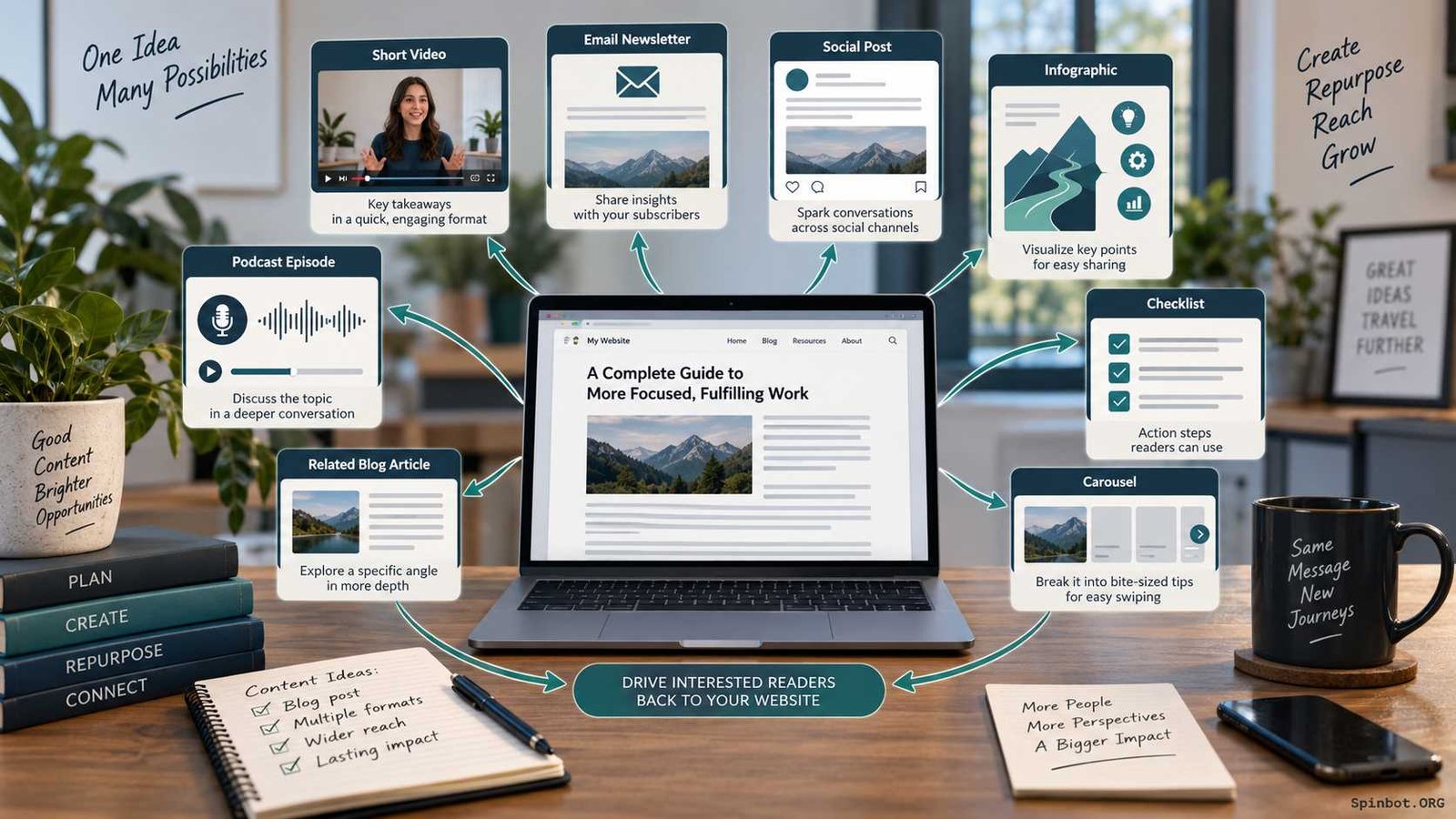
If you already have a useful blog post, guide, tutorial, webinar, research note, or video, part of your next month’s content may already be sitting in front of you. The opportunity is to take the strongest parts of that work and turn them into new assets built for different readers, formats, and channels.
That is the practical idea behind content upcycling for more traffic.
Content upcycling means taking useful material you have already created and giving it a new purpose. A detailed article might become a short video, email lesson, infographic, checklist, social thread, or a narrower follow-up article. The original thinking does some of the heavy lifting, but the finished asset should still give the audience something useful in its own right.
This distinction matters. Copying the same material into five places is distribution. Rewording it slightly is rewriting. Good content upcycling goes further by adapting the information to a new context, audience, question, or format.
Google’s people-first content guidance supports the same basic principle. When content draws from existing material or other sources, Google recommends adding substantial original value instead of simply copying or rewriting what already exists.
What Content Upcycling Actually Means
Content upcycling is closely related to content repurposing, and the terms are often used interchangeably. In practice, I find “upcycling” more useful when it reminds you that the new version should become more valuable for a specific purpose.
Suppose you have a 2,500-word guide called How to Create a Content Calendar.
You could turn it into:
- a five-minute video explaining the planning process;
- a downloadable calendar checklist;
- an email about common planning mistakes;
- a social carousel showing the workflow;
- an infographic showing the monthly process;
- a short article about choosing content pillars.
Those assets come from the same core subject, but they are not identical copies.
Search Engine Land describes content repurposing in much the same way: one existing piece of content is transformed into multiple formats for different channels, with a deliberate distribution plan rather than random reuse.
That last part is easy to miss. Upcycling only helps traffic when the new asset has somewhere useful to go and a reason to exist.
Choose Content Worth Upcycling
Not every old article deserves another life.
If a post was weak, inaccurate, badly targeted, or never useful to readers, turning it into six additional formats simply creates six versions of the same problem.
Start with material that gives you evidence of demand.
Google Search Console is one of the easiest places to look. Its Performance report lets you examine clicks, impressions, click-through rate, average position, queries, and individual pages. You can use those signals to see which topics already attract attention and which pages are appearing in search without getting as many clicks as they potentially could.
A good upcycling candidate might be a page that:
- consistently attracts organic traffic;
- ranks for several related queries;
- earns links or shares;
- generates email signups or leads;
- explains a question customers repeatedly ask;
- has strong information but is difficult to consume in its current format;
- performed well previously and could become useful again after an update.
Traffic is not the only signal. A post with modest search numbers may contain a very strong example, framework, chart, checklist, or explanation that works beautifully elsewhere.
There is also a category of content you should refresh before you repurpose it.
Imagine your article contains 2023 software screenshots, old prices, dead links, and recommendations for tools that no longer exist. Turning that article into a video in 2026 would multiply outdated information. Update the source first. Then reuse it.
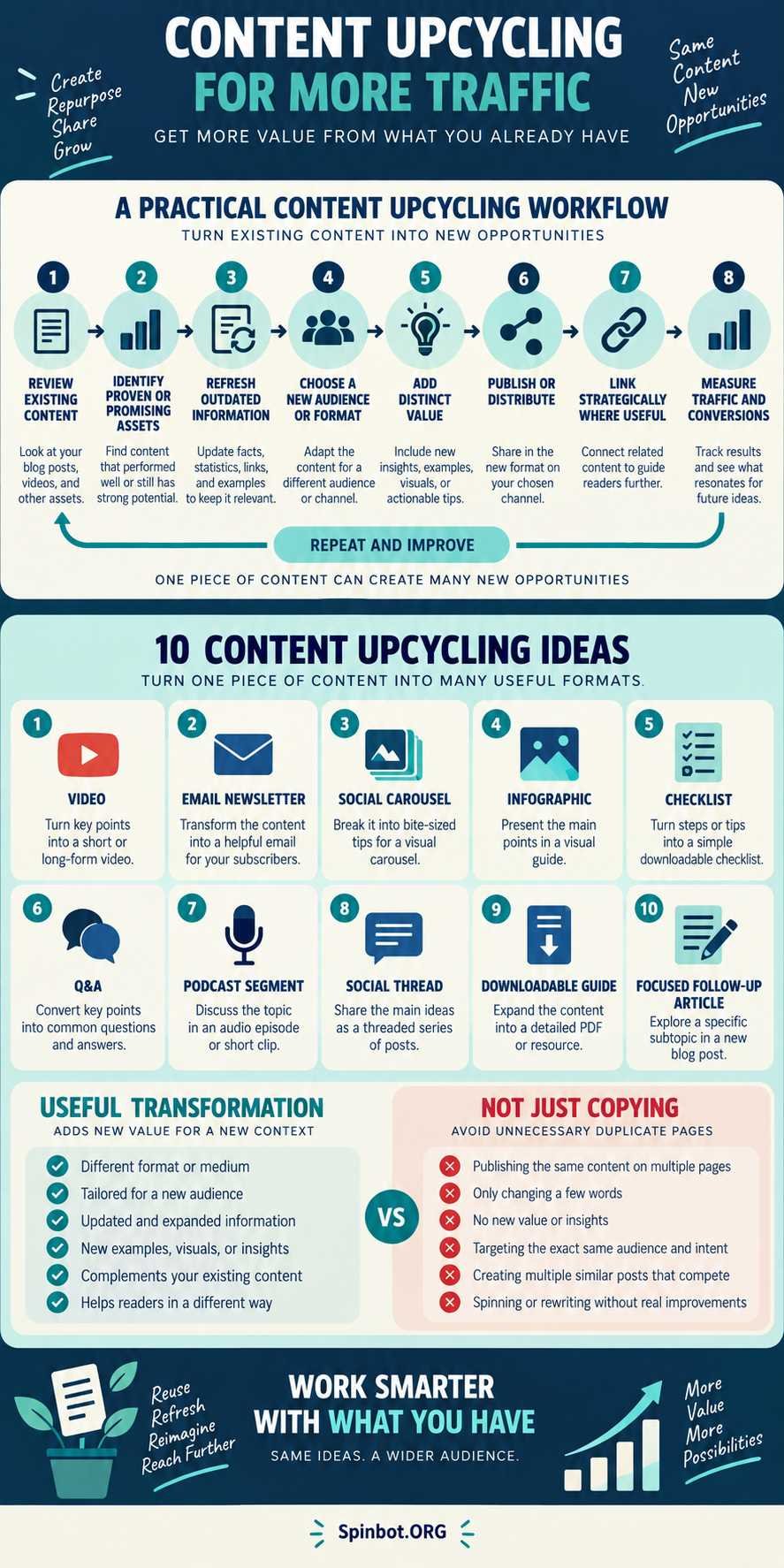
10 Content Upcycling Ideas That Can Extend Your Reach
There are dozens of possible formats, but these ten cover most blogging and content-marketing needs.
1. Turn a blog post into a short video
A tutorial can become a short visual explanation for YouTube, TikTok, Instagram, LinkedIn, or another video channel.
Do not read the article aloud.
Pull out one problem and one useful solution. A 2,000-word post about SEO writing might produce a three-minute video specifically about improving search intent.
The video can point viewers toward the longer guide when they need the full process.
2. Build an email from one strong section
You do not need to summarize the entire article.
One section may be enough.
A post with seven content-planning mistakes could produce seven separate emails over several weeks. Each email can explain one mistake, add context, and link to the deeper resource where appropriate.
This works especially well because email readers usually want a focused takeaway, not an entire blog article pasted into their inbox.
3. Convert a process into a social carousel
Step-by-step content naturally fits a carousel.
A guide containing ten steps might become six slides showing only the essential decisions. The blog retains the detailed examples, explanations, screenshots, or templates.
That creates a useful relationship between the two assets rather than forcing the social post to duplicate everything.
4. Turn data into an infographic
Statistics buried inside a long article are easy to overlook.
If several data points tell a clear story, organize them visually. You might combine a timeline, comparison, simple process diagram, and a few carefully sourced figures.
An infographic should simplify understanding, not decorate the article.
It also gives you a distinct asset that can appear in newsletters, presentations, social posts, or supporting articles.
5. Turn instructions into a checklist
Long guides often contain more information than readers need while they are actually doing the task.
That is where a checklist earns its place.
For example, a detailed guide to publishing a blog post could become a one-page checklist covering:
- search intent;
- title;
- factual verification;
- internal links;
- images;
- metadata;
- proofreading;
- publication;
- indexing checks;
- performance review.
The article teaches. The checklist helps the reader execute.
6. Convert reader questions into Q&A content
Comments, customer emails, Search Console queries, community discussions, and support conversations can reveal follow-up questions your original article did not answer clearly.
Those questions are valuable raw material.
A guide about paraphrasing might lead naturally to questions such as:
- When should a source be cited?
- Can paraphrasing still be plagiarism?
- How much wording needs to change?
- When is a quotation better?
You could answer individual questions through videos, social posts, newsletter sections, or genuinely useful follow-up pages.
7. Use an article as the foundation for a podcast segment
An article already gives you research and structure.
Instead of turning it into a spoken copy, use one argument as the starting point for a discussion.
A post called Should You Use AI to Write Blog Posts? might become a podcast segment comparing three workflows: fully manual writing, AI-assisted drafting, and AI-assisted editing.
Audio lets you explore nuance and tradeoffs that may feel awkward in a tightly structured written guide.
8. Turn one argument into a social thread
A long article usually contains several smaller arguments that can stand independently.
Pull out one.
For example, an article about updating old content might contain a section explaining why changing the publication date without improving the article is a poor refresh strategy.
That single argument can become a useful thread with examples, consequences, and a link to the deeper guide.
9. Combine related content into a downloadable guide
Upcycling can also move upward rather than downward.
Instead of breaking one large asset into smaller pieces, combine several related pieces into something more substantial.
Suppose you have separate articles about:
- keyword research;
- search intent;
- content briefs;
- outlines;
- internal linking;
- content refreshing.
Those could form the basis of a downloadable blogging workflow guide.
The important word is basis. Do not simply export six existing posts into a PDF. Edit them into one coherent resource, remove repetition, update facts, and add whatever is missing.
10. Create a focused follow-up article
Sometimes the best new format is another article.
This works when the second page answers a meaningfully different search need.
A broad guide called How to Write a Blog Post might reasonably link to a separate article about How to Write Blog Introductions. The second page has narrower intent and can go much deeper.
But this approach needs judgment because it can also create unnecessary overlap.
Turn Repurposed Content Into Traffic
Creating ten assets is not the goal.
Getting useful content in front of the right people is.
Think about the path a person may take.
Someone finds a short video explaining three ways to refresh an old article. The video helps immediately, but the viewer wants the full audit process. That person follows the link to your complete blog guide.
Someone else discovers your checklist through email. They use it, return to the website, and read the detailed tutorial.
Another reader finds an infographic through search or social sharing and follows it back to the supporting article.
Each format performs a different job.
That is why content upcycling works better when you design the route before producing the assets.
Ask three questions:
Where will people discover this?
A social carousel, Google Search page, YouTube video, newsletter, and downloadable PDF have different discovery patterns.
What can this format explain well?
Video is good for demonstration. A checklist is good for execution. A long article is better when a reader needs depth, context, references, and comparisons.
What should the reader do next?
Sometimes the answer is visit the full guide. Other times the asset itself should solve the problem completely. Do not weaken every piece of content just to force a click.
A useful asset builds trust even when the reader never reaches another page.
Avoid the Duplicate Content Trap
Content upcycling becomes messy when publishers create multiple web pages that are almost the same.
There is an important distinction here.
Google says some duplicate content is normal and is not itself a spam-policy violation. When several URLs contain the same or very similar primary content, Google can group those pages and select a representative canonical URL.
Still, deliberately publishing several nearly identical pages is rarely a strong content strategy.
You may make tracking harder, confuse readers, waste editorial effort, and force search engines to choose among pages that should probably have been one stronger resource.
If you genuinely have duplicate or very similar URLs, Google supports signals such as redirects, rel="canonical" annotations, and sitemap inclusion to help indicate the preferred URL.
But canonical tags are not a substitute for editorial judgment.
If you are about to publish:
- 10 Tips for Better Blog Writing
- 10 Ways to Improve Blog Writing
- 10 Blog Writing Improvement Tips
- 10 Techniques for Writing Better Blogs
you probably do not have four content ideas.
You have one.
A better approach may be to build one strong page and use the underlying ideas in different non-competing formats.
A Simple Content Upcycling Workflow
You do not need a complicated system.
Start with a repeatable process.
1. Find a proven or promising asset
Review search performance, conversions, links, email engagement, social responses, customer questions, or other signals that show interest.
2. Check whether the source is still accurate
Update dates, links, examples, screenshots, claims, product details, and recommendations before reusing anything.
3. Extract reusable ideas
Do not ask, “How do I turn this article into ten posts?”
Ask, “What useful pieces are inside this article?”
You may discover a process, opinion, statistic, comparison, checklist, mistake, question, example, and decision framework.
Those are your building blocks.
4. Choose the audience and channel
The format should follow the reader.
A detailed SEO explanation may work on a blog. A 30-second version may work on social. A decision checklist may work as a download.
Do not force every idea into every channel.
5. Adapt the content
Change the structure, level of detail, presentation, and emphasis to match the new format.
This is where upcycling separates itself from copy-and-paste publishing.
6. Add something new
A new asset is stronger when it includes something the original did not.
That might be:
- a current example;
- a visual explanation;
- a narrower use case;
- a counterexample;
- updated evidence;
- a template;
- a practical checklist;
- a different audience perspective.
7. Connect the assets where it helps the reader
Link a short resource to the deeper one when the connection is useful.
You can also link from the original article to a specialized follow-up page if readers would benefit from more detail.
8. Measure what happens
After publishing, compare performance rather than assuming the extra content helped.
That feedback determines what you should upcycle next.
A Realistic Example of One Article Becoming Several Assets
Suppose a blogger publishes a strong guide on how to create a content calendar.
Search Console shows that the page receives steady impressions and clicks. The query data also reveals interest in content calendar templates and questions about how far ahead bloggers should plan. Search Console allows publishers to analyze performance by queries and pages, which makes this kind of discovery possible.
The blogger could create:
- a short video showing a monthly planning workflow;
- a printable planning checklist;
- an email explaining why overplanning causes problems;
- an infographic showing the planning cycle;
- a social carousel covering five calendar fields;
- a Q&A post about how far ahead to plan;
- a podcast discussion about flexible vs. fixed schedules;
- a social thread explaining content batching;
- a downloadable editorial calendar guide;
- a separate article about choosing content pillars.
That is a sensible content-upcycling system because each asset solves a slightly different problem.
Now consider the failure path.
If the blogger creates ten articles targeting tiny variations of “content calendar tips,” the site may end up with several pages competing for nearly the same reader need.
More production has created more clutter, not more value.
The fix is simple: keep closely related search intent on the strongest main page and move the derivative ideas into formats or topics that genuinely deserve their own existence.
Measure Whether Upcycling Is Bringing More Traffic
The easiest mistake is measuring output.
“We turned three articles into 27 pieces of content.”
Fine. But did anyone care?
Track outcomes instead.
For organic search, Search Console can show whether clicks, impressions, CTR, queries, and page performance change over time.
For other channels, useful measurements may include:
- referral visits;
- newsletter clicks;
- social traffic;
- video views that lead to site visits;
- downloads;
- email signups;
- leads;
- assisted conversions;
- returning visitors.
Look at the chain, not just the first number.
A social post with 50,000 views and 15 website visits may be less valuable to your goal than a niche email that generates 200 visits from 1,500 subscribers.
Traffic quality matters.
So does learning which formats fit your audience. If checklists repeatedly outperform carousels, make more checklists. If your videos earn attention but rarely produce website visits, decide whether awareness alone justifies the effort.
Content strategy gets easier when actual audience behavior starts making the decisions for you.
Get More Value From Fewer Strong Ideas
The biggest benefit of content upcycling is not that it lets you publish constantly.
It lets you stop treating every publication as a completely separate project.
A strong idea can be researched once, improved over time, and expressed in several useful ways. Each format can reach people in a different setting while the original resource remains the deeper source of information.
But selectivity is what makes the model work.
Upcycle content that has proven value or contains a genuinely useful idea. Refresh outdated material before spreading it. Give each new asset a clear audience and purpose. Avoid turning tiny keyword variations into piles of nearly identical pages. And measure whether the additional work produces useful traffic, engagement, or conversions.
Ten average pieces created from one weak article are still average.
One strong resource turned into four genuinely useful assets is usually the better content strategy.

Raj blends SEO mastery with real-world freelance grit. Covers SEO, blogging, content strategy, copywriting, freelance writing, marketing, and business communication.