
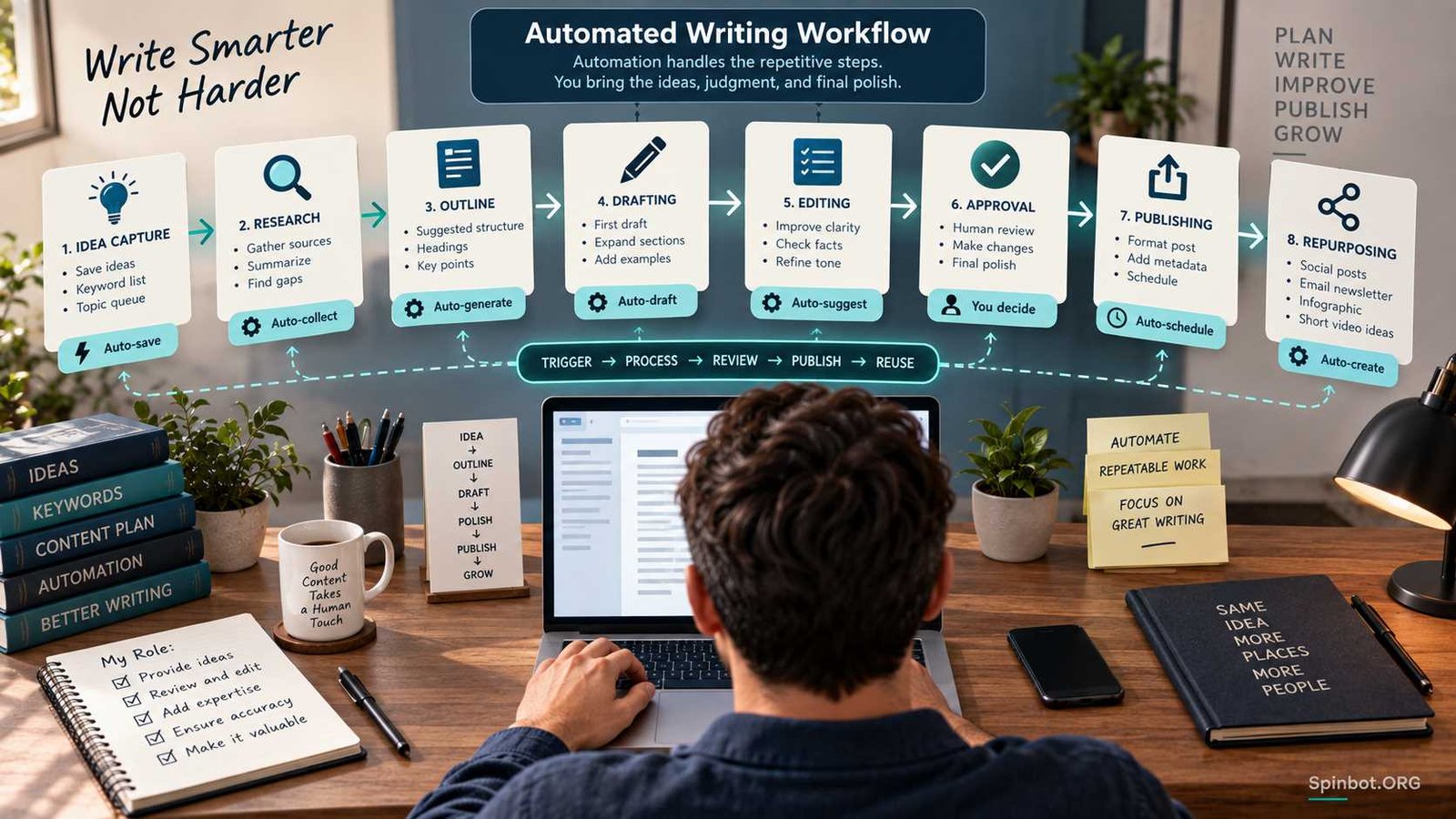
Those are good places to automate your writing workflow.
Workflow automation means setting up repeatable tasks so that one event can start the next action with little or no manual work. A new approved topic might create an editing task. A finished draft might move into a review queue. A published article might trigger a reminder to prepare an email or social post.
The useful part is not removing the writer. It is removing routine handoffs so the writer can spend more time researching, deciding, explaining, and editing.
What It Means to Automate Your Writing Workflow
A writing workflow is simply the path a piece of content follows from idea to finished work.
For a blogger, that path might be:
Idea → keyword research → brief → draft → edit → fact-check → upload → final review → publish → repurpose.
A freelance writer may have additional stages for client approval, revisions, invoicing, or delivery. A content team may add assignments, subject-matter review, SEO checks, design, and legal approval.
Automation connects some of those stages.
Most automation systems work around a trigger and one or more actions. The trigger is the event that starts the workflow. The action is what happens next. Zapier, for example, defines its workflows in exactly this way: a trigger starts the workflow, followed by one or more actions. Filters and search steps can add conditions and logic.
Suppose you manage article ideas in Google Sheets.
Your trigger could be:
Status changes to Approved.
The next actions could be:
Create a writing task → copy the keyword and notes into the task → notify the writer → set a due date.
You have automated the movement of information. You have not automated the decision about whether the topic is worth publishing.
That distinction becomes even more important when AI enters the workflow.
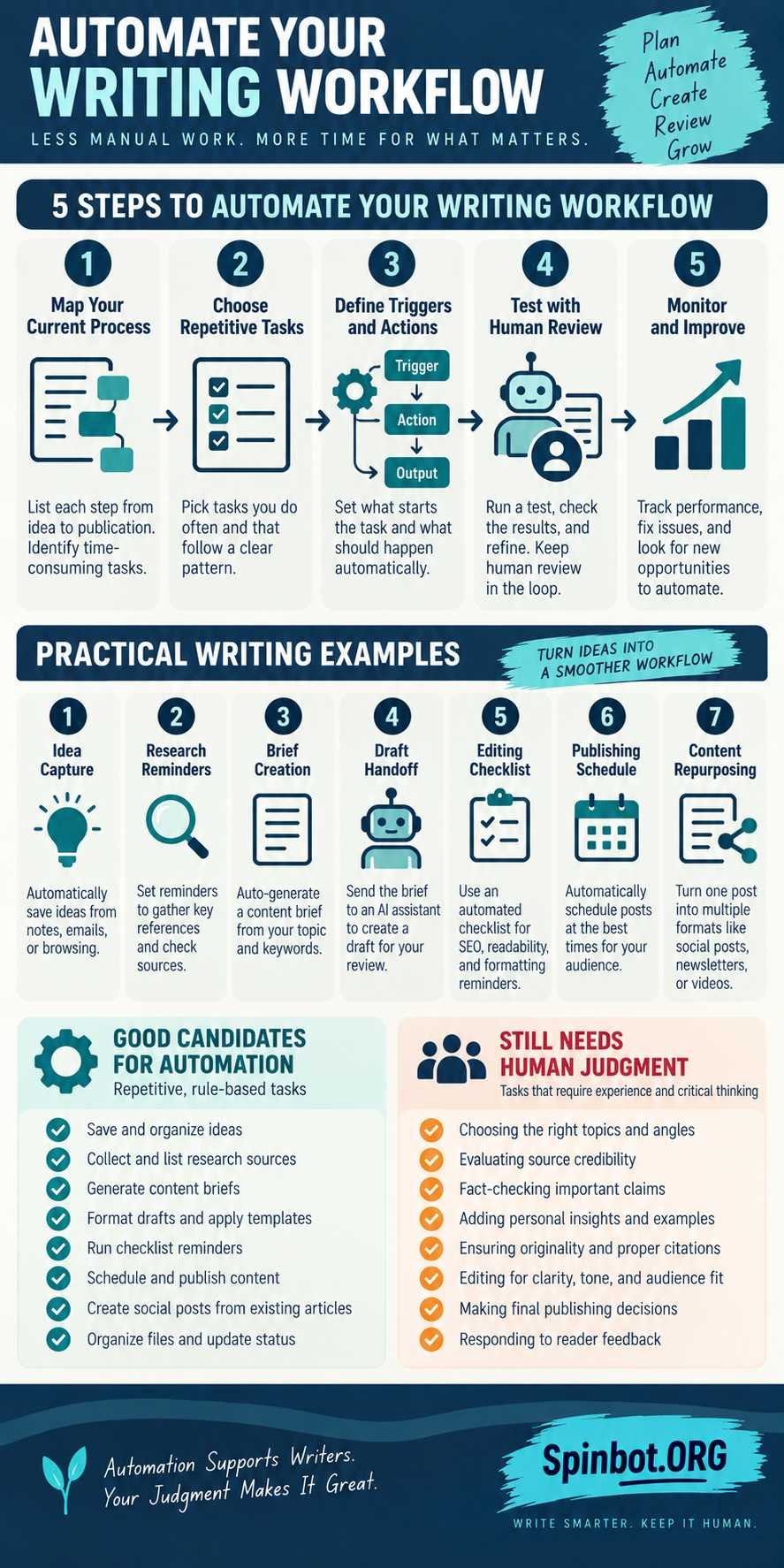
The Five Steps to Automate a Writing Workflow
There is no universal five-step workflow that every writer must follow. Different industries use different process models. For writing automation, however, the following five-step framework is practical because it starts with your existing process rather than forcing you into a particular tool.
1. Map the Writing Process You Already Use
Before adding automation, write down what happens from the moment you get an idea until the work is finished.
Be more specific than:
Research → write → publish.
You may discover that the actual process looks more like this:
- Save topic.
- Check whether it has already been covered.
- Research search intent.
- Choose a primary keyword.
- Prepare a brief.
- Assign the article.
- Write the draft.
- Edit for clarity.
- Verify important claims.
- Prepare images.
- upload to WordPress.
- check formatting.
- set publishing date.
- publish.
- reuse the article elsewhere.
This map shows you where the repeated work lives.
Content workflows commonly include ideation, creation, distribution, and later refinement, but the details inside those stages depend on the publisher. Research, outlining, writing, editing, subject-matter review, publishing, and refreshing can all appear in the same process.
Do not automate anything yet. First understand what you are actually doing.
2. Choose Repetitive Tasks Worth Automating
The easiest automation targets share three qualities: the task happens often, follows a predictable rule, and does not require much judgment.
Moving an approved topic into a writing queue is predictable.
Deciding whether that topic deserves to exist is not.
Good candidates include:
- copying approved ideas into a content tracker
- creating tasks from new content requests
- assigning standard checklists
- setting reminders
- moving files between workflow stages
- updating status fields
- notifying an editor when a draft is ready
- scheduling recurring content reviews
- creating WordPress drafts from structured data
- recording published URLs
- sending finished content into a repurposing queue
A task can still use AI without becoming fully automatic. For example, an AI system might prepare three headline options, but an editor chooses the one that accurately represents the article.
That is usually a healthier workflow than automatically publishing whatever headline the model produces.
3. Define Triggers, Actions, and Conditions
Now translate the process into simple rules.
Imagine you run a small blog and store article ideas in a spreadsheet.
A basic automation might say:
Trigger: A row changes to Approved.
Condition: Main keyword, category, and author fields are not empty.
Action: Create a content brief task.
Action: Copy the keyword data into the task.
Action: Notify the assigned writer.
Adding the condition matters. Without it, an incomplete row could start the workflow and send bad input downstream.
This is where simple automation becomes much more reliable. You are not only asking, What should happen? You are also asking, Under what conditions should it happen?
The same idea applies later in the process.
A draft should not move to publishing simply because a file exists. Its status might also need to be Editor Approved.
4. Test the Workflow With Human Review
Run the workflow on a few real pieces of content before trusting it with your entire publishing system.
Watch what happens when the input is messy.
What if the category is missing?
What if two identical topics are added?
What if the AI returns an incomplete brief?
What if the writer changes the article title halfway through the process?
What if an app connection expires?
A workflow that performs perfectly with one carefully prepared test row may behave very differently when hundreds of real rows pass through it.
Keep a human checkpoint before actions that are expensive, public, hard to reverse, or likely to damage quality.
Publishing is an obvious example.
Your workflow might automatically create a WordPress draft but leave its status as Draft until someone checks the content, sources, links, images, metadata, and formatting.
That small barrier can prevent a large number of avoidable mistakes.
5. Monitor Problems and Improve the System
Automation is not something you configure once and forget.
Look for repeated failures.
Perhaps writers keep receiving briefs without enough context. The automation may be working correctly while the input form is badly designed.
Perhaps duplicate posts keep appearing. You may need a search or duplicate-check step before creating a new record.
Perhaps every article gets stuck at the same approval point. That could be a process problem rather than a software problem.
Good automation gradually removes friction. Bad automation simply moves friction somewhere less visible.
What Should You Automate and What Should Stay Human?
The easiest way to decide is to separate movement, assistance, and judgment.
| Type of work | Examples | Best approach |
|---|---|---|
| Mechanical | Move files, create tasks, update statuses, send reminders | Usually safe to automate |
| AI-assisted | Summarize notes, suggest outlines, classify topics, create first-pass metadata | Automate with review |
| Judgment-heavy | Verify facts, choose an argument, assess originality, approve publication | Keep human control |
AI can speed up research organization, outlining, rewriting, formatting, and idea development. But those tasks become risky when the system is allowed to treat generated output as verified truth.
Suppose an AI-created brief includes a statistic.
The workflow should not interpret that statistic as correct simply because the model produced it. Either the model must provide a verifiable source that gets checked, or the writer must verify the claim independently.
The same applies to quotations, laws, product features, medical claims, dates, and prices.
Automation moves information efficiently. It does not automatically make that information reliable.
Can ChatGPT Create Workflows?
Yes, but the phrase can mean several different things.
At the simplest level, you can ask ChatGPT to help design a workflow. Give it your current process, tools, repeated tasks, and approval rules, then ask it to identify likely triggers, actions, conditions, and human checkpoints.
For example:
I manage blog topics in a spreadsheet. Each row contains a keyword, category, author, status, and publishing date. When status becomes Approved, I want a brief created, assigned for writing, reviewed by an editor, and eventually uploaded to WordPress as a draft. Design the workflow and identify where human approval should be required.
ChatGPT can help turn that description into a clearer process.
Current ChatGPT also goes beyond planning. Scheduled tasks can run once or repeatedly, monitor for changes, and perform supported scheduled work. OpenAI’s current documentation says eligible Work users can also create event-triggered tasks around supported Gmail, Slack, and GitHub events. Those tasks remain subject to app permissions and approval requirements.
Connected-app permissions matter here. If an external action requires approval, the task can pause until that approval is given rather than silently making the change.
That makes ChatGPT useful for workflows such as:
- recurring research summaries
- content reminders
- monitoring selected incoming messages
- preparing follow-up work after supported events
- gathering information from connected sources
- producing drafts or reports for review
Availability varies by plan, workspace, app, and permission settings, so it is better to design around the capabilities available in your account than assume every ChatGPT user has the same automation options.
When an External Automation Tool Still Makes Sense
ChatGPT does not replace every automation platform.
If your workflow depends heavily on moving structured data between many applications, a dedicated automation service may still be the simpler choice.
Zapier, for instance, currently supports workflows built from app triggers, actions, filters, search steps, and other logic across thousands of integrations.
The deciding question is not Which tool is more advanced?
Ask where the workflow actually lives.
If the job is mainly reasoning, researching, summarizing, monitoring, or working with information, ChatGPT may handle much of it.
If the job is mainly moving records between a form, spreadsheet, CRM, project manager, email system, and CMS, an integration platform is often easier to control.
Many real workflows use both.
Practical Automated Writing Workflow Examples
You do not need to automate the entire content operation to get useful results. A few small handoffs can remove plenty of repetitive work.
Capture Ideas Automatically
Suppose topic suggestions arrive through a form.
Instead of copying each submission into a spreadsheet, the form can create the row automatically. The row might contain:
- proposed topic
- source
- audience
- category
- date submitted
- status
Nothing is written yet. You have simply removed manual copying.
An editor can then review the ideas and mark suitable topics Approved.
That status change becomes the next trigger.
Turn Approved Topics Into Content Briefs
Once a topic is approved, AI can help turn structured inputs into a first-pass brief.
Give it the primary keyword, supporting questions, target audience, category, and any source requirements.
The output could include:
- search intent
- suggested angle
- likely reader questions
- outline
- research checklist
- metadata suggestions
An editor should still review the brief before drafting begins.
A poor brief automated at high speed produces poor drafts at high speed.
Move Drafts Into an Editing Queue
This is one of the safest forms of automation.
When a writer marks a task Draft Complete, the workflow can:
assign the editor, set the editing deadline, update the status, attach the draft link, and notify the right person.
No creative judgment has been outsourced. The system simply makes sure the handoff happens consistently.
Schedule Publishing and Distribution
Once an article has been approved, automation becomes useful again.
A publishing workflow might set the scheduled date, record the final URL, notify the team, and create follow-up distribution tasks.
You can also trigger activity after publication rather than before it. For example, a new WordPress post could create a distribution task or send a notification.
Repurpose Published Content
A published article can also become the trigger for a separate repurposing workflow.
The system could prepare source material for:
- an email summary
- a social post
- a short Q&A
- a checklist
- a carousel outline
- a future content update
The important phrase here is source material.
Repurposing should adapt the idea to the new format, not mindlessly chop one article into fragments.
A Simple Writing Automation From Topic to WordPress Draft
Consider a practical setup using Google Sheets, an automation platform, AI, and WordPress.
A spreadsheet row could contain:
Keyword | Category | Author | Supporting Questions | Status
When the status changes to Approved, the automation checks that the required fields exist.
It then sends those fields to the AI step with a controlled prompt asking for a structured content brief.
After the brief has been reviewed, another status such as Brief Approved can allow the draft stage to begin.
Once the article passes editorial review, the workflow can create a WordPress post as a draft, not immediately publish it.
This type of setup is technically realistic. Zapier currently lists integrations that can create WordPress posts from Google Sheets rows, including workflows that combine Google Sheets, OpenAI, and WordPress.
The final WordPress draft should still receive a human check.
That reviewer can catch broken headings, unsupported claims, wrong categories, missing links, formatting problems, weak images, duplicate topics, or an AI response that simply misunderstood the assignment.
For a solo blogger, stopping at Draft is often the sensible boundary.
Full auto-publishing sounds impressive until the first malformed row produces a malformed public post.
Where Automated Writing Workflows Break
The most useful automation plans are designed around failure, not just success.
Bad input is the first problem. If your spreadsheet contains a vague keyword and no audience, better automation will not magically create a strong editorial direction.
Duplicates are another common problem. Two slightly different topic names may represent the same search intent. A system that blindly creates both can increase content overlap.
AI output can sound confident while being wrong. Generated facts, quotes, statistics, or references need verification when accuracy matters.
Permissions expire. Connected applications can lose authorization, accounts can change, or administrators can restrict actions. OpenAI’s connected-app documentation explicitly notes that app access and actions depend on existing permissions and workspace controls.
Conditions can be too loose. A workflow triggered by any updated spreadsheet row may run when someone merely fixes a typo.
Automation can happen twice. Retries, duplicate records, or repeated status changes may create two tasks or two drafts unless the workflow checks whether the destination already exists.
This is why the best workflows usually contain checkpoints, filters, logs, and clear status fields.
You want enough automation to remove repetitive work without making the process difficult to inspect.
Start With One Repetitive Handoff
A solo writer does not need a complex automation diagram connecting fifteen applications.
Pick one task you dislike doing repeatedly.
Perhaps every approved keyword has to be copied into a writing template.
Automate that.
Perhaps every finished article needs the same editing checklist.
Automate the creation of the checklist.
Perhaps published posts keep disappearing into the archive without being repurposed.
Automatically create a repurposing task seven days after publication.
Once that automation works reliably, add another.
Complexity should be earned by a real problem. If a three-step workflow solves the problem, a twelve-step workflow is not more professional. It is simply harder to maintain.
Automate the Repetition and Keep the Decisions
The best reason to automate your writing workflow is not to remove yourself from writing. It is to stop spending attention on work that does not deserve much attention.
Triggers can move information. Scheduled tasks can remind you. AI can organize material and prepare drafts. Integrations can connect your spreadsheet, writing tools, communication apps, and publishing system.
Your judgment still decides what deserves to be written, which sources are trustworthy, whether an argument makes sense, whether the writing sounds right, and whether the final piece should be published.
That division of labor is a useful target.
Let the workflow remember the routine. Keep the decisions that shape the work.

Covers AI writing tools, large language models, prompt engineering, AI detection, and practical AI writing workflows for Spinbot.ORG.