
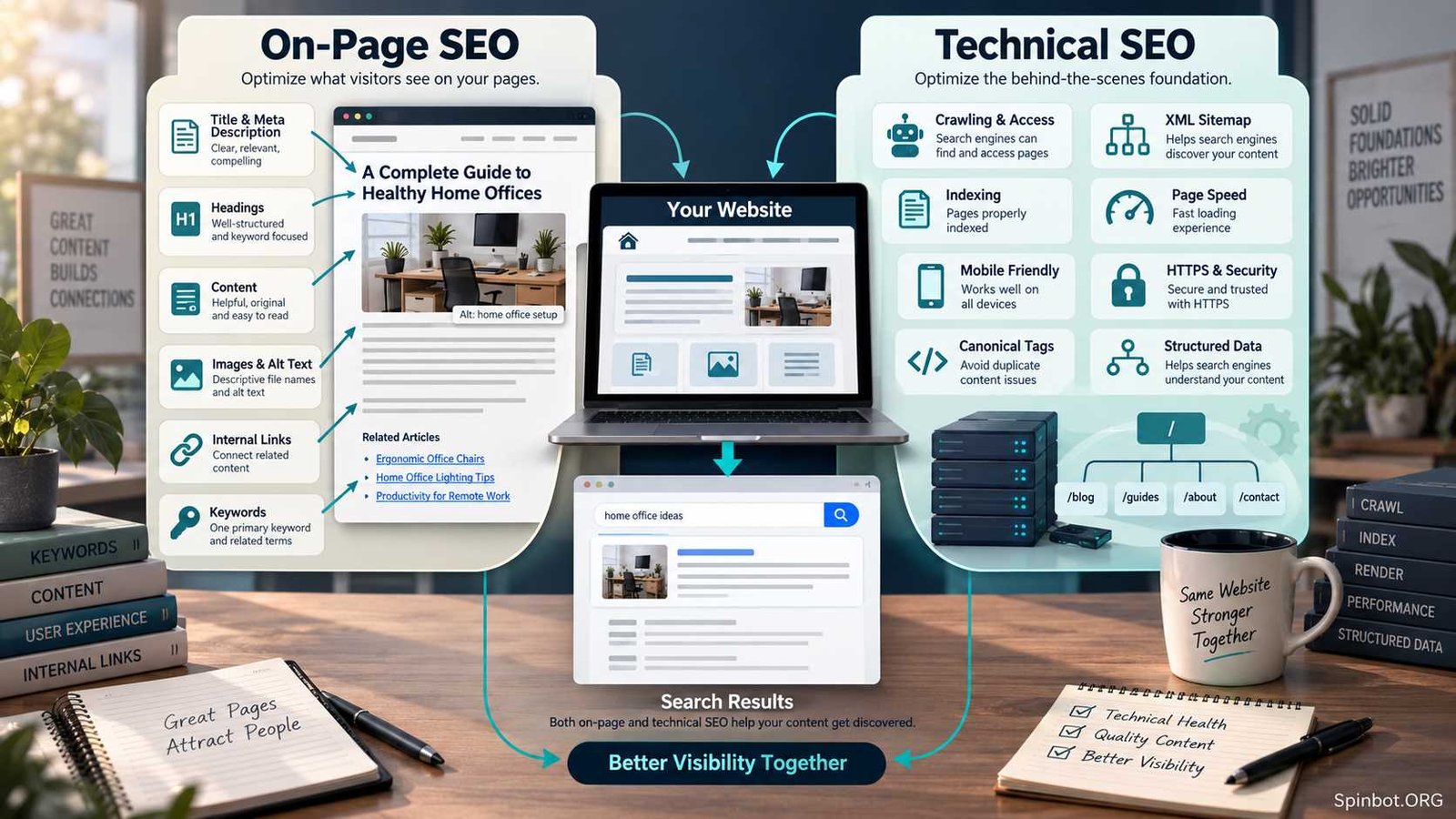
That is the practical difference behind on page SEO vs technical SEO.
On-page SEO improves the individual page: its content, title, headings, links, images, and relevance to a search query. Technical SEO improves the systems that allow search engines to discover, crawl, render, understand, and index the website.
You usually need both. The real question is which one deserves attention first.
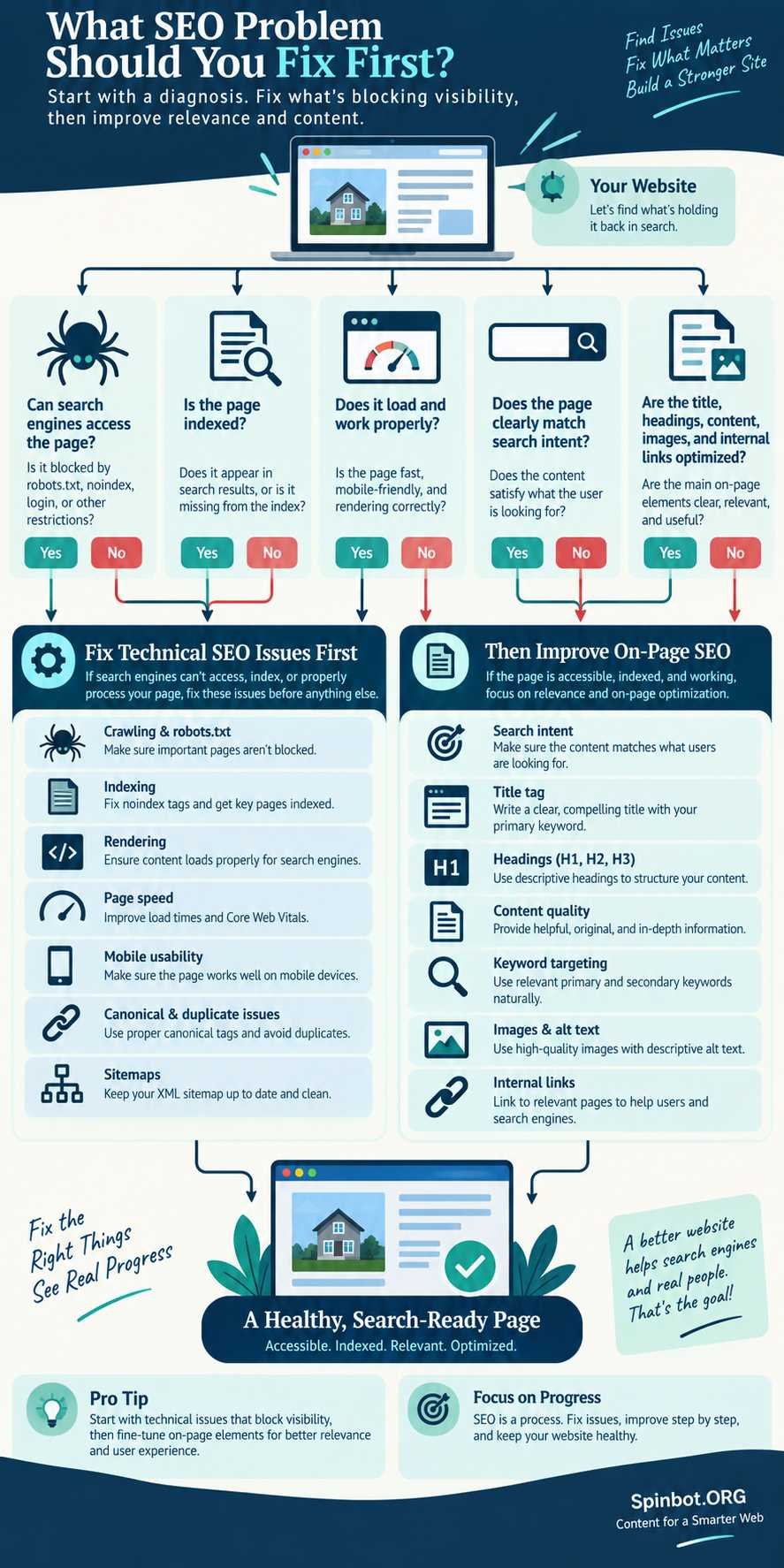
A useful rule is simple: if search engines cannot reliably access or index the page, fix the technical problem first. If the page is accessible but does not satisfy the searcher, work on the on-page SEO.
Google’s Search Essentials make the same basic priority clear. A page must meet certain technical requirements to be eligible for Search, but technical eligibility alone does not guarantee that it will rank. Helpful, reliable content and clear page signals still matter.
On Page SEO vs Technical SEO in Simple Terms
The easiest way to separate the two is to look at what you are trying to improve.
| Area | On-Page SEO | Technical SEO |
|---|---|---|
| Main focus | Quality and relevance of individual pages | Website access, crawling, indexing, and performance |
| Typical scope | One page at a time | Often sitewide |
| Content optimization | Major part | Usually not the main focus |
| Title and headings | Yes | Sometimes checked during audits |
| Internal links | Yes | Also affects crawl structure |
| Indexing problems | Rarely the main responsibility | Core responsibility |
| Robots.txt | No | Yes |
| XML sitemap | No | Yes |
| Canonical URLs | Overlap | Usually technical SEO |
| Page speed | Some overlap | Usually technical SEO |
| Mobile usability | Some overlap | Often technical SEO |
| Backlinks | No | No, normally off-page SEO |
SEO categories are not perfectly sealed boxes. Internal links, URLs, structured data, mobile experience, and page speed can touch more than one discipline.
That is fine.
The labels exist to help you diagnose problems, not to create arguments about which SEO professional owns a particular checkbox.
What On-Page SEO Actually Covers
On-page SEO deals with things you can improve directly on a web page to make its purpose clearer to both readers and search engines.
It starts with the content itself.
A page targeting “how to clean white shoes,” for example, will not perform well simply because the exact phrase appears six times. The page needs to solve the problem. Readers may need cleaning methods for different materials, products to avoid, drying instructions, and advice for stains.
That is search intent.
Content and search intent
Good on-page SEO asks whether the page gives the visitor what they expected after clicking the search result.
For an informational search, that may mean a clear explanation or tutorial. For a commercial query, readers may expect comparisons, pros and cons, prices, or buying criteria.
Ahrefs includes search intent, content completeness, title optimization, headings, internal linking, image optimization, URLs, and related page-level improvements within its current on-page SEO guidance.
The useful lesson here is that on-page optimization is much broader than inserting keywords.
Titles, headings, URLs, images, and internal links
Common on-page SEO work includes:
- writing a clear SEO title
- using a descriptive main heading
- organizing sections with useful subheadings
- creating readable URLs
- adding descriptive image alt text where appropriate
- linking to relevant pages on the same website
- linking to useful external references when readers need them
- improving confusing or thin sections
- making important answers easy to find
- removing irrelevant content
Google specifically recommends using the words people search with in prominent places such as titles and main headings, while also using descriptive alt text and link text where appropriate.
Notice what Google does not say: repeat your primary keyword a fixed number of times.
That distinction matters.
Keywords without keyword stuffing
A page should have a clear main subject. Related words, entities, examples, and questions should appear because they help explain that subject.
Suppose you are writing about beginner running shoes. Natural supporting concepts might include cushioning, stability, heel drop, fit, road running, and shoe size.
You do not need to calculate a magical density for each phrase.
Google explicitly warns against keyword stuffing and says its search system does not use the old meta keywords tag.
The better goal is topical clarity.
What Technical SEO Actually Covers
Technical SEO works further behind the page.
Its job is to reduce technical obstacles between your content and search engines.
Ahrefs defines technical SEO around helping search engines find, crawl, understand, and index pages. Its current technical SEO guidance includes crawling, indexing, site structure, redirects, canonicalization, sitemaps, robots directives, performance, and related technical systems.
Crawling and indexing
Google first needs to discover a URL. Its crawler then needs to access the page and its important resources.
After that, Google may decide to add the page to its index.
Problems can appear at any point.
A page may be:
- blocked by robots.txt
- marked
noindex - orphaned with no internal links pointing to it
- redirecting incorrectly
- returning an error
- using the wrong canonical URL
- difficult for crawlers to render
- excluded because of duplicate or conflicting signals
You could spend hours rewriting the title and introduction of such a page without fixing the real problem.
Google recommends using Search Console’s URL Inspection tool when you need to check how Google sees a particular URL.
Site architecture, canonicals, sitemaps, and redirects
Technical SEO becomes especially important as websites grow.
A small blog with 50 articles may have a fairly simple structure. An ecommerce website with thousands of products, filters, categories, parameters, deleted items, and seasonal pages creates much more room for crawl and index problems.
Technical work may include:
- XML sitemap management
- redirect rules
- canonical tags
- robots.txt
- indexation controls
- duplicate URL management
- JavaScript rendering
- pagination or faceted navigation
- broken-link cleanup
- HTTPS configuration
- international hreflang implementation
Not every site needs advanced technical work.
For a straightforward WordPress blog, spending days studying crawl-budget theory while basic articles remain weak is usually a poor use of time.
Speed, Core Web Vitals, and mobile experience
Performance also falls largely on the technical side.
Google currently uses three Core Web Vitals metrics: Largest Contentful Paint (LCP) for loading, Interaction to Next Paint (INP) for responsiveness, and Cumulative Layout Shift (CLS) for visual stability. Google recommends good Core Web Vitals because they contribute to a better page experience.
But do not turn SEO into a speed-score competition.
A technically perfect page with weak information does not become the best search result just because its performance report looks good.
Fix serious performance problems. Do not sacrifice useful content or business functionality just to chase a perfect score.
Where On-Page and Technical SEO Overlap
Some SEO tasks refuse to stay neatly in one column.
Internal linking is a good example.
Adding a contextual internal link inside an article is usually considered on-page SEO. At scale, however, internal linking becomes part of site architecture and crawl discovery, which makes it a technical concern too.
URLs create the same problem. Writing a short descriptive slug feels on-page. Designing a sitewide URL structure and fixing redirect chains is clearly more technical.
Structured data can also cross the line. The markup lives in the page code, but implementing it correctly may require development work.
Rather than worrying about ownership, ask what the problem is.
If the problem is meaning and relevance, think on-page.
If the problem is access, crawling, indexing, rendering, or sitewide technical behavior, think technical SEO.
Technical SEO vs Content SEO Is a Different Comparison
The phrase technical SEO vs content SEO introduces another distinction.
Content SEO deals primarily with creating and improving content around what people search for. It can include keyword research, search intent, topic selection, content depth, updates, and information architecture.
On-page SEO overlaps heavily with content SEO, but they are not identical.
For example, deciding that a website needs a complete guide about mortgage preapproval is content strategy. Writing the article to satisfy the query is content SEO. Optimizing its title, headings, URL, images, and internal links is on-page SEO.
Making sure Google can crawl and index it belongs mainly to technical SEO.
These layers work together.
Which Should You Fix First?
This is where the comparison becomes useful.
Do not automatically start with a giant technical audit because technical SEO sounds more advanced.
Start with the problem blocking progress.
1. Check whether important pages can be indexed
If a valuable page is accidentally marked noindex, nothing else matters until that is corrected.
Likewise, investigate major crawl blocks, server errors, broken redirects, incorrect canonicals, or inaccessible resources.
Google’s documentation recommends checking whether Google has found your content before chasing deeper SEO improvements.
2. Fix serious sitewide technical failures
If hundreds of pages share the same problem, one technical correction may outperform dozens of individual content edits.
Examples include a broken template, widespread canonical mistake, mobile rendering failure, or important section accidentally blocked from crawling.
3. Move to page quality and search intent
Once the site is accessible and reasonably healthy, content usually deserves more attention.
Ask:
Does this page actually answer the query?
Does it cover the questions readers are likely to have next?
Is important information buried under filler?
Is the title accurate?
Do headings help people scan the page?
Are there useful internal links?
For many ordinary blogs, this work will create more value than continually hunting for minor technical warnings.
A WordPress Example Makes the Difference Clear
Suppose you publish a WordPress article targeting “best vegetables to grow in containers.”
You write a useful guide, choose a descriptive title, structure it with clear headings, add original images, write useful alt text, and link to related gardening posts.
That is mostly on-page SEO.
Your SEO plugin helps you edit the title and meta description. It may also create an XML sitemap and canonical tags automatically.
Then something goes wrong.
While preparing the article, you accidentally leave the page set to noindex.
The article could be better than every competing result and still have an obvious search problem. The technical directive tells search engines not to index it.
Fix the noindex problem first.
Now imagine the opposite. Google can crawl the page, the canonical is correct, the site is fast enough, and the URL appears in the index. Yet the article contains only 400 vague words and barely answers the query.
Running another technical audit will not solve that.
The bottleneck is now content and on-page SEO.
That is why SEO priorities should follow the actual failure, not whichever checklist is longest.
How Many Keywords Should You Use Per Page?
A common question is how many keywords SEO per page should target.
There is no useful universal number.
You may have one primary search topic and several related terms that naturally belong to it. A detailed page can also rank for queries you never deliberately inserted.
Google recommends using terms people search for in prominent and descriptive places, but it does not publish a required keyword count or density. It also warns against repeatedly stuffing words into a page.
So instead of asking whether a 1,500-word post needs five, ten, or twenty keywords, ask whether the page completely and naturally covers one clear search intent.
That is a much better editing test.
Where Off-Page SEO Fits
On-page and technical SEO still do not cover the entire SEO picture.
Off-page SEO deals with signals and activity beyond your own pages, particularly backlinks, mentions, publicity, and broader authority building.
A basic off-page SEO checklist might include earning relevant links, promoting useful research or resources, getting legitimate brand mentions, and building relationships within your niche.
But off-page work should not become a substitute for fixing a weak site.
Promoting a page that search engines cannot index makes little sense. Building links to a disappointing article is not much better.
First make the asset worth discovering.
A Quick SEO Diagnosis Before You Start Optimizing
Before choosing your next SEO task, run through these questions:
- Can Google access the page?
If not, investigate technical SEO. - Can the page be indexed?
Checknoindex, canonical signals, server responses, and other technical problems. - Does the site work properly for users?
Major performance, mobile, security, or rendering problems may need technical attention. - Does the page satisfy the search intent?
If not, improve the content. - Are the title, headings, images, and internal links useful and descriptive?
This is mainly on-page SEO. - Is the page strong but lacking authority or discovery?
Off-page promotion may now deserve more attention.
This order prevents one of the biggest SEO mistakes: improving the wrong thing.
Treat SEO as a System, Not Competing Checklists
The debate over on page SEO vs technical SEO becomes much easier once you stop treating them as competing strategies.
Technical SEO builds the conditions that allow search engines to reach and process your pages. On-page SEO gives those pages a clear topic, useful information, strong organization, and relevance to real searches.
For most sites, the best priority is straightforward.
Make sure important pages can be crawled and indexed. Fix serious technical failures. Then spend your energy making those pages substantially more useful to the people searching for them.
Once that foundation is working, links, promotion, and broader authority building have something worthwhile to support.
SEO is rarely won by completing the longest checklist. It improves when you identify the real bottleneck and fix that first.

Raj blends SEO mastery with real-world freelance grit. Covers SEO, blogging, content strategy, copywriting, freelance writing, marketing, and business communication.