

That action might be joining an email list, booking a demo, downloading a guide, buying a product, or registering for an event. The problem is that a normal WordPress page often includes menus, sidebars, links, and other distractions that compete with that goal.
A good plugin landing page WordPress setup gives you more control. You can build a focused page, remove unnecessary navigation, add forms and calls to action, and create a design that works well on phones without writing the whole page from scratch.
But there isn’t one WordPress landing page plugin that makes sense for everyone.
Some are complete visual website builders. Others focus heavily on conversions. A few work inside the normal WordPress block editor. And platforms such as Landingi use WordPress mainly as the publishing layer while much of the page-building work happens in their own system.
Here are eight strong options and, more importantly, the situations where each one makes sense.
What Should a WordPress Landing Page Plugin Actually Do?
A landing page builder should make it easier to create a page around a single campaign goal.
At a basic level, you should be able to control:
- Headlines and body copy
- Images and video
- Buttons and calls to action
- Forms
- Page sections and columns
- Mobile layouts
- Headers and footers
- Spacing, colors, and typography
Marketing-focused tools may go further with email integrations, reusable templates, popups, analytics, A/B testing, dynamic content, or funnel features.
The right feature list depends on what you’re building.
A freelancer creating one portfolio lead page doesn’t need the same landing page software WordPress setup as a company running dozens of paid advertising campaigns.
Dedicated landing page plugin or general page builder?
This distinction matters.
A general WordPress page builder helps you design many parts of a website. Elementor and Beaver Builder fall largely into this group. They can build landing pages, but they can also build ordinary website pages and broader site layouts.
A conversion-focused tool such as Thrive Architect or OptimizePress puts more emphasis on sales, opt-ins, campaign pages, and marketing workflows.
Then there are native block-editor tools such as Kadence Blocks and Spectra Blocks. They extend the editor already built into WordPress instead of giving you a completely separate visual editing system. Kadence specifically describes its workflow as building landing pages, blogs, and full sites directly inside the native WordPress editor.
Neither approach is automatically better.
The question is how much design freedom and marketing functionality you actually need.
Features matter more than template numbers
Hundreds of templates sound impressive, but template count should not be your first filter.
A better checklist is:
- Can you build the page you need without fighting the editor?
- Can you connect your forms to your email or CRM system?
- Can you make the page look right on mobile?
- Can you hide unnecessary site navigation?
- Does it support the campaign elements you use, such as video, pricing tables, testimonials, or lead forms?
- What happens to your content if you later stop using the builder?
- Are important features locked behind a paid plan?
Once those questions are answered, templates become a useful bonus rather than the main reason to choose a plugin.
WordPress Landing Page Plugins at a Glance
| Plugin | Best for | Editing approach | Free option | Standout strength |
|---|---|---|---|---|
| SeedProd | Focused campaign pages | Separate drag-and-drop builder | Yes | Dedicated landing-page workflow |
| Elementor | Flexible visual design | Front-end drag-and-drop editor | Yes | Broad design control |
| Beaver Builder | Straightforward visual editing | Front-end visual builder | Yes | Simple, familiar workflow |
| OptimizePress | Funnels and marketing campaigns | Conversion-focused builder | Mainly paid | Marketing-focused page tools |
| Thrive Architect | Conversion-focused sites | Visual landing-page editor | Paid | Sales and lead-generation pages |
| Landingi | Teams managing many campaigns | External platform + WordPress plugin | Plugin is free; platform account required | A/B testing and campaign management |
| Kadence Blocks | Gutenberg users | Native block editor | Yes | WordPress-native workflow |
| Spectra Blocks | Block-based page creation | Native block editor | Yes | Native blocks plus AI-assisted creation |
Features and plan limits change, so check the current vendor plan before buying a tool only for one specific feature.
1. SeedProd: Best for Focused WordPress Landing Pages
SeedProd is one of the clearest choices when your main goal is building dedicated landing pages rather than redesigning every part of your WordPress site.
Its current WordPress plugin supports drag-and-drop page building and standalone landing pages for uses including sales pages, opt-in pages, webinars, thank-you pages, coming-soon pages, and maintenance pages. SeedProd also says its landing pages can work independently of the design of your existing WordPress theme.
That separation is useful.
Imagine your normal website has a large menu, blog sidebar, footer links, and several competing calls to action. You may not want any of those elements on a paid-ad landing page.
SeedProd lets you create a more focused campaign design without having to rebuild the rest of the website.
Its current plugin listing also describes more than 200 themes, landing-page templates, and layout sections, along with integrations for services such as ActiveCampaign, Mailchimp, ConvertKit, Drip, GetResponse, and Zapier.
Best for: Bloggers, small businesses, and marketers who want a dedicated WordPress landing page workflow without turning their entire site into a complex page-builder project.
Watch for: Many of the more advanced blocks and site-building capabilities sit in paid versions.
2. Elementor: Best for Design Flexibility
If visual control is your priority, Elementor remains one of the most flexible choices.
The plugin uses a drag-and-drop editor and includes controls for layouts, typography, images, buttons, templates, and many other page elements. Its free plugin currently lists more than 40 free widgets, including video, buttons, testimonials, social icons, image galleries, and carousels.
That makes Elementor especially useful when the landing page design itself is important.
For example, you might want:
- A large video hero section
- Testimonial cards
- Pricing sections
- Multiple call-to-action areas
- Custom spacing on desktop and mobile
- A visually polished product demonstration
If you’re researching video in landing page designs, Elementor is an obvious candidate because its native video widget supports sources including YouTube, Vimeo, VideoPress, Dailymotion, and self-hosted video.
The tradeoff is scope.
Elementor is not just a landing page plugin. It is a broader website-building system. That flexibility is valuable, but it can be more than you need if all you want is one simple lead-capture page.
Best for: Designers, agencies, bloggers, and businesses that want detailed control over page appearance.
Watch for: Don’t add sections, effects, and widgets simply because the editor makes them available. A landing page still needs one main conversion goal.
3. Beaver Builder: Best for a Straightforward Visual Workflow
Beaver Builder takes a familiar front-end editing approach.
You work directly on the visible page and move elements around using drag-and-drop controls. Its WordPress.org listing describes front-end editing, templates, responsive design, and no-code page creation.
Its biggest appeal is not a huge list of flashy marketing features. It is the straightforward page-building workflow.
That makes it a good fit for people who want to create custom WordPress layouts without learning a more specialized campaign platform.
You can use it for:
- Service landing pages
- Local business campaigns
- Lead-generation pages
- Event pages
- Product introductions
- Simple B2B campaign pages
If your site already uses Beaver Builder for normal pages, it may make more sense to keep your landing pages in the same system rather than installing another builder solely for marketing campaigns.
Best for: Businesses and agencies that want a dependable visual page builder for both landing pages and normal website pages.
Watch for: If advanced testing, funnel management, or deep marketing automation is central to your strategy, a more conversion-focused platform may be a better fit.
4. OptimizePress: Best for Funnels and Marketing Campaigns
OptimizePress is much more clearly aimed at marketers.
Its current landing-page product focuses on lead generation, product and service campaigns, drag-and-drop editing, and conversion-oriented templates. OptimizePress says its builder includes more than 100 landing-page templates.
The difference becomes clearer when you think beyond a single page.
A typical campaign might contain:
- An opt-in page
- A registration or sales page
- A checkout step
- A thank-you page
That is a different problem from simply making a homepage look nicer.
OptimizePress makes more sense when the landing page sits inside a broader marketing journey.
Best for: Course sellers, coaches, digital-product businesses, and marketers building funnels or repeated campaigns.
Watch for: It may be more platform than you need if you only want an occasional page for collecting email addresses.
5. Thrive Architect: Best for Conversion-Focused Marketers
Thrive Architect is another tool built with marketing pages in mind.
Thrive’s current documentation distinguishes a normal WordPress page from a true landing page. In its landing-page mode, the page can use its own design instead of relying on the theme’s normal header, footer, or sidebar. Thrive identifies sales pages, opt-in pages, webinar registration pages, and similar conversion pages as typical uses.
That is exactly what many marketers need.
Your main website might encourage visitors to browse. A campaign landing page usually needs the opposite. You want visitors to focus on one offer.
Thrive Architect also currently includes more than 130 pre-built landing-page templates, including designs for lead generation, sales pages, webinars, and coming-soon pages.
Best for: Marketers who care more about opt-ins, sales, and campaign structure than general-purpose website design.
Watch for: It makes the most sense when you’ll use the broader marketing workflow, not just one isolated design feature.
6. Landingi: Best for Managing Many Landing-Page Campaigns
Landingi takes a different approach from a typical WordPress page builder.
You create and manage pages through the Landingi platform, then use its WordPress plugin to connect the platform and publish those pages on your WordPress site.
The current WordPress plugin listing describes more than 400 editable templates, advanced forms, A/B testing, analytics tools, and integrations with email marketing, CRM, advertising, and analytics services.
This setup can make sense when landing pages are an ongoing marketing operation rather than an occasional WordPress task.
For example, a team running campaigns across different products may need to:
- Create many page variations
- Run tests
- Capture leads
- Connect forms to a CRM
- Track campaign events
- Publish pages to WordPress URLs
Landingi’s WordPress plugin itself is free, but the plugin documentation says an active Landingi account is required for the pages to work.
Best for: Marketing teams and agencies managing multiple campaigns and tests.
Watch for: This is not purely a WordPress-native workflow. Your landing-page operation depends on the external Landingi platform.
7. Kadence Blocks: Best for the Native WordPress Editor
Not every WordPress site needs another full page builder.
Kadence Blocks extends Gutenberg, the standard WordPress block editor, with extra layout and design controls. Its plugin page specifically lists landing pages among the types of content you can build directly in the native editor.
This approach has a major practical advantage: you stay inside an editing system you may already know.
Instead of switching between the standard WordPress editor and a separate visual builder, you create the landing page using blocks.
This can be a sensible setup for:
- Blog owners
- Content-heavy websites
- Simple lead-generation pages
- SEO landing pages
- Small-business sites
- Users who prefer Gutenberg
It also reduces the temptation to turn every landing page into an elaborate design project.
Best for: WordPress users who want better landing-page layouts without leaving Gutenberg.
Watch for: Dedicated campaign platforms may offer more advanced testing and marketing functions.
8. Spectra Blocks: Best for Block-Based Page Building With AI Assistance
Spectra Blocks is another native block-editor option, but its current version adds an interesting twist.
The plugin was rebuilt on WordPress’s modern block APIs, and its current version can work with the separate Zip AI companion to generate page drafts and individual sections inside the WordPress editor. The resulting layouts remain editable as blocks rather than being locked inside a separate AI interface.
You can also build manually using its containers, buttons, sliders, accordions, popups, countdowns, and other blocks.
One caution matters here: the rebuilt Spectra Blocks plugin is relatively new. WordPress.org shows version 1.0.0 launching in July 2026, so users of the older Spectra product should pay attention to the distinction between the new Spectra Blocks plugin and Spectra Legacy.
Best for: WordPress users who want a native block workflow and are interested in AI-assisted first drafts.
Watch for: Because the rebuilt plugin is newer than several established alternatives, test it on your actual theme and campaign workflow before making it central to a large site.
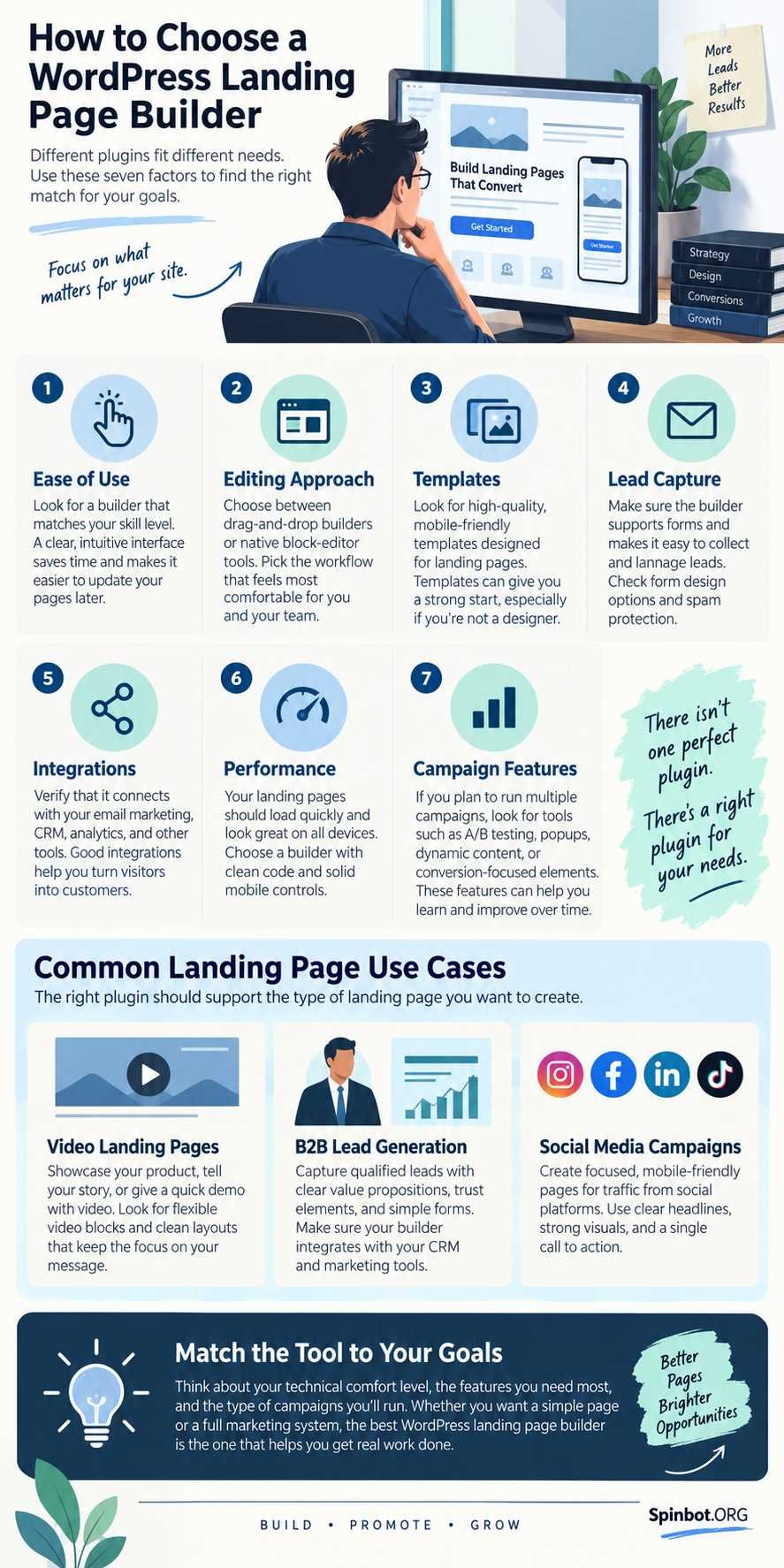
Which Landing Page Builder Fits Your Campaign?
The easiest way to choose isn’t to ask which plugin has the most features.
Ask what happens before and after someone visits the page.
For B2B lead-generation pages
Most good B2B landing page examples share a simple idea: the visitor should quickly understand the offer and know what to do next.
A B2B page may need:
- A clear business problem
- A specific offer
- Product or service benefits
- Customer proof
- A demo or consultation form
- CRM integration
- A strong call to action
For a simple service-business page, Elementor, SeedProd, Beaver Builder, or Kadence Blocks may be enough.
If you run many campaigns and send leads directly into CRM and testing workflows, Landingi becomes more attractive because its current integration list includes platforms such as HubSpot, Salesforce, Pipedrive, Zoho CRM, Mailchimp, ActiveCampaign, Google Analytics, and Google Tag Manager.
For landing pages with video
Video can help explain a product that is easier to show than describe.
But don’t add a video simply because the builder supports it.
A useful video should support the same action as the rest of the page. A software demo might show the product in use before a free-trial button. A consultant could use a short introduction before a booking form.
Elementor has a built-in video widget, making it one of the simplest options when video is central to the layout.
Whatever builder you use, keep mobile users in mind. A huge autoplaying video can become a burden rather than a benefit.
For social-media traffic
A social media landing page usually needs to get to the point quickly.
Someone coming from Instagram, Facebook, LinkedIn, TikTok, or another social platform may know very little about your site.
That means the page should usually contain:
- A headline connected to the post or ad they clicked
- One clear offer
- A short explanation
- Strong visual proof
- A mobile-friendly call to action
- Minimal unnecessary navigation
SeedProd is useful for focused campaign pages. Elementor makes sense when visual branding matters. Landingi becomes stronger when you’re running and testing multiple paid social campaigns.
The traffic source should influence the page, but it shouldn’t force you into a separate plugin unless your current builder cannot handle the campaign.
For bloggers and small businesses
Start simpler than you think.
If you only create a few landing pages each year, installing an entire conversion platform may add cost and maintenance without giving you much extra value.
Kadence Blocks or Spectra Blocks may be enough if you prefer Gutenberg. Elementor or Beaver Builder can make sense if you already use them elsewhere on the site. SeedProd is attractive if you specifically want distraction-free campaign pages.
The best plugin is often the one that solves your landing-page problem without creating three new ones.
How to Choose Without Installing Five Plugins
Plugin comparison can easily turn into endless testing.
Use this short decision process instead.
1. Decide what the page must accomplish
Don’t start with design.
Start with the action.
Do you want an email signup, demo booking, product purchase, webinar registration, app download, or something else?
That answer tells you which features matter.
2. Check the integrations you already use
If your email platform, CRM, payment tool, or analytics system is central to the campaign, verify compatibility before building the page.
Never assume an integration is included merely because a plugin advertises marketing features.
3. Choose your editing style
If you like Gutenberg, start with Kadence Blocks or Spectra Blocks.
If you want visual drag-and-drop editing, consider Elementor, Beaver Builder, or SeedProd.
If your priority is conversion campaigns and funnels, look closely at Thrive Architect or OptimizePress.
If you manage many landing pages and experiments, Landingi may make more sense.
4. Think about long-term maintenance
A landing page isn’t finished when you publish it.
You’ll probably need to change copy, replace an offer, update a form, edit a testimonial, or modify a campaign later.
Choose a system your team can still understand six months from now.
5. Test the page, not just the builder
A plugin cannot guarantee conversions.
Your offer, headline, traffic quality, page speed, proof, form length, mobile experience, and call to action all affect results.
The builder gives you tools. It doesn’t replace marketing judgment.
The Best Choice Depends on What You Need to Build
If you want one practical starting point, match the plugin to the job.
Choose SeedProd when you want dedicated WordPress landing pages with a focused campaign workflow.
Choose Elementor when design freedom and visual control matter most.
Choose Beaver Builder when you want a straightforward visual editor that can handle both normal pages and landing pages.
Choose OptimizePress or Thrive Architect when your landing pages are closely tied to lead generation, sales, and marketing funnels.
Choose Landingi when your team needs campaign management, integrations, testing, and many landing pages.
Choose Kadence Blocks when you want to keep your landing pages inside Gutenberg.
Choose Spectra Blocks when you prefer native WordPress blocks and want to experiment with AI-assisted page creation.
The key is not finding the WordPress landing page plugin with the longest feature list. It’s choosing the smallest, clearest tool that can support the campaign you’re actually running.

Raj blends SEO mastery with real-world freelance grit. Covers SEO, blogging, content strategy, copywriting, freelance writing, marketing, and business communication.