

That action might be joining an email list, downloading a guide, registering for a webinar, requesting a quote, or buying a product. You do not necessarily need a developer, and you do not always need an expensive landing page platform either.
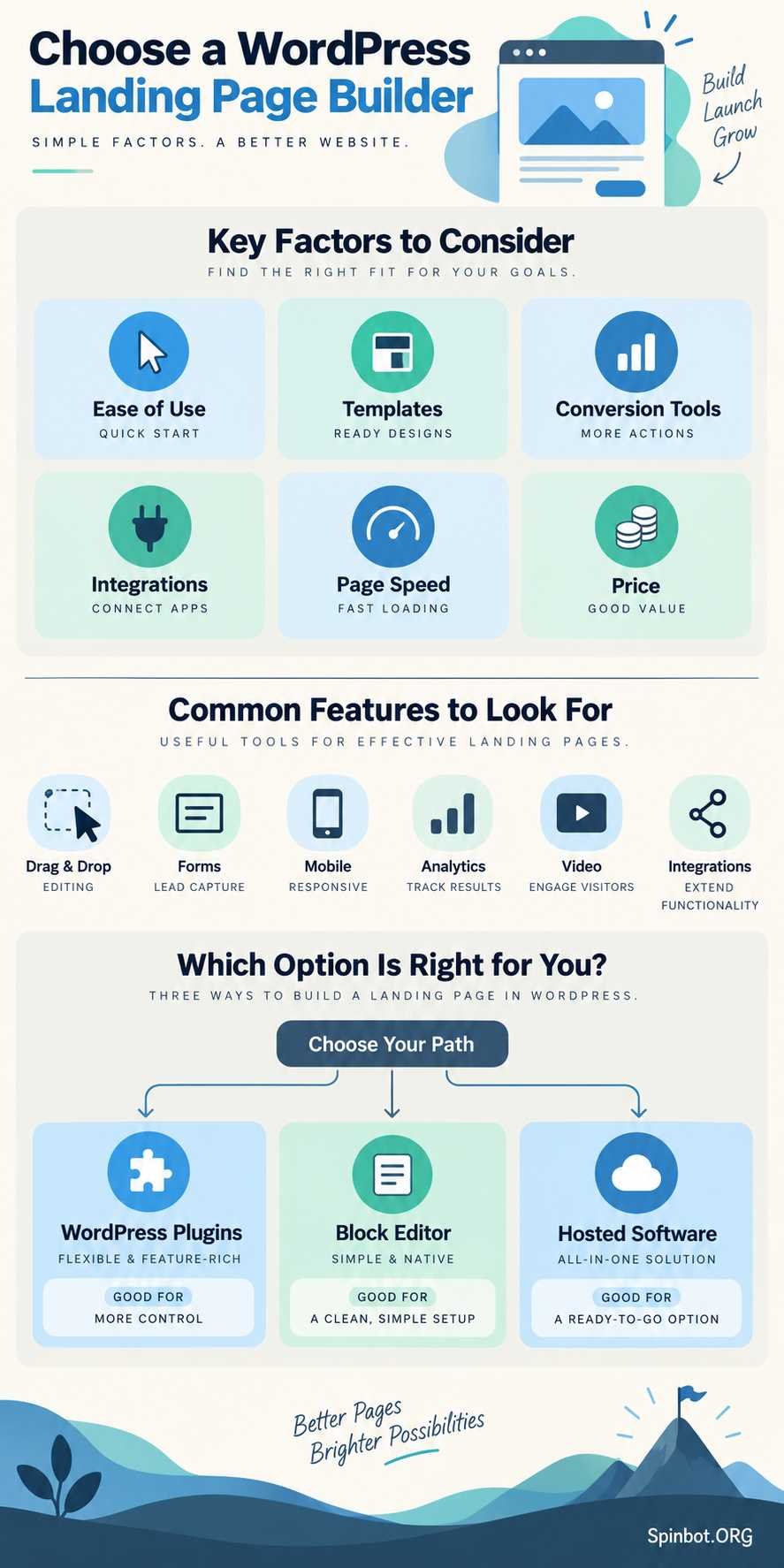
WordPress now gives you several ways to build these pages. You can use a dedicated WordPress landing page plugin, a full drag and drop builder, the native WordPress block editor, or external landing page software.
The right choice depends less on which builder has the longest feature list and more on what you are actually trying to build.
What Is a WordPress Landing Page Builder?
A WordPress landing page builder is a tool that lets you create focused marketing pages without manually coding the layout.
A normal website page may contain navigation menus, sidebars, dozens of links, and several competing messages. A landing page usually has a narrower purpose.
WordPress describes a landing page as a standalone page designed around a specific call to action, such as signing up, buying something, or joining a mailing list. WordPress also recommends removing unnecessary elements such as headers and menus when they distract from that goal.
Most modern builders let you create these layouts visually. You add sections, headings, images, buttons, forms, videos, testimonials, and other elements without writing HTML or CSS.
Landing page builder vs regular WordPress editor
You may not need another plugin at all.
WordPress’s native block editor can create landing pages using blocks and patterns. With a compatible block theme, you can also create a custom page template that removes the normal header and footer.
A dedicated builder becomes more useful when you want:
- More design control
- Ready-made landing page templates
- Visual drag-and-drop editing
- Built-in opt-in forms
- Marketing integrations
- Reusable sections
- Popups or conversion elements
- Sales funnels
- Easier responsive editing
The tradeoff is that another builder adds another system to learn and maintain.
WordPress plugin vs hosted landing page software
There are also two different types of landing page software WordPress users commonly consider.
A WordPress plugin works inside your WordPress website. SeedProd, Elementor, Thrive Architect, Beaver Builder, OptimizePress, and Divi fall into this general group.
A hosted landing page platform runs outside WordPress. You build and manage campaigns through the provider’s own platform and connect the finished pages to your site or domain.
A WordPress plugin makes sense when WordPress is already the center of your website and you want to manage everything in one place.
External software can make more sense for marketing teams running large numbers of campaigns across several websites or brands.
For most bloggers, freelancers, small businesses, and creators already using WordPress, starting with a WordPress-based option is usually simpler.
Best Landing Page Builders for WordPress
There is no single builder that wins for every website. These seven options serve different types of WordPress users.
| Builder | Free option | Visual editing | Landing page templates | Best for |
|---|---|---|---|---|
| SeedProd | Yes, limited | Yes | Yes | Beginners and focused landing pages |
| Elementor | Yes | Yes | Yes | Flexible visual design |
| Thrive Architect | No | Yes | Yes | Conversion-focused marketers |
| Beaver Builder | Yes, Lite | Yes | Yes with premium version | Stable reusable layouts |
| OptimizePress | No | Yes | Yes | Funnels and selling |
| Divi | No | Yes | Yes | Design-heavy websites |
| WordPress Block Editor | Included with WordPress | Block-based | Patterns | Lightweight native builds |
1. SeedProd: Best for focused landing pages
SeedProd is one of the easiest choices to understand because landing pages are a central part of the product rather than a side feature.
It provides a visual drag-and-drop editor, responsive layouts, landing page templates, opt-in features, email marketing integrations, and standalone pages that can work separately from your normal WordPress theme. Its free plugin can create landing pages, while more advanced blocks and integrations are part of paid versions.
That separation from your theme can be useful.
Suppose your normal blog has a navigation bar, sidebar, latest posts, and a large footer. Your campaign page does not need any of those things. SeedProd can give you a cleaner environment specifically for the campaign.
Best for: Bloggers, small businesses, course creators, and beginners who mainly want landing pages rather than complete visual control over every part of WordPress.
Watch for: Many of the more useful marketing features are reserved for paid plans, so check the current feature comparison before choosing it based only on the free plugin.
2. Elementor: Best for flexible visual design
Elementor is much broader than a landing page plugin.
Its free WordPress plugin provides a visual drag-and-drop editor, templates, responsive editing, and a large collection of widgets. The current WordPress.org listing reports more than 10 million active installations.
For landing pages, there is one important 2026 change.
Elementor’s older dedicated Landing Pages custom post type has been deprecated since Elementor Pro 3.27. That does not mean Elementor can no longer build landing pages. Instead, Elementor recommends creating a normal WordPress page and using the Elementor Canvas layout when you want to remove headers, footers, and sidebars.
That is the workflow new users should follow.
Elementor is particularly useful when you need precise control over spacing, responsive layouts, sections, images, typography, and other design details.
Best for: Designers, agencies, bloggers, and businesses that want one builder for landing pages and other website pages.
Watch for: Do not follow old tutorials that tell you to create new pages through Templates → Landing Pages. That feature is deprecated for new workflows.
3. Thrive Architect: Best for conversion-focused marketers
Thrive Architect has a different emphasis. It is designed around marketing pages rather than simply attractive page design.
The current product includes visual editing and a large set of landing page templates. Thrive documentation says its template system supports lead-generation, sales, webinar, and coming-soon pages, among other types.
This makes Thrive particularly interesting when your page is part of a bigger marketing process.
For example, you might create:
- A lead-generation page.
- A thank-you page.
- A sales page.
- Different page variations.
- An A/B test using the separate Thrive Optimize component.
Current Thrive pricing separates Architect from its Optimize testing product, so do not assume A/B testing is included with every Architect purchase.
Best for: Affiliate marketers, email marketers, creators, and businesses that care more about conversion workflows than general website design.
Watch for: It is a paid solution and can be more than you need if you only want one basic landing page.
4. Beaver Builder: Best for reusable, dependable layouts
Beaver Builder has been around for years and takes a relatively straightforward approach to front-end WordPress editing.
A free Lite version is available, while premium versions add more modules, templates, reusable layouts, forms, and other features.
Its template library specifically includes landing-page layouts. Beaver Builder also allows saved templates and reusable sections, which can help if you repeatedly create similar pages for different products, locations, or clients.
Imagine an agency building campaign pages for 20 local businesses. Instead of recreating the hero, testimonial section, contact area, and CTA each time, reusable layouts can reduce repetitive work.
Best for: Agencies, developers, freelancers, and business sites that value reusable layouts and a traditional visual-builder workflow.
Watch for: Many of the stronger landing-page features and templates require the paid product.
5. OptimizePress: Best for landing pages plus funnels
OptimizePress moves beyond individual pages into a broader marketing system.
Its WordPress tools cover landing pages, sales pages, funnels, checkouts, opt-in forms, and other conversion-focused workflows. The core builder uses a drag-and-drop editing interface.
This matters if your landing page is only the first step.
A simple lead-generation campaign may need one page and a form. A product funnel may need a sales page, checkout, upsell, thank-you page, and follow-up steps.
OptimizePress is aimed more directly at that second situation.
As of September 2026, its entry-level Launch plan includes its landing-page builder for one WordPress site, while higher plans add funnel and checkout tools. Pricing can change, so it is better to check the current plan before buying.
Best for: Coaches, digital-product sellers, consultants, and marketers building funnels inside WordPress.
Watch for: It is probably unnecessary if all you need is a simple newsletter signup page.
6. Divi: Best for design-heavy WordPress sites
Divi combines a WordPress theme with a powerful visual page-building system.
The current Divi builder provides front-end drag-and-drop editing, responsive controls, reusable design systems, and prebuilt layouts.
Divi also provides a blank-page option that can remove the standard header and footer, making it suitable for standalone landing pages.
Its strength is design flexibility.
If you already run a Divi site, installing another WordPress landing page plugin may create needless overlap. It often makes more sense to build the landing page with the system already controlling the rest of your site.
Best for: Existing Divi users, designers, freelancers, and businesses wanting strong visual control across an entire website.
Watch for: Choosing a full website-building ecosystem just to create one campaign page may be excessive.
7. WordPress Block Editor: Best lightweight alternative
The native WordPress editor deserves a place on this list because many site owners do not actually need another page builder.
Current WordPress tools let you create a page from a blank layout or predefined patterns. You can add buttons, columns, covers, media, forms through compatible blocks, and other common landing-page elements. A custom template can remove your normal site header and footer.
This route has one major advantage: fewer dependencies.
You do not have to introduce another visual editor simply because you need one landing page.
Best for: Bloggers, simple business websites, performance-conscious users, and anyone comfortable with WordPress blocks.
Watch for: Advanced marketers may miss the specialized templates, conversion widgets, integrations, and campaign management available in dedicated tools.
How to Choose the Right Landing Page Builder
Do not choose based on the largest template count.
Start with what the page needs to accomplish.
Start with your landing page goal
A newsletter signup page and a product funnel have very different requirements.
For a basic lead magnet, you may only need:
- Headline
- Short explanation
- Image
- Email form
- CTA button
- Privacy information
The WordPress editor, SeedProd, or Elementor can handle that easily.
A product campaign involving several pages, checkout flows, upsells, or testing may justify a more marketing-focused system such as OptimizePress or Thrive.
Check how quickly you can edit the page
A good drag and drop builder should save time, not merely look impressive in a demo.
Ask yourself whether you can easily:
- Change headings
- Rearrange sections
- Duplicate elements
- Adjust mobile layouts
- Save reusable blocks
- Replace images
- Edit forms
- Preview before publishing
If simple edits require hunting through several menus, the builder may slow you down once the novelty wears off.
Look beyond templates
Templates help you start faster, but they should not make the decision for you.
A beautiful template becomes useless if the builder cannot connect to your email service, handle your form properly, or create the mobile layout you need.
Check integrations before committing.
If your business depends on a specific CRM, newsletter provider, checkout system, analytics platform, or form plugin, confirm compatibility first.
Think about page speed
Visual builders can generate more HTML, CSS, and JavaScript than a simple hand-built or block-based page.
That does not automatically make them slow. Hosting, images, fonts, tracking scripts, plugins, animations, and third-party embeds also affect performance.
Still, avoid adding features simply because the builder makes them easy.
A rotating slider, background video, animation, popup, countdown timer, chat widget, and six tracking scripts on the same page can turn a clean landing page into a loading test.
Consider builder lock-in
Your landing pages may live longer than your current marketing campaign.
Before choosing a builder, ask what happens if you stop using it.
Can you easily move the content? Will pages remain readable? How much rebuilding would be required?
The more deeply a website depends on one builder’s custom elements, templates, and styling system, the harder switching can become.
That does not mean you should avoid page builders. It simply means switching cost belongs in the decision.
How to Build a Landing Page in WordPress
Whatever tool you choose, the basic process stays surprisingly similar.
1. Create a distraction-free page
Start with a blank page or landing-page template.
Remove navigation, sidebars, unrelated links, and other elements that compete with the main action.
2. Build the hero section
The top of the page should quickly answer three things:
What is this?
Who is it for?
What should I do next?
A headline, short supporting explanation, relevant visual, and clear CTA are often enough.
Do not force visitors to solve a puzzle before understanding your offer.
3. Explain the benefit
Move from what you offer to why the visitor should care.
Instead of:
“Our platform includes automated reporting.”
Try:
“Get a weekly report without building it manually.”
Specific outcomes are easier to understand than feature lists.
4. Add proof where it helps
Depending on the offer, useful proof may include:
- Genuine customer testimonials
- Client logos you have permission to display
- Product demonstrations
- Screenshots
- Case-study results with proper context
- Guarantees or policies
- Professional credentials
Never invent testimonials, user counts, ratings, or results just to make the page appear more persuasive.
5. Build the form or CTA
Ask only for information you genuinely need.
A free checklist probably does not require someone’s company size, phone number, street address, job title, and annual budget.
More fields create more work for the visitor.
6. Check the mobile version
Do not assume responsive automatically means good.
Preview the actual page on narrow screens.
Check:
- Headline wrapping
- Button size
- Form usability
- Image cropping
- Spacing
- Video dimensions
- Font size
- Sticky elements
Then submit the form yourself and make sure the next step works.
Should You Put Video on a Landing Page?
Video can be useful when it explains something more clearly than text or demonstrates a product that visitors need to see.
That does not mean every landing page needs one.
A video in a landing page should have a specific job: demonstrate the product, explain the offer, show how something works, or answer an important objection.
Performance is the main technical concern.
Third-party video players are commonly loaded through iframes, and those embeds can download additional scripts and resources. Google’s web.dev guidance recommends techniques such as lazy loading or using a lightweight placeholder that loads the real video player only after someone interacts with it.
That gives you a practical rule:
Do not make every visitor download a heavy video player immediately if many visitors will never play it.
Also avoid autoplay with sound. Give visitors control over playback and make sure the page still explains the offer for people who never watch the video.
How to Tell What Website Builder Was Used
You may find a landing page you like and wonder which builder created it.
Technology-detection tools such as Wappalyzer and BuiltWith can often identify the CMS, page builder, analytics software, and other technologies used on a public website.
You can also check manually.
Right-click the page and choose View Page Source, then search for common fingerprints.
For WordPress, /wp-content/ is a strong clue.
Plugin paths can reveal more. For example, a reference containing /wp-content/plugins/elementor/ suggests Elementor assets are being loaded.
You may also find builder-specific CSS classes, scripts, generator metadata, or theme directories. Elementor’s current guide recommends a combination of technology-detection tools and source-code inspection for this type of investigation.
Do not treat detection as perfect proof, though.
Caching systems, optimization plugins, custom development, removed metadata, and mixed technology stacks can make identification harder.
More importantly, do not copy another site’s protected copy, images, branding, or proprietary design assets just because you can identify the tool behind them. Use other pages for inspiration, then create your own material.
Which WordPress Landing Page Builder Should You Choose?
For most beginners who want a dedicated landing-page workflow, SeedProd is an easy place to start.
Choose Elementor when you want much more visual control and expect to use the same builder across other parts of your WordPress website.
Choose Thrive Architect when conversion-focused marketing tools are a major priority.
Choose Beaver Builder when reusable layouts, front-end editing, and a straightforward WordPress workflow matter more than flashy extras.
Choose OptimizePress when landing pages are part of a larger funnel involving selling, checkouts, and follow-up pages.
Choose Divi when your website already runs on Divi or you want a broader design system rather than a landing-page-only tool.
And before installing anything, try the WordPress block editor. For a focused page with a headline, benefits, CTA, form, and a few supporting sections, it may already do everything you need.
The best landing page builder for WordPress is not the one with the most widgets or templates. It is the one that lets you build the page you need, connect the tools your business relies on, keep the experience fast and clear, and make future edits without fighting the software.

Raj blends SEO mastery with real-world freelance grit. Covers SEO, blogging, content strategy, copywriting, freelance writing, marketing, and business communication.