
That action might be joining an email list, requesting a demo, registering for a webinar, downloading a guide, starting a free trial, or buying a product. The page usually removes distractions that make sense on a normal website, such as a large navigation menu or several competing calls to action.
The harder decision is choosing the right landing page software for WordPress.
You can build landing pages with WordPress itself. You can install a dedicated landing page plugin. You can use a full website page builder. You can even design the page in a hosted platform and connect it to your WordPress domain.
None of these methods is automatically best. The right choice depends on how often you create campaigns, how much design control you need, whether you want A/B testing, and how much extra software you want running on your WordPress site.
What Is Landing Page Software for WordPress?
Landing page software helps you create standalone pages designed around a specific conversion goal.
A typical landing page might contain:
- A clear headline
- A short explanation of the offer
- Images or video
- Benefits or product features
- Testimonials or other trust signals
- A lead form
- One primary call-to-action button
- A thank-you or confirmation step
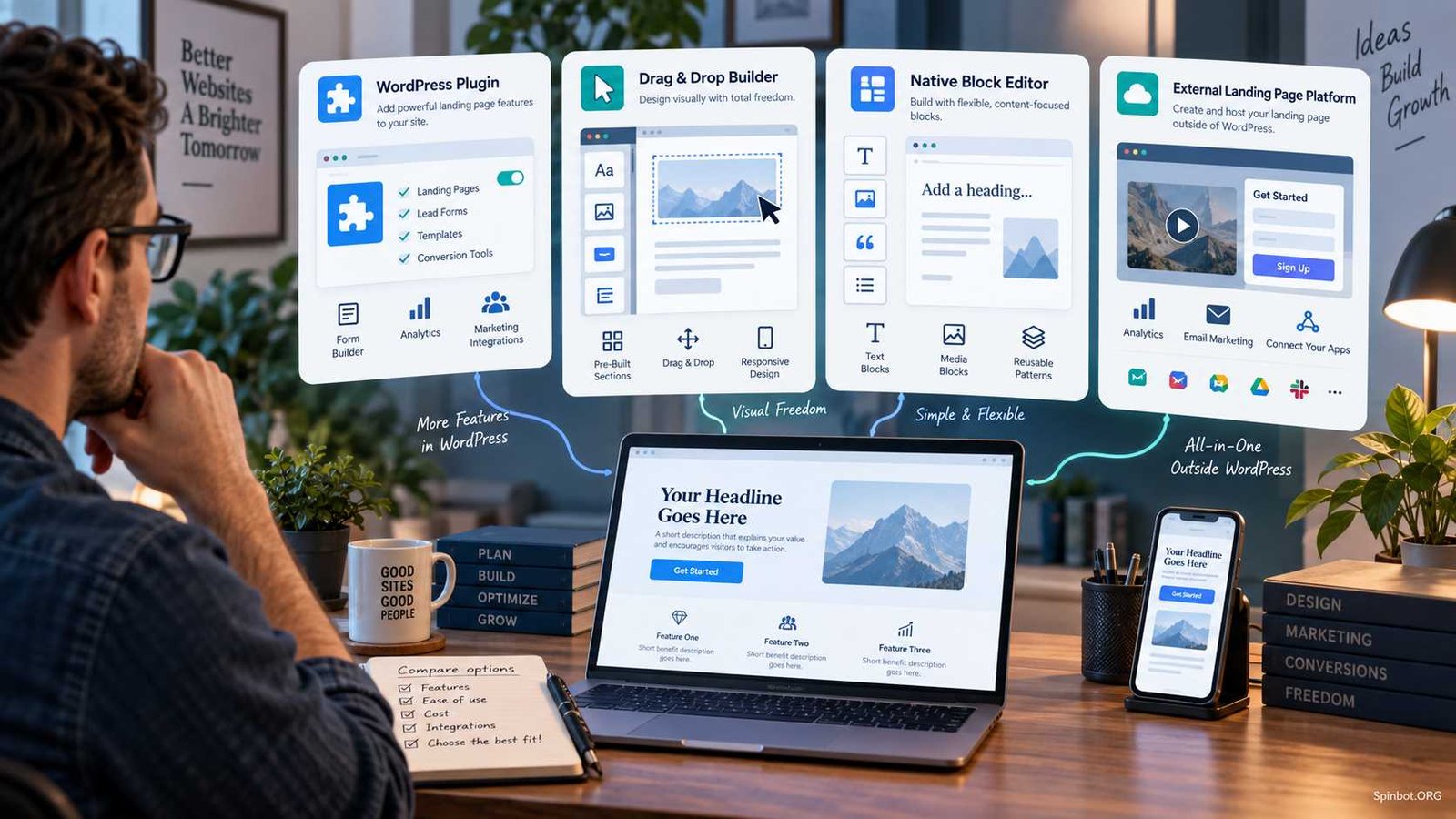
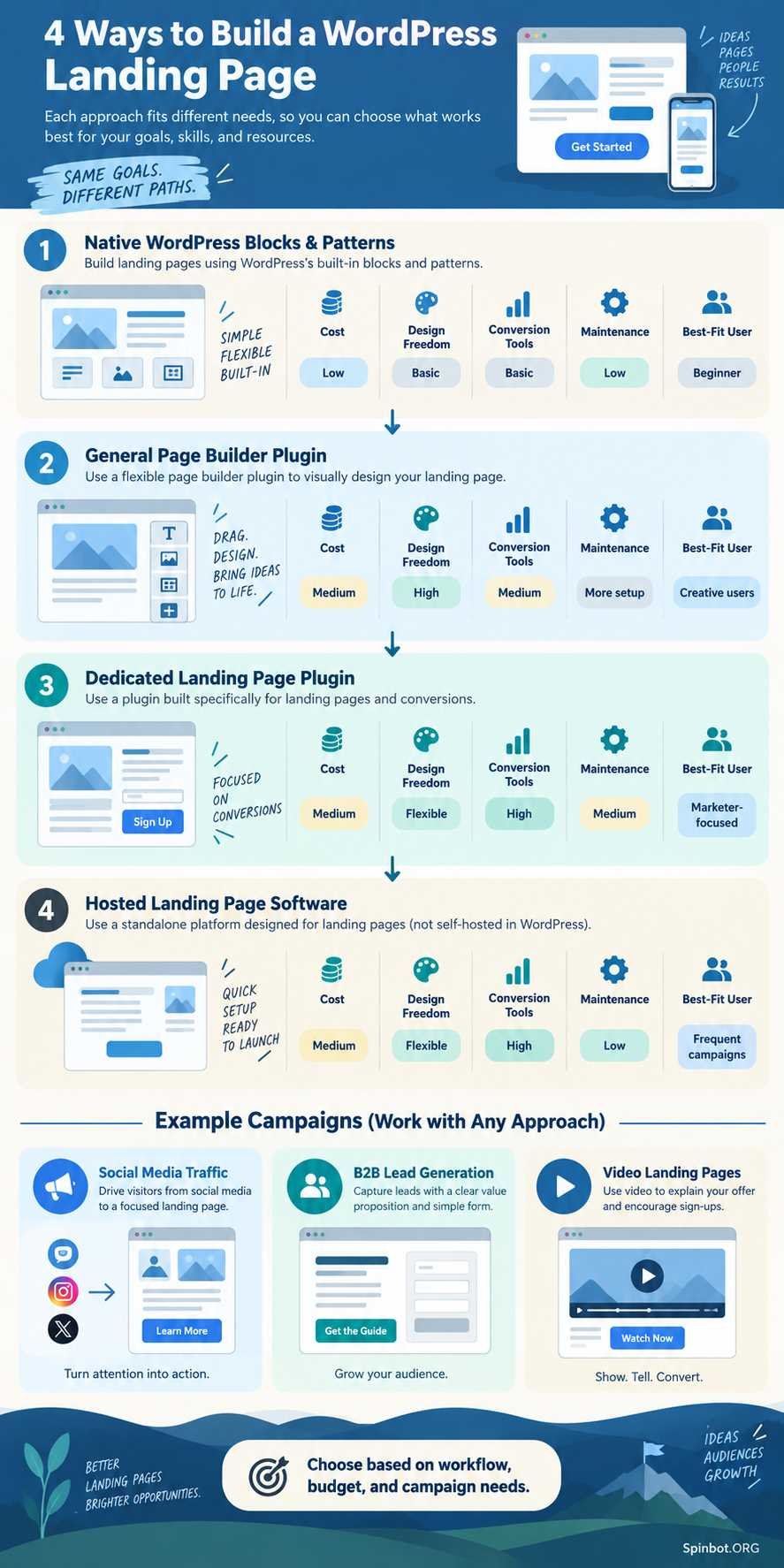
For WordPress users, there are four main ways to build these pages.
1. Native WordPress blocks
The WordPress Block Editor can build surprisingly complete landing pages without a separate visual page-builder plugin.
WordPress patterns are pre-arranged groups of blocks that you can insert and customize. The official WordPress Pattern Directory also provides reusable designs for sections such as calls to action, banners, headers, text areas, and other page elements.
This approach keeps your software stack simple.
2. General WordPress page builders
Plugins such as Elementor and Beaver Builder let you visually design many kinds of WordPress pages, not just landing pages.
They make sense when you want one editing system for your homepage, service pages, campaign pages, and other parts of your site.
3. Dedicated landing page plugins
Tools such as SeedProd and conversion-focused builders such as Thrive Architect put more emphasis on campaign pages, opt-in forms, sales pages, and marketing workflows.
These can be useful when landing pages are an important part of how you generate leads or sales.
4. Hosted landing-page platforms
Services such as Unbounce run outside your normal WordPress installation but can publish pages on a WordPress-connected domain.
This model can suit marketing teams that want campaign management and testing tools without making WordPress responsible for the entire landing-page system. Unbounce, for example, supports publishing its pages through a WordPress integration while hosting the landing pages on its own infrastructure.
WordPress Landing Page Options Compared
| Approach | Best for | Design freedom | Marketing tools | Extra WordPress overhead |
|---|---|---|---|---|
| Native WordPress blocks | Simple campaigns and smaller sites | Moderate | Depends on other plugins | Low |
| General page builder | Sites needing visual design across many pages | High | Varies | Moderate |
| Dedicated landing-page plugin | Frequent lead and sales campaigns | High | Usually stronger | Moderate |
| Hosted landing-page platform | Marketing teams and paid campaigns | High | Often advanced | Lower on WordPress itself |
The important point is that a landing page builder is not automatically better just because it has more features.
If you need three landing pages per year, adding a large marketing platform may create more complexity than value. If you run dozens of campaigns and test different offers every month, native WordPress blocks may feel limiting.
Choose according to the work you actually do.
WordPress Itself May Be Enough
Before installing another plugin, check whether the standard WordPress editor can handle the page you want.
You can combine Cover, Columns, Group, Heading, Image, Buttons, and other blocks to build a simple landing page. Patterns speed this up by giving you pre-built sections that you can edit instead of starting with a blank page. WordPress has supported centrally managed patterns in the Site Editor since WordPress 6.3, although some Site Editor features depend on using a block theme.
Native WordPress is especially appealing when you need:
- A simple lead-generation page
- An event registration page
- A downloadable resource page
- A promotional page with one CTA
- A lightweight campaign page
- A page that matches the rest of your website
You may still need another plugin for forms, analytics, email marketing, or testing. But that can be better than installing a full landing-page system just to get a different page layout.
SeedProd: A Dedicated WordPress Landing Page Builder
SeedProd is designed specifically around visual website and landing-page creation inside WordPress.
Its current feature set includes a drag-and-drop editor, reusable sections and blocks, landing-page templates, responsive controls, email marketing integrations, subscriber management, domain mapping, WooCommerce features, and dynamic text tools. Some capabilities require paid plans.
That makes SeedProd a strong fit when you want WordPress to remain the center of your campaign workflow.
You could use it for:
- Email opt-in pages
- Sales pages
- Webinar registration
- Coming-soon pages
- Thank-you pages
- Product promotions
- Lead magnets
Its biggest advantage is focus. Instead of adapting a normal website page into a campaign page, you work with a builder designed around these types of pages.
The tradeoff is familiar with any dedicated plugin: you are adding another system to maintain. Check whether your existing theme or page builder can already handle the job before installing overlapping software.
Elementor: Useful for Broader Design Control
Elementor remains a major visual page-building option for WordPress, but there is one detail that can confuse readers following older guides.
Elementor previously offered a dedicated Landing Pages feature based on a separate custom post type. Elementor says that feature is deprecated as of Elementor Pro 3.27.
That does not mean Elementor can no longer be used to design landing pages.
You can still create a normal WordPress page and design it with Elementor. The important distinction is that you should not choose Elementor because an old tutorial tells you to depend on its former dedicated Landing Pages workflow.
Elementor makes more sense when you already use it across your site or need broad visual control beyond campaign pages.
For example, a small business could use the same builder for:
- Homepage layouts
- Service pages
- Contact pages
- Lead-generation pages
- Promotional campaigns
That can be simpler than maintaining one builder for your website and another for landing pages.
Beaver Builder: A Straightforward Visual Workflow
Beaver Builder is another general WordPress page builder that can be used for landing pages.
Its official documentation includes a dedicated landing-page template group as well as content-page and micro-page templates. Beaver Builder also supports visual front-end editing and reusable layouts.
This makes it a practical option when you want visual editing but do not necessarily need a separate marketing platform.
Its landing-page templates cover purposes such as marketing pages, events, homepages, and one-page sites. Beaver Builder also allows users to save and reuse layouts, rows, and modules, depending on the version and features available.
For agencies or freelancers who repeatedly build pages for different projects, reusable layouts can matter more than having hundreds of flashy templates.
Thrive Architect: Built Around Conversion Pages
Thrive Architect takes a more marketing-focused approach.
It can create standard WordPress content pages or standalone landing pages. In its landing-page mode, the builder can replace the normal theme layout, giving you control over elements such as headers and footers rather than forcing the page to use the surrounding website design.
Thrive also provides pre-built landing-page templates for use cases such as lead generation, sales, webinars, and coming-soon campaigns. Its current documentation describes more than 130 templates available through its landing-page template system.
This distinction matters.
A normal business page often benefits from your site navigation because visitors may want to explore your company. A paid-ad landing page may work better with fewer exits and one obvious next step.
Thrive Architect is worth considering when that conversion-focused approach is more important to you than simply designing attractive pages.
OptimizePress: Another Marketing-Focused WordPress Option
OptimizePress also sits closer to the marketing side of the category than to a general WordPress page editor.
Its current platform centers on OptimizeBuilder for creating landing pages, sales pages, membership pages, and other marketing pages. Higher plans add features such as checkout, funnels, urgency tools, and additional site licenses. OptimizePress moved its current plans to an annual subscription model.
This type of tool makes more sense when your landing pages connect to a larger sales process.
If you only need a single newsletter page, much of that functionality may be unnecessary.
Hosted Landing Page Software Can Still Work With WordPress
Not every WordPress landing page needs to be built inside WordPress.
A hosted platform such as Unbounce lets you create the page in its own builder and then connect it with WordPress.
Unbounce currently promotes features including responsive templates, A/B testing, Dynamic Text Replacement, popups, sticky bars, and integrations with external marketing tools. Its WordPress integration allows pages created in Unbounce to be published through a WordPress-connected domain.
This setup can be attractive when a marketing team runs many campaigns while another team manages the main WordPress website.
It separates two jobs:
WordPress manages the main website.
The landing-page platform manages campaigns.
The drawback is that you now have another paid platform, another interface, and another set of integrations to manage.
For a small blog, that may be excessive. For a company running significant paid advertising, it can be reasonable.
How to Choose a Landing Page Builder for WordPress
Do not choose based on template count alone.
Start with these questions.
How often will you create landing pages?
If the answer is once or twice a year, WordPress blocks or your existing page builder may be enough.
If landing pages are a weekly part of your marketing, a dedicated tool starts to make more sense.
Do you need A/B testing?
A/B testing sends visitors to different versions of a page so you can compare results.
It becomes useful when you have enough traffic to make testing meaningful and when improving conversion rates can materially affect revenue or lead volume.
Do not pay for an advanced testing platform simply because A/B testing sounds professional. Low-traffic sites may learn more from talking to users, improving the offer, and fixing obvious page problems first.
Which integrations matter?
List what must happen after someone completes your form.
For example:
- The visitor submits an email address.
- The contact enters your email platform or CRM.
- A tag or campaign is applied.
- The visitor sees a thank-you page.
- Analytics records the conversion.
- Your sales or marketing workflow continues.
A builder that looks beautiful but cannot connect cleanly to your existing workflow is probably the wrong builder.
What happens if you stop using it?
Plugin lock-in deserves more attention than it gets.
Ask what happens to your pages if you cancel the paid plan, deactivate the plugin, or move the website later.
Also consider who will maintain the page six months from now. A slightly less impressive tool that your team understands can be more valuable than an advanced system nobody wants to touch.
How important is page performance?
Every landing page needs scripts, styles, images, forms, tracking, and sometimes video. Adding several overlapping plugins can increase the amount your site must manage.
Keep the page focused.
You rarely need three form plugins, two animation systems, a separate popup plugin, and a large page builder all competing on one campaign page.
Using Video in a Landing Page
Video can help when the product or message is easier to show than explain.
Good uses include:
- Product demonstrations
- Short software walkthroughs
- Customer explanations
- Course previews
- Complex service explanations
- Founder or team introductions
The mistake is treating video as decoration.
A giant background video can consume resources while doing little to help the visitor decide. Autoplaying audio is even more disruptive.
Give the video a clear purpose and keep the core message available in text. Visitors should still understand the offer even if they never press play.
For an important sales page, consider using a video thumbnail or lightweight embed method rather than loading a heavy player immediately.
Building a Social Media Landing Page
A social media landing page should continue the conversation that started in the post or advertisement.
Suppose an Instagram ad says:
“Download our free 10-step local SEO checklist.”
The landing page should not open with:
“Welcome to Smith Digital Solutions.”
It should immediately continue the offer:
“Get the 10-Step Local SEO Checklist.”
The message matches. The visitor knows they arrived in the right place.
Keep social landing pages especially simple because many visitors will arrive on phones.
A practical structure is:
- Clear offer
- One short explanation
- Visual proof or example
- Simple form or CTA
- Trust signal
- Repeated CTA when necessary
Do not send paid social traffic to a generic homepage unless exploring the whole website is actually the goal.
What B2B Landing Page Examples Can Teach You
B2B landing pages often have different conversion goals from consumer sales pages.
The visitor may not buy immediately. The desired next step could be:
- Book a demo
- Start a trial
- Request pricing
- Download a report
- Register for a webinar
- Contact sales
- Submit a project inquiry
Imagine a software company promoting an inventory platform.
Its landing page does not need to explain every feature the company has ever built. It needs to convince the right visitor that taking the next step is worthwhile.
A useful B2B page might contain:
Headline: Reduce stock errors across multiple locations.
Proof: A short result, customer example, or relevant trust signal.
Explanation: Three reasons the software solves the visitor’s problem.
CTA: Book a 20-minute demo.
Form: Only the information genuinely needed to handle that request.
The lesson from good B2B landing page examples is not that every page should copy the same layout. It is that the offer, proof, form, and CTA should all support the same decision.
Which WordPress Landing Page Setup Should You Pick?
For a blogger or small content site, start with the WordPress Block Editor or the page builder you already use. Add dedicated software only when you hit a real limitation.
For a small business, a general builder such as Beaver Builder or Elementor can make sense when you also need visual control over normal website pages.
For a freelancer or marketer creating regular campaigns, a dedicated WordPress landing page plugin such as SeedProd or a conversion-focused builder such as Thrive Architect may provide a more suitable workflow.
For a business selling courses, memberships, or digital products, marketing-focused systems such as OptimizePress may be worth considering because the landing page can be part of a wider funnel.
For a B2B marketing team or paid-ad operation, hosted landing-page software such as Unbounce becomes more attractive when campaign testing, publishing workflows, and marketing integrations justify a separate platform.
The simplest rule is this: buy for the workflow you have, not the feature list you might use someday.
WordPress already gives you enough tools to build a basic landing page. A plugin landing page WordPress setup becomes worthwhile when it saves you repeated work, gives you design control you actually need, or connects your campaigns to forms, email, CRM, testing, and sales systems more effectively.
The best landing page software for WordPress is therefore not one specific product. It is the least complicated setup that lets you publish the right page, measure the result, and improve the next campaign.

Raj blends SEO mastery with real-world freelance grit. Covers SEO, blogging, content strategy, copywriting, freelance writing, marketing, and business communication.