

The best free alternative to Grammarly for most people is LanguageTool. It checks spelling, punctuation, grammar, and basic style across more than 30 languages and dialects. However, it is not the best choice for every writer. QuillBot is stronger for paraphrasing, Hemingway is better for readability, and ProWritingAid gives long-form writers more detailed reports.
Here is the short version:
| Tool | Best for | Main free-plan limitation |
|---|---|---|
| LanguageTool | Everyday and multilingual editing | Advanced suggestions require Premium |
| QuillBot | Grammar checking and paraphrasing | Some rewriting features have limits |
| ProWritingAid | Long-form and creative writing | Checks up to 500 words at a time |
| Hemingway Editor | Readability and concise writing | Advanced AI corrections are paid |
| Wordtune | Rewriting sentences | Ten rewrites and AI suggestions daily |
| Microsoft Editor | Writing within Microsoft Edge | Advanced refinements require Microsoft 365 |
| DeepL Write | Natural multilingual rewriting | Some advanced features require Write Pro |
| Google Docs | Collaborative documents | Less detailed than specialist editors |
| Slick Write | Account-free writing analysis | Limited integrations and rewriting help |
| Claude | Conversational revision | Not a dedicated inline grammar checker |
No free tool perfectly reproduces every Grammarly feature. The right choice depends on what you write, where you write it, and which limitations you can accept.
What Counts as a Free Grammarly Alternative?
A free trial is not the same as a free alternative.
Some writing tools let you use all their features for seven or fourteen days, then require payment. Others maintain a permanent free plan but limit the document length, number of daily rewrites, advanced suggestions, or available integrations.
A useful free alternative should provide at least one of these functions without requiring payment:
- Spelling and grammar correction
- Punctuation checking
- Readability analysis
- Sentence rewriting
- Style or tone suggestions
- Browser or document-editor integration
It should also offer enough free usage to handle a real task. A tool that permits only a few hundred words per month may be technically free, but it is not practical for regular blogging, academic writing, or business communication.
Free-plan conditions change frequently. Check the provider’s current plan page before building your entire editing workflow around one product.
1. LanguageTool: Best Direct Grammarly Alternative
LanguageTool is the closest free replacement for Grammarly if you want corrections while writing in browsers, documents, and common desktop applications.
Its free version identifies spelling mistakes along with basic punctuation, grammar, capitalization, and style problems. It can also detect issues such as repeated phrases, incorrect word choices, and unnecessary expressions, although its more advanced suggestions are reserved for Premium users.
The biggest advantage is language coverage. According to LanguageTool, its grammar checker supports more than 30 languages and dialects. These include English, Spanish, German, French, Dutch, and Portuguese. Its English checker supports regional varieties such as American, British, Canadian, Australian, New Zealand, and South African English.
LanguageTool offers browser add-ons as well as integrations for Google Docs and Microsoft Word. This makes it a practical option for people who want a Grammarly-like checker where they already write.
Choose LanguageTool if:
- You regularly write in more than one language.
- You need corrections inside browsers and office applications.
- You want a direct grammar checker rather than a general AI chatbot.
- Basic spelling, grammar, and style feedback covers most of your needs.
The free version does not reveal every available correction. If you are editing a major report, thesis, or client document, you may still need a manual review or a second tool.
2. QuillBot: Best for Grammar Checking and Paraphrasing
QuillBot is a strong choice when you need both error correction and sentence rewriting.
Its free grammar checker identifies grammar, spelling, and punctuation problems in pasted text. You can review corrections individually or apply multiple fixes. QuillBot also provides separate tools for paraphrasing, summarizing, translating, and checking punctuation.
This wider toolset makes QuillBot useful for students, bloggers, and people who write English as an additional language. For example, you can correct a paragraph first, then use the paraphraser to explore clearer ways to express a difficult sentence.
That does not mean you should accept every rewrite. A paraphraser can alter emphasis, remove a necessary technical term, or make a simple sentence sound less natural. Compare the output with your original meaning before publishing it.
In a 2024 comparison, Scribbr tested free grammar checkers using a text containing 20 errors. QuillBot received the highest correction score, while LanguageTool finished closely behind. Scribbr disclosed that it is affiliated with QuillBot through its parent company, so that relationship should be considered when interpreting the results. You can review the full free grammar-checker test.
Choose QuillBot if:
- You want grammar checking and paraphrasing in one toolkit.
- You need a fast browser-based editor.
- You often revise essays, articles, or short professional documents.
- Rewording is as important to you as correcting errors.
QuillBot is one of the best sites like Grammarly for free, but some paraphrasing modes and other advanced functions remain limited to paid accounts.
3. ProWritingAid: Best for Long-Form and Creative Writing
ProWritingAid approaches editing as a detailed analysis rather than a quick proofreading pass.
It can examine grammar, spelling, punctuation, repetition, sentence length, readability, pacing, dialogue, and other patterns that matter in long documents. These reports are particularly helpful for novelists, authors, and writers working on extensive reports or articles.
The free plan has a significant restriction: it checks only 500 words at a time. According to ProWritingAid’s current plan comparison, free users receive grammar, spelling, punctuation, and thesaurus checking, two runs of each report per day, three Sparks, and ten Rephrases.
The 500-word limit makes it less convenient for a 3,000-word article or an entire book chapter. You can divide a document into sections, but repeatedly copying and pasting text disrupts the editing process.
Choose ProWritingAid if:
- You write fiction or other long-form content.
- You want reports that reveal repeated writing habits.
- You do not mind checking a document in smaller sections.
- You want to learn why your writing feels slow, repetitive, or uneven.
It is less suitable for someone who only wants unobtrusive corrections while composing emails.
4. Hemingway Editor: Best for Clear, Readable Prose
Hemingway Editor focuses on readability rather than comprehensive proofreading.
Its free online readability checker identifies hard-to-read sentences and calculates a grade-level score. It can help you find long sentences, dense passages, excessive adverbs, and complicated phrasing. The free Hemingway readability checker allows users to scan text without a word-count limit.
This is useful for web content, instructions, emails, and business documents that need to be understood quickly.
Hemingway should not be treated as a complete replacement for a grammar checker. A sentence can be easy to read and still contain a spelling, punctuation, or agreement error. Its advanced AI rewriting and grammar features belong to Hemingway Editor Plus, which is a paid product after its trial period.
Choose Hemingway if:
- Your writing is grammatically correct but feels heavy.
- You want to shorten long sentences and reduce clutter.
- You write for broad online audiences.
- You already have another tool for spelling and grammar.
A practical zero-cost combination is LanguageTool for corrections followed by Hemingway for clarity.
5. Wordtune: Best for Rewriting Sentences
Wordtune is designed for writers who know what they want to say but are not satisfied with how they have said it.
It can suggest alternative versions of a sentence, adjust its tone, or make it more concise. This is helpful when an email sounds too blunt, a paragraph feels repetitive, or an explanation needs simpler wording.
Wordtune’s Basic plan includes unlimited spelling corrections and grammar checks. Its current free allowance includes ten rewrites and AI suggestions per day, along with limited AI generations and three monthly summaries, according to the company’s plans page.
The daily limit means Wordtune works better for selective revision than for rewriting an entire article. Use it on the sentences that genuinely need alternatives rather than sending every line through the tool.
Choose Wordtune if:
- Rephrasing is your main editing problem.
- You work on emails, posts, and short documents.
- You want several ways to express the same idea.
- Ten daily rewrites are enough for your normal workflow.
Review suggestions carefully. The smoothest rewrite is not always the most accurate one.
6. Microsoft Editor: Best for Microsoft Edge Users
Microsoft Editor provides spelling, grammar, and writing assistance within parts of the Microsoft ecosystem.
The situation has changed since many older Grammarly-alternative articles were published. Microsoft retired the separate Editor extensions for Chrome and Edge on October 31, 2025. The extensions no longer receive support or updates, according to Microsoft’s retirement notice.
However, basic Microsoft Editor functionality is now built into Edge. It provides free spelling, grammar, and synonym suggestions across supported websites. Microsoft says its Edge-based editor offers basic guidance in more than 20 languages and spelling suggestions in more than 80 languages. More details are available on the Microsoft Editor for Edge page.
Editor also remains available within services such as Word and Outlook, with more advanced refinements connected to Microsoft 365 subscriptions.
Choose Microsoft Editor if:
- You already use Microsoft Edge.
- You write mainly in Word, Outlook, or Microsoft web apps.
- You need basic correction without installing another browser extension.
- You do not need deep style or rewriting reports.
Avoid following outdated instructions that tell you to install the retired Chrome extension.
7. DeepL Write: Best for Natural Multilingual Refinement
DeepL Write is a writing assistant from the company known for DeepL Translator. It can suggest improvements to phrasing, grammar, word choice, style, and tone.
Its main strength is natural-sounding language refinement. Instead of only marking an error, it can provide alternative wording that better suits the selected style. This can help multilingual writers make a sentence sound less literal or awkward.
DeepL Write works best as a rewriting and refinement tool. It may not offer the same browser-wide correction experience as Grammarly or LanguageTool, depending on your device, plan, and writing environment. Advanced functions and higher usage may also require Write Pro.
Choose DeepL Write if:
- You work across supported languages.
- Your sentences are correct but sound translated or unnatural.
- You value wording and tone suggestions.
- You are comfortable using a separate editing interface.
Do not assume a polished rewrite is factually correct. DeepL Write improves language; it does not verify the information inside the sentence.
8. Google Docs: Best Built-In Collaborative Option
Google Docs includes spelling and grammar suggestions at no additional charge for users with a Google account.
Its suggestions are less detailed than those from dedicated editing platforms, but the convenience is hard to beat. Corrections appear inside the document, where collaborators can also comment, suggest edits, and review version history.
Google Docs is particularly useful for teams, students, and freelance writers who already draft in the platform. You do not have to paste sensitive or carefully formatted text into another online editor simply to catch a missing word or punctuation mistake.
Choose Google Docs if:
- You already write and collaborate in Google Docs.
- You want basic correction without another account.
- Comments and suggestion mode matter more than detailed style reports.
- Your documents do not require specialist academic or creative analysis.
It is a sensible first editing layer, but important work still deserves a close human proofread.
9. Slick Write: Best Account-Free Basic Checker
Slick Write is a lightweight browser-based editor that analyzes spelling, style, sentence structure, and writing statistics.
It appeals to people who want to paste text into a checker without joining a complex AI platform. Its feedback can draw attention to long sentences, adverbs, passive constructions, repeated words, and unusual structural patterns.
The interface and integrations are more limited than those of Grammarly, LanguageTool, or ProWritingAid. It is therefore better for an occasional diagnostic pass than continuous correction while you type.
Choose Slick Write if:
- You want a simple web-based analysis.
- You prefer not to create another account.
- Writing statistics help you revise.
- You do not need AI-generated rewrites.
As with Hemingway, a highlighted pattern is not automatically an error. Passive voice, long sentences, and adverbs can all be appropriate when used deliberately.
10. Claude: Best Conversational Editing Companion
Claude can review a passage, explain confusing grammar, compare two versions, shorten a paragraph, or rewrite text for a specific audience. Its conversational format lets you give detailed instructions that ordinary grammar checkers cannot easily handle.
For example, you might ask it to:
- Correct grammar without changing technical terminology.
- Simplify a paragraph for an eighth-grade reading level.
- Identify unclear pronoun references.
- Explain each major edit instead of silently rewriting.
- Produce three versions with different levels of formality.
Claude is not a direct Grammarly replacement. It does not normally sit inside every text field and underline errors continuously. Usage on its free plan is also subject to limits, and access can vary with demand.
More importantly, generative AI can introduce new mistakes. Anthropic warns that Claude can produce convincing but incorrect information and advises users to scrutinize important outputs and check original sources. That warning appears in the company’s guidance on incorrect or misleading responses.
Choose Claude if:
- You want explanations and flexible revision instructions.
- You are editing selected passages rather than checking continuously.
- You can compare the revised version with the original.
- You will verify facts, quotations, and technical claims independently.
This is why “Claude AI alternative free” should be treated as a related but separate question. Claude can assist with editing, but it serves a different role from a dedicated grammar extension.
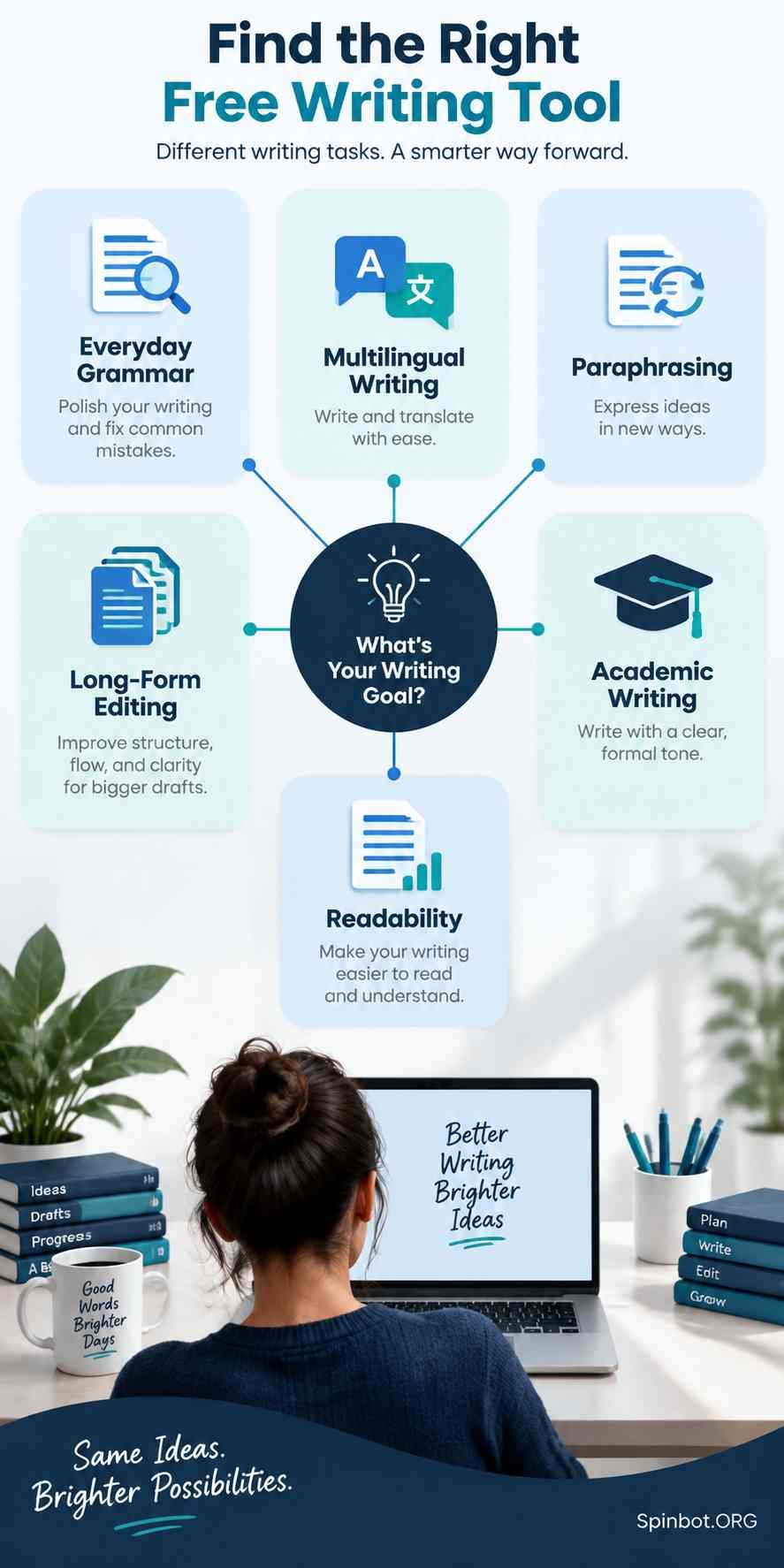
Which Free Grammarly Alternative Should You Choose?
The best choice becomes clearer when you start with the writing task rather than the longest feature list.
For everyday emails and online writing
Start with LanguageTool. It offers the closest general experience to Grammarly and works well for routine grammar, spelling, and punctuation correction.
Microsoft Edge users may find the built-in Microsoft Editor sufficient for basic work.
For students and academic writers
Use QuillBot for grammar and selective paraphrasing, or ProWritingAid when you need more detailed analysis.
Do not use paraphrasing software to disguise copied material. Cite sources whenever an idea, quotation, argument, or distinctive finding comes from someone else. A rewritten sentence can still constitute plagiarism if the underlying source is not acknowledged.
For bloggers and freelance writers
A two-tool workflow often works better than one free service:
- Check the draft with LanguageTool or QuillBot.
- Run the corrected version through Hemingway.
- Review headings, names, links, numbers, and claims manually.
This separates grammatical accuracy from readability instead of expecting one tool to judge everything.
For multilingual writers
Choose LanguageTool for broad language coverage and inline checking. Consider DeepL Write when your main challenge is making phrasing sound natural.
Be sure to select the correct regional form of English. American, British, Canadian, and Australian conventions differ in spelling and sometimes punctuation.
For fiction and long documents
ProWritingAid offers the most useful analytical approach, although its free 500-word limit requires section-by-section checking. Hemingway can then identify passages that have become difficult to read.
Fiction writers should treat style alerts as observations, not orders. Fragments, unusual punctuation, and long sentences may be intentional parts of a character’s voice.
Limitations You Should Check Before Switching
The word “free” can hide restrictions that matter more than the price.
Word and usage limits
A 500-word limit may be acceptable for emails but frustrating for a research paper. Daily rewriting allowances can also disappear halfway through a large assignment.
Check whether a restriction applies per document, per day, or per month.
Missing advanced corrections
Free plans often handle obvious spelling and grammar errors while reserving tone, fluency, consistency, and advanced style feedback for subscribers.
That does not make the free version useless. It simply means you should not assume that a clean dashboard proves the document is error-free.
Integration gaps
Some tools work anywhere in a browser. Others require you to paste text into a web editor. A strong checker that interrupts your workflow may be less helpful than a simpler one built into the application you use every day.
Privacy and confidential writing
Online writing assistants process the text you provide according to their own privacy and data-handling policies. Avoid pasting passwords, private medical information, unpublished research data, confidential client records, legal documents, or internal business material into a third-party service without reviewing its policies and obtaining any required permission.
For sensitive work, use approved organizational tools or offline proofreading options.
Incorrect or unnecessary suggestions
Grammar software does not fully understand your intention. It may change a technical term, alter tone, remove a deliberate fragment, or “correct” a name it does not recognize.
Always read the revised sentence in context. The writer remains responsible for the final meaning.
A Practical Free Editing Workflow
You do not need to find one website that does everything Grammarly does. A small combination of free tools can produce better results.
- Draft without constant interruption. Finish the main idea before fixing every minor error.
- Run a grammar pass. Use LanguageTool, QuillBot, or the checker built into your document editor.
- Check readability. Use Hemingway to locate dense sentences and cluttered passages.
- Rewrite selectively. Use Wordtune, QuillBot, DeepL Write, or Claude only where the original wording is weak.
- Restore your voice. Remove generic or overly formal rewrites that do not sound like you.
- Verify important details. Check names, figures, quotations, citations, dates, and links against reliable sources.
- Read the final version aloud. This often reveals missing words, repetition, and unnatural rhythm that software overlooks.
The best free alternative to Grammarly is therefore not always a single product. For most people, LanguageTool is the strongest direct replacement, while LanguageTool plus Hemingway is a more complete free editing workflow.
Choose QuillBot when paraphrasing matters, ProWritingAid for long-form analysis, Wordtune for targeted rewrites, and Claude when you need a conversational editor that can follow precise instructions. The tool should support your judgment, not replace it.

Covers AI writing tools, large language models, prompt engineering, AI detection, and practical AI writing workflows for Spinbot.ORG.