

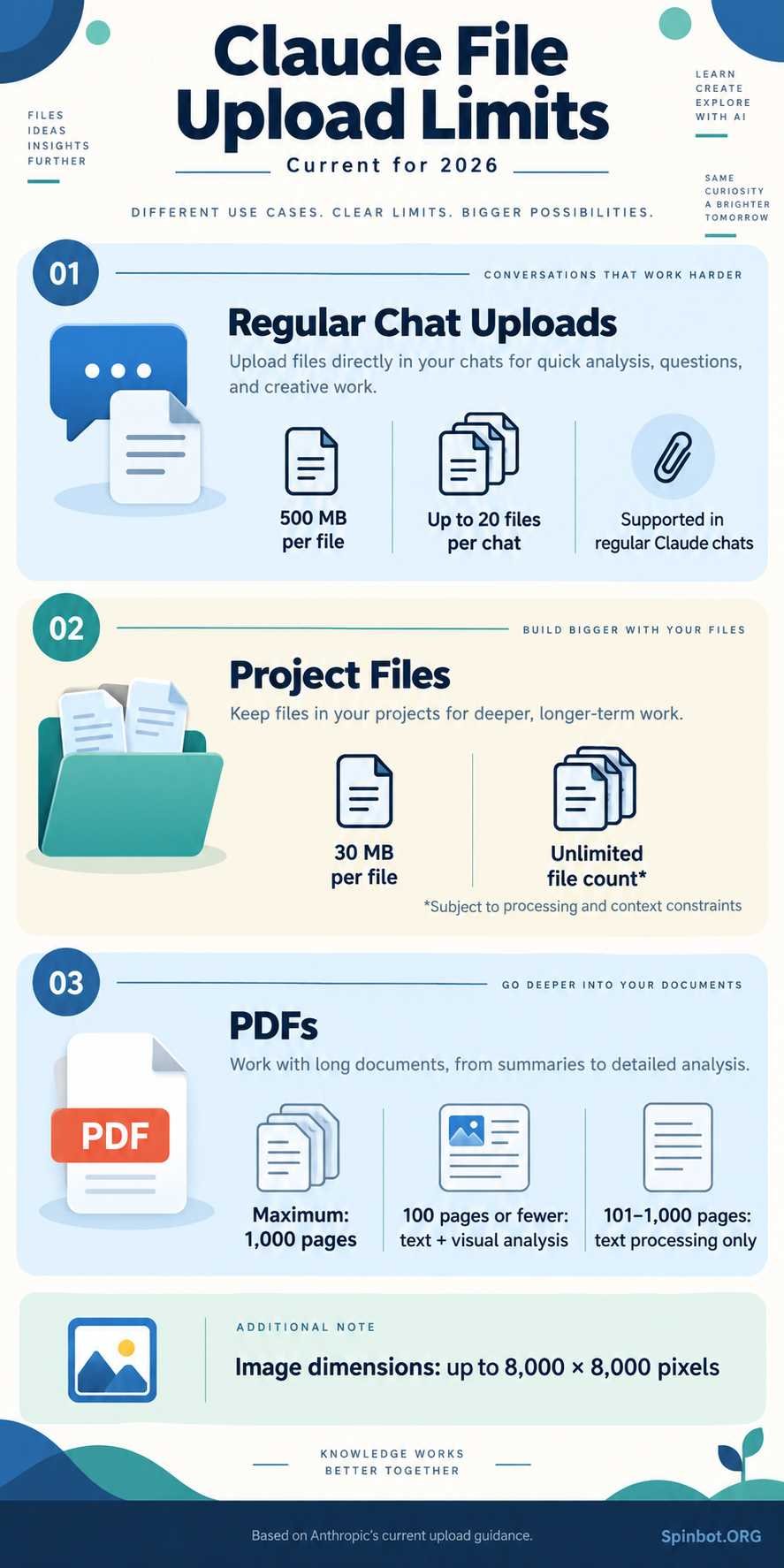
As of September 2026, Claude allows files up to 500 MB each in a regular chat, with up to 20 files per chat. Claude Projects work differently: files added to a Project are limited to 30 MB each. PDFs also have their own page and visual-processing rules.
Here is the quick version:
| Claude feature | Current limit |
|---|---|
| Regular chat file size | 500 MB per file |
| Files per chat | Up to 20 |
| Project file size | 30 MB per file |
| Project file count | Unlimited, subject to processing limits |
| PDF page limit in Claude chat | 1,000 pages |
| Full PDF visual analysis | 100 pages or fewer |
| Image dimensions | Up to 8,000 × 8,000 pixels |
These are Claude.ai limits. Claude’s API has separate request and file rules, which we will cover later.
What Is the Claude File Upload Limit in 2026?
The current Claude file size limit is 500 MB per file when you upload a document directly to a normal Claude chat. You can attach up to 20 files to one chat.
That is much larger than the 30 MB figure you may still find in older articles.
The important distinction is where you upload the file:
- A normal Claude chat allows files up to 500 MB.
- A Claude Project allows files up to 30 MB each.
- Claude’s developer API follows its own request-size rules.
- PDFs have additional page-count restrictions.
So a statement such as “Claude has a 30 MB upload limit” is no longer a complete answer.
Claude File Size Limit for Regular Chats
For a standard conversation on Claude.ai, Anthropic currently lists a 500 MB maximum per uploaded file.
You can upload files by using the plus button beside the chat box, selecting files from your computer, dragging files into Claude, or pasting supported images from your clipboard.
Claude supports common document formats including:
- DOCX
- CSV
- TXT
- HTML
- ODT
- RTF
- EPUB
- JSON
- XLSX
XLSX spreadsheet uploads require Claude’s code execution and file creation feature to be enabled.
Claude also accepts these image formats:
- JPEG
- PNG
- GIF
- WebP
For images, Anthropic currently sets a maximum dimension of 8,000 × 8,000 pixels.
A 500 MB file limit does not mean Claude can always use every piece of information inside a huge document at once. File size and usable context are two different things.
Claude PDF Upload Limit
PDF files have more rules than ordinary text documents because Claude can process both the text and visual material inside them.
Maximum PDF Size and Page Count
A PDF uploaded to a regular Claude chat can be up to the general 500 MB file-size limit, but it cannot contain more than 1,000 pages.
Anthropic divides PDF processing into two groups.
PDFs of 100 pages or fewer: Claude can analyze both text and visual elements, including charts, graphics, and images.
PDFs from 101 to 1,000 pages: Claude processes the text but does not analyze the visual elements in the same way.
PDFs over 1,000 pages: Claude does not accept them.
That distinction matters for documents such as research reports, financial statements, textbooks, scanned manuals, and presentations converted to PDF.
Imagine uploading a 180-page annual report. Claude may still work with the report’s extracted text, but you should not assume it has interpreted every graph, image, or visual table on pages beyond the first 100-page visual-analysis range.
If the diagrams matter, splitting the document into smaller PDFs is often the better approach.
Claude Project File Limits Are Different
Claude Projects provide persistent workspaces where you can store background information and use it across multiple related conversations.
The Claude Project file limit is 30 MB per individual file, not 500 MB. Anthropic currently says there is no fixed number of Project files, although practical processing and context limits still apply.
This gives us an important comparison:
| Feature | Regular Claude chat | Claude Project |
|---|---|---|
| Maximum file size | 500 MB | 30 MB |
| Number of files | 20 per chat | No fixed file-count limit |
| Main purpose | One conversation | Reusable project knowledge |
Projects are useful when you repeatedly work with the same material. For example, a writer could place brand guidelines, reference documents, research notes, and product information into a Project instead of uploading the same files in every new conversation.
But “unlimited files” should not be read as “unlimited usable information.”
Claude still has to retrieve and process relevant material when answering you.
File Size and Context Size Are Not the Same Thing
This is one of the easiest Claude file upload restrictions to misunderstand.
File size measures how much storage the file uses, usually in MB.
Context window measures how much information Claude can actively work with during a conversation, usually in tokens.
A 400 MB file may technically meet the upload limit while still containing far more text than Claude should process as one continuous block.
Anthropic says Claude’s available context depends on the model. Current paid-plan models can provide context windows ranging from 200K tokens to 500K or 1 million tokens, depending on the model being used. Anthropic also uses automatic context management for supported configurations and retrieval techniques for Projects.
So there are several different limits at work:
- Can the file be uploaded?
- Can Claude extract its content?
- How much of that content fits into the available context?
- Can Claude retrieve the relevant parts when answering?
Passing the first test does not automatically guarantee the other three.
Claude Attachment Limit: How Many Files Can You Upload?
Claude currently permits up to 20 files in a regular chat.
That is an attachment-count limit, not a total storage allowance.
For example, you could upload:
- several research papers,
- a spreadsheet,
- a project brief,
- supporting images,
- and a few text documents
as long as you remain within the file-count and individual-file restrictions.
If your task requires dozens of reference documents, a Claude Project may make more sense than repeatedly adding them to individual chats.
Projects are designed to keep knowledge available across related conversations rather than treating each chat as a completely separate workspace.
Why Claude May Reject a File Below 500 MB
A file being smaller than 500 MB does not guarantee that Claude will accept or fully process it.
Several other restrictions may be involved.
You Have Reached the Attachment Limit
A regular chat supports up to 20 uploaded files. Trying to add more can require starting another chat or changing how you organize the material.
Your PDF Has Too Many Pages
A PDF may be only a few megabytes in size but still contain more than 1,000 pages. In that case, its page count rather than its storage size becomes the problem.
The File Format Is Not Supported
Claude supports many common document formats, but not every possible file type.
If Claude does not accept a format, converting it to PDF, TXT, DOCX, CSV, or another supported format may solve the issue.
The Extracted Content Is Very Large
Anthropic notes that additional token restrictions can apply according to the amount of content extracted from uploaded files.
A highly compressed file can be small on disk while containing a very large amount of text.
An Image Is Too Large in Dimensions
Claude currently supports image dimensions up to 8,000 × 8,000 pixels. An image can therefore run into a dimension restriction even when its file size appears reasonable.
Your PDF Depends Heavily on Visual Content
Claude’s standard chat documentation says PDFs of 100 pages or fewer receive text and visual analysis. For PDFs between 101 and 1,000 pages, processing is text-only.
If charts or scanned pages contain the information you need, splitting the document can produce better results.
Claude.ai and Claude API File Limits Are Different
Claude.ai is the consumer chat product. The Claude API is designed for developers who build Claude into apps and workflows.
Their limits should not be mixed together.
For the Claude API, Anthropic currently lists a 32 MB maximum request size for the Messages API and a 500 MB limit for the Files API. Batch API requests have their own limits.
PDF rules through the API also differ from ordinary Claude.ai uploads.
Anthropic’s current Platform documentation allows up to 600 PDF pages per API request when using a 1-million-token context window, or 100 pages when the request uses a smaller context window. The general maximum request size is 32 MB, although files can be uploaded separately through the Files API and referenced by file ID.
This is why searching for “Claude PDF upload limit” can produce apparently conflicting numbers. One page may be discussing Claude.ai while another is describing the developer API.
Always check which product the limit applies to.
How to Handle Files That Exceed Claude’s Limits
You usually do not need to abandon a document simply because it exceeds a Claude upload restriction.
Split a Large PDF by Section
Instead of cutting a 1,500-page book into random pieces, divide it into logical sections or chapters.
Clear divisions make it easier to tell Claude exactly which source it should use.
Keep Visual PDFs Under 100 Pages When Possible
If you need Claude to interpret charts, diagrams, screenshots, or other visual information, create smaller PDFs that stay within the visual-processing range.
Remove Pages You Do Not Need
A 700-page report may contain only 60 pages relevant to your task. Extracting those pages reduces noise as well as processing load.
Break Large Datasets Into Useful Parts
For CSV or spreadsheet work, divide data by year, department, category, or another meaningful boundary rather than simply splitting every fixed number of rows.
Use Projects for Repeated Reference Material
If you return to the same documents across many chats, place suitable files in a Claude Project instead of re-uploading them each time.
Remember that Project files have a lower 30 MB per-file limit.
The Claude Limits Worth Remembering
The simplest way to understand the current Claude upload limit is to separate chat uploads from Projects and developer requests.
For regular Claude chats, the current headline number is 500 MB per file with up to 20 files per chat.
For Claude Projects, each file is limited to 30 MB.
For PDFs in normal Claude chats, the maximum is 1,000 pages, but full text-and-visual analysis applies to PDFs of 100 pages or fewer.
And for developers using the API, request-size and PDF limits follow a separate set of rules.
Those distinctions matter more than any single number. When Claude refuses a file, check not only its MB size but also where you are uploading it, its format, PDF page count, image dimensions, and the amount of content Claude needs to process.
Because Anthropic has changed these limits over time, use its current help documentation as the final reference rather than relying on an older article that still lists the previous Claude upload limit.

Covers AI writing tools, large language models, prompt engineering, AI detection, and practical AI writing workflows for Spinbot.ORG.